Platformer · New game
Starbase Breach
Find each sector's key, blast through the docking ring and reactor spine, and beat the clock in a free 8-bit platformer built for a browser tab.
#10 this weekAI-assisted: Code, Graphics
The game runs in this tab. No install, no account.
The short answer
Starbase Breach is a free 8-bit action platformer that runs in a browser tab with no account. Shoot enemies and crates, hunt the hidden key in each of three sectors, climb ladders, dodge spikes and saws, and unlock the exit before the 300-second clock runs out. Keyboard, touch, and gamepad inputs are all covered.
What is Starbase Breach?
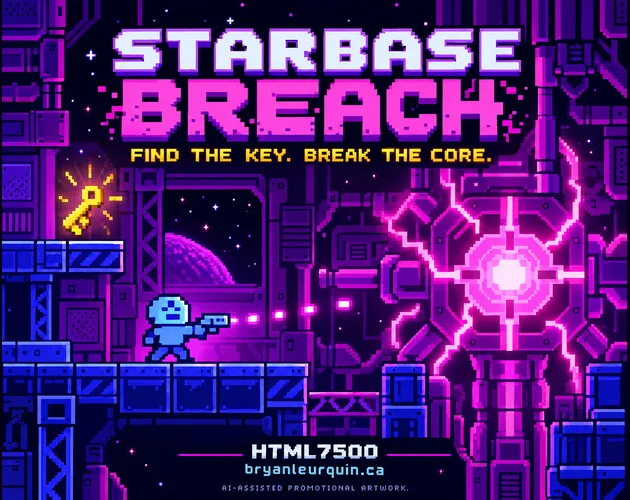
Starbase Breach is an 8-bit action platformer set aboard a station that has been overrun. The objective is easy to state and harder to finish: work through three sectors, find the hidden key in each one, unlock the exit, and eventually face The Core. Those sectors are the Docking Ring, the Hydro Labs, and the Reactor Spine, and there is one way out of the whole run.
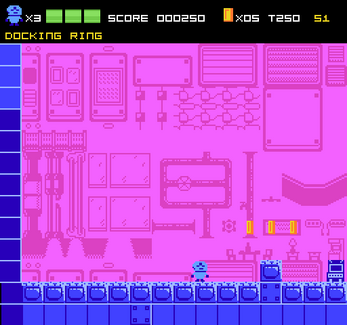
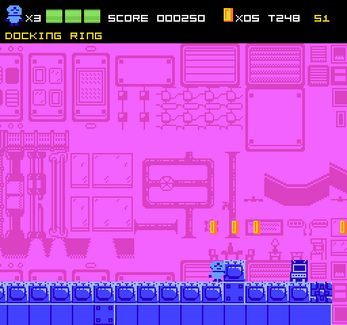
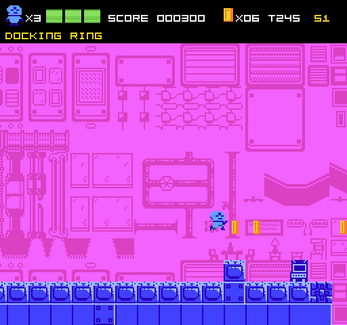
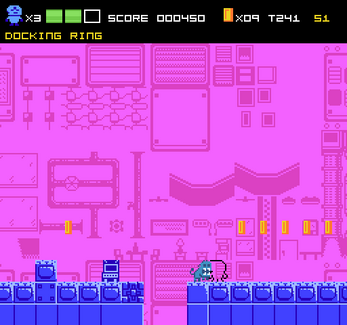
Combat is run-and-gun rather than puzzle solving. Enemies and crates both take fire, coins are scattered for the collecting, ladders connect vertical stretches, and pits, spikes, and saws punish sloppy movement. Pixel art carries the retro look from the first screen to the last.
It runs in a browser as an HTML5 game, needs no game account, and costs nothing to play. Created by HTML7500, also credited as Bryan Leurquin, it is the sort of game a player can open in a tab and start within seconds.
How to play
Every sector follows a fixed loop. Search the crates until that sector's key turns up, then reach the locked exit and move on. Crates are shot open, so a run alternates between fighting enemies, breaking containers, and hunting the route forward. The three sectors finish at The Core.
Survival is limited. A run starts with three HP and three lives, and extra lives arrive at 10,000 points or 100 coins. Each sector also runs on a 300-second timer, and clearing it feeds coin, time, and no-damage bonuses into the score, so speed and cleanliness both pay.
Death does not end a session. Checkpoint terminals set the respawn point, and sector-start saves let a player return with Continue instead of starting from the beginning. Progress, settings, and the high score are held in the current browser rather than a cloud account, which is worth knowing before a long attempt.
Controls
Keyboard play uses the arrow keys or WASD to move and climb, with Down to crouch, Z, J, or Space to jump, and X or K to fire. Holding the fire key gives continuous auto-fire, which is a genuine help during crate clearing and crowded stretches. Esc or P pauses, and menus take arrow keys plus Enter.
Touch devices get a landscape layout built around a D-pad, a jump button, a fire button, and a pause button. Playing in portrait orientation pauses the game and asks for a rotation, so it is worth locking the phone sideways before starting a timed sector.
Gamepads map movement to the D-pad or left stick, jumping to A, firing to B or X, and pausing to Start. Music and sound effects can each be switched off in the menus, which matters on shared devices or quiet rooms. Every input method is documented in-game, so nobody has to guess a binding mid-run.
| Input | Action |
|---|---|
| Arrow keys or WASD | Move and climb |
| Down arrow | Crouch |
| Z, J, or Space | Jump |
| X or K | Fire, hold for auto-fire |
| Esc or P | Pause |
| Arrow keys and Enter | Navigate menus |
| Touch D-pad and A / B / II buttons | Move, jump, fire, and pause in landscape |
| Gamepad D-pad or left stick | Move |
| Gamepad A, B or X, Start | Jump, fire, and pause |
Tips for your first run
The 300-second sector timer is generous only if the key is found early. Crates are the priority target, because a crate that hides the key is also a crate that may hold coins, and both feed the run's score. Shooting everything on screen costs little and saves backtracking later.
Three HP disappears faster than expected once saws and spikes enter the picture. Crouching clears low gaps, ladders open up vertical routes, and careful movement around hazards preserves health for the no-damage bonus that rewards a clean clear. Checkpoint terminals are worth noting on the way through, since they decide where a death sends the player back.
- Break crates first; the sector key is inside one of them
- Collect coins toward the 100-coin extra life
- Watch the timer, then decide whether to chase the time bonus or bank a safe finish
- Tag checkpoint terminals as you pass so a death costs less ground
- Hold the fire key instead of tapping it when enemies crowd the screen
- Use crouch and ladders to find routes that skip hazard clusters
Content and replayability
The scope is deliberately tight. Three named sectors, one hidden key apiece, one locked exit each, and a final confrontation with The Core make up the spine of the game. Within that frame, the appeal is replay: coin totals, timer results, and no-damage clears each add to the score, so a second attempt at the Docking Ring has a different target than the first.
The extra life thresholds at 10,000 points and 100 coins give short sessions a concrete goal, and the high score is kept locally so a player can measure each return against the last. Sector-start saves and checkpoint terminals mean experiments are cheap, which encourages riskier coin routes or faster clears.
What the game does not offer is long-form progression beyond that structure. It is a tight arcade-style run rather than a sprawling campaign, and the challenge comes from doing the same three sectors more cleanly rather than from unlocking new territory.
Presentation and performance
The look is 8-bit pixel art, credited in-game to sitebender's space base platform shooter art set. Music comes from Not Jam's music pack, while sounds, interface elements, and fonts draw on Kenney's retro audio and pixel font collections. The asset notices identify these resources as CC0 1.0, with a supplemental notice for the music jingles.
Because it is an HTML5 build, there is nothing to download or install: the game runs inside the browser tab. Keyboard play has been checked in Chromium, while gamepad support and broad mobile-device compatibility have not been independently tested, so a controller or phone setup may vary by device.
Saves are local, which has practical consequences. Clearing browser storage, browsing privately, or switching browsers or devices can wipe or separate progress, the high score, and settings. Landscape orientation is recommended on phones, and the menu options for music and sound effects give quick control over the audio side of a session.
Who should play it
Players who like a compact run-and-gun platformer will find the shape familiar: three sectors, a key hunt, a locked exit, and a final confrontation with The Core. Score chasers get a timer, coin totals, and no-damage bonuses to chase, and the extra life thresholds at 10,000 points and 100 coins give a short session a clear target.
Keyboard players are the safest fit, since arrow keys or WASD handling movement and climbing has been checked in Chromium. Anyone with a gamepad or a phone can use the provided mappings, but those routes have not been independently tested as widely.
It suits players who want a browser tab game with no account and no payment. Players who need cross-device saves, or who want a sprawling campaign with many areas, should look elsewhere: three named sectors and local-only storage define the scope here.
Screenshots
How we tested it
The build was loaded from games.debutplay.com in a headless Chromium session on ; the canvas started and no request was blocked. The guide was last checked on .
From the developer
Find the key. Break the Core. Starbase Breach is an 8-bit action platformer from HTML7500 / Bryan Leurquin. The starbase has been overrun. Fight through the Docking Ring, Hydro Labs, and Reactor Spine, find each sector's hidden key, open the exit, and face The Core. Three sectors. One way out. Shoot enemies and crates, collect coins, climb ladders, and avoid pits, spikes, and saws.Search the crates for a key, then reach the locked sector exit.Start with three HP and three lives. Earn extra lives at 10,000 points or 100 coins.Beat each sector's 300-second timer and chase coin, time, and no-damage bonuses.Checkpoint terminals set your respawn point; sector-start saves let you return with Continue. Controls Keyboard: Arrow keys or WASD to move and climb; Down to crouch; Z, J, or Space to jump; X or K to fire (hold for auto-fire); Esc or P to pause. Use arrows and Enter in menus.Touch: Landscape play with a D-pad, A to jump, B to fire,…
Frequently asked questions
Is Starbase Breach free to play?
Yes. It costs nothing, runs in a browser, and involves no payments or donations. No game account is needed before the first jump.
What do you do in each sector?
Search the crates for that sector's key, reach the locked exit, and move on. Enemies, pits, spikes, and saws stand in the way, and a 300-second timer runs the whole time.
What happens when you die?
Checkpoint terminals set the respawn point, and sector-start saves let you return with Continue, so a bad stretch does not force a full restart from the Docking Ring.
How are extra lives earned?
A run begins with three HP and three lives. Additional lives are awarded at 10,000 points or after collecting 100 coins.
Does the game save progress?
Progress, settings, and the high score are stored locally in the current browser. Clearing browser storage, private browsing, or switching devices can remove or separate those saves.
Can it be played on a phone?
Touch controls include a landscape D-pad with jump, fire, and pause buttons. Portrait orientation pauses play and asks for a rotation, and wide mobile compatibility has not been independently verified.
What games are similar to Starbase Breach?
The closest matches on DebutPlay are Heroic Henry, Demian buscando donde pertenece, Hush. They share the same genre, so the controls and the pace carry over.
Something wrong or missing? Tell us. How we test games.