Shooter · New game
Browser of the Dead (Free Demo)
A flashlight, three levels, and a crowd of infected between you and the exit — here is how to get through the free Browser of the Dead demo.
#18 this weekAI-assisted: Code, Graphics, Sound
The game runs in this tab. No install, no account.
The short answer
Browser of the Dead is a top-down survival horror shooter that runs in a browser window. The free demo includes three levels — City Streets, the Cemetery and the Abandoned House — plus three difficulties, save-and-continue between stages, Field Notes, achievements and a jukebox. Keyboard, controller and touch are all supported, with optional twin-stick aiming on phones.
What is Browser of the Dead?
Browser of the Dead is a top-down survival horror shooter from Zed Head Games that plays directly in a browser window — no install, no launcher. The camera sits above the action, the art is 2D, and the atmosphere leans dark: your flashlight is effectively your whole field of view, so the room only exists once you sweep the beam across it. A door has already given way, the infected are inside, and the way out stays shut until you have the keys.
What is playable right now is a free demo, not the finished release. The game itself is still in development. The demo covers the opening stretch of the campaign across three levels: City Streets, the Cemetery and the Abandoned House. The Brute appears during that run, and each infected type you encounter gets its own Field Notes entry.
It is built for singleplayer and for short sittings rather than marathon sessions. Click the game once to begin, and the audio starts on that first click or tap. Progress is kept in your browser, so you can stop between levels and continue later without replaying what you have already cleared.
How to play
Every level follows the same survival loop. Hunt down the keys, force your way through the doors that block the route, and reach the exit before the infected swarm you. The keys are the real objective; the doors are the gates that hold you back until you have them, and the infected are the pressure that stops you from taking your time.
Before you start, you pick a difficulty: Easy, Normal or Hard. That choice shapes the demo run from the first street onward, and because progress saves between levels you can work through the three stages in one sitting or across several.
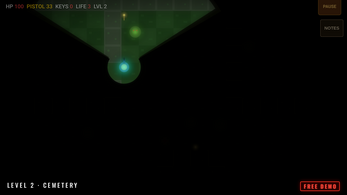
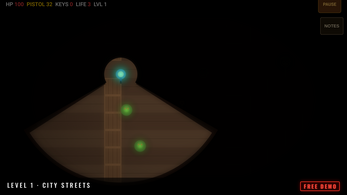
The flashlight rule matters more than it sounds. Because visibility is limited to what the beam touches, you are always moving into information you do not have yet — a corridor looks clear until it is not. Learning to sweep a room before committing to it, and to keep moving once the infected notice you, is most of the skill the demo asks for.
The demo can be played with a keyboard, a controller, or touch, and the phone version supports twin-stick aiming if you turn it on in Settings. Nothing about the three levels changes with input method — only how the aiming and movement feel in your hands.
Controls
On a keyboard, movement is handled by WASD or the arrow keys. Space or F fires, and E is the context key: it uses objects, opens doors and cycles your weapons. Esc or P pauses the game.
On a controller, the left stick moves and the right stick aims. A or the right trigger fires; B or the right bumper handles using and interacting; Y swaps weapons; Start pauses.
On a touchscreen, a left stick moves your character while dedicated FIRE and USE buttons cover shooting and interaction. Twin-stick aiming is optional on phones and lives in the Settings menu, and the layout works in either portrait or landscape orientation.
One thing worth knowing before you click: the game needs a single click to start, and sound begins on that same first click or tap. If you are playing somewhere you need to stay quiet, sort the volume out first. Demo progress is saved in your browser, so closing the tab between levels is safe.
| Input | Action |
|---|---|
| Keyboard | Move with WASD or the arrow keys |
| Keyboard | Fire with Space or F |
| Keyboard | Use objects, open doors and switch weapons with E |
| Keyboard | Pause with Esc or P |
| Touch | Move with the left stick; FIRE and USE buttons handle shooting and interacting |
| Touch | Optional twin-stick aiming, enabled in Settings; works in portrait or landscape |
| Controller | Left stick moves, right stick aims, A or RT fires, B or RB uses, Y switches weapons, Start pauses |
Tips for your first run
The demo rewards patience at doorways more than speed in open ground. A few habits make the three levels much less punishing.
Treat the keys as your route plan rather than a side objective — every door you cannot open is a detour you have to survive twice. Read Field Notes as they unlock, because each infected type behaves differently and the Brute is not something to meet without warning. And if Normal feels like too much on the first street, drop to Easy and finish the demo rather than stalling on it.
- Start on Easy if this is your first top-down horror shooter, then replay the levels on Normal and Hard once you know the layouts.
- Sweep the flashlight across a room before stepping into it — you only see what the beam touches.
- Collect keys early; doors stay shut until you have them, and wandering without them means more time among the infected.
- Check Field Notes after each new infected type appears, especially before you reach the Brute.
- On a phone, enable twin-stick aiming in Settings before you start rather than mid-level.
- Use the save-and-continue system: clear one level, stop, and come back fresh instead of pushing through all three tired.
Content and replayability
The demo's three levels — City Streets, the Cemetery and the Abandoned House — can be played on Easy, Normal or Hard, so a single playthrough is not the only way to spend time with it. Between levels the game saves and lets you continue, which makes short sessions practical.
Beyond the campaign slice, the demo includes Field Notes that fill in as you encounter each infected type, achievements to chase, a sound test jukebox, and an original soundtrack to listen through. Those extras give the demo a second layer once the three levels themselves are familiar.
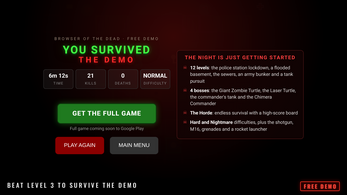
The full game, still in development, is planned to be considerably larger: twelve levels that move through a police station lockdown, a flooded basement, the sewers, an army bunker and a tank pursuit. Four bosses are lined up — the Giant Zombie Turtle, the Laser Turtle, the commander's tank and the Chimera Commander — alongside Hard and Nightmare difficulties and a wider arsenal that includes a shotgun, an M16, grenades and a rocket launcher. There is also The Horde, an endless survival mode with a high-score board. The finished version is announced for Google Play, with iPhone and iPad releases to follow.
Presentation and performance
The look is deliberately dark and 2D, built around a flashlight cone rather than a wide camera. That choice does a lot of work: streets, gravestones and interiors are only ever partly visible, so tension comes from framing rather than from jump scares. The tone is horror throughout, and the game carries a content warning for zombie violence and blood.
The soundtrack is original, and the demo ships with a sound test jukebox to browse it. Audio starts on your first click or tap, so the first thing you hear is intentional rather than accidental. Artwork, sound and music are AI-generated, parts of the code were written with AI assistance, and the design, levels and story are credited to Zed Head Games — worth knowing if that matters to you.
As an HTML5 build it runs in the browser itself, published on 28 October 2026, and it is still marked in development, which means details can shift before the full release. The demo has been tested across keyboard, controller and touch, so the input layer is broader than most browser shooters manage. No performance figures, system requirements or browser compatibility notes are available, so check it on your own setup before committing to a long session.
Who should play it
This is a natural fit for anyone who likes twin-stick shooters and top-down zombie horror but does not want to install anything. The demo is short enough to finish in a session or two and structured so you can stop between levels, which suits players fitting games around a lunch break or a commute.
It also works well as a phone game. Touch controls are supported in portrait or landscape, and twin-stick aiming can be switched on in Settings if you prefer aiming with a second stick rather than relying on the buttons. Controller players get the most conventional setup: left stick to move, right stick to aim.
The flip side is that this is a horror game with blood and zombie violence, and the darkness is the point rather than a setting you can dial down. Players who want bright, readable arenas or a full campaign should note that this is a three-level demo with the twelve-level release still to come. Anyone curious about the larger plan — the Horde mode, the four bosses, the expanded weapon set — can try the opening slice now and see whether the flashlight-and-keys loop holds up.
Screenshots
How we tested it
The build was loaded from games.debutplay.com in a headless Chromium session on ; the canvas started and no request was blocked. The guide was last checked on .
From the developer
The door didn't hold. Browser of the Dead is a top-down survival horror shooter from Zed Head Games. Your flashlight is all you can see by. Find the keys, break through the doors and get out before the infected close in.This free demo has the first 3 levels: City Streets, the Cemetery and the Abandoned House. You'll face the Brute there too.What's in the demo - 3 full levels with Easy, Normal and Hard difficulty - Save and continue between levels - Field Notes on every infected you meet - Achievements, a sound test jukebox and an original soundtrack - Touch (portrait or landscape), keyboard and controller support, with optional twin-stick aiming on phonesThe full game has - 12 levels: the police station lockdown, a flooded basement, the sewers, an army bunker and a tank pursuit - 4 bosses: the Giant Zombie Turtle, the Laser Turtle, the commander's tank and the Chimera Commander - The Horde: endless survival with a high-score board -…
Frequently asked questions
Is Browser of the Dead free to play?
The demo is free. The full game is still in development, and no price has been announced for it, so nothing is confirmed about what the finished release will cost.
Which levels are in the demo?
Three: City Streets, the Cemetery and the Abandoned House. Each can be played on Easy, Normal or Hard, and progress saves between levels so you can continue where you stopped.
Can you play it on a phone?
Yes. Touch controls are supported in portrait or landscape, with a left stick for movement plus FIRE and USE buttons. Twin-stick aiming is optional and switched on in Settings.
Does the demo save your progress?
Yes. Progress is stored in your browser, and the game saves and lets you continue between levels. Closing the tab after clearing a stage will not send you back to the start.
Is this the complete game?
No. It is a free demo of a game still in development. The full version is planned with twelve levels, four bosses, the Horde survival mode, Hard and Nightmare difficulties, and additional weapons.
What should you know before starting?
Click once to launch, and sound begins on that first click or tap. The flashlight limits what you can see, keys are the objective, and the demo contains zombie violence and blood.
What games are similar to Browser of the Dead (Free Demo)?
The closest matches on DebutPlay are GALAGUH!, Iron Halls, DEADHAUL: Last Transmission. They share the same genre, so the controls and the pace carry over.
Something wrong or missing? Tell us. How we test games.