Puzzle · New game
Grandma's PC
Grandma's PC is a short, comedic point-and-click puzzle about fixing a chaotic retro desktop, completing odd errands, and surviving pop-ups, minigames, and family contacts.
#36 this weekAI-assisted: Code, Graphics
The game runs in this tab. No install, no account.
The short answer
Grandma's PC is a free HTML5 point-and-click puzzle that drops you into a chaotic retro desktop and asks you to help Grandma with three small tasks. You will hunt for a recipe, send a cat photo to Aunt Rosa, and clean an inbox while dodging pop-ups, heat, minigames, and ambiguous family instructions. It is short, intentionally annoying, and built for players who enjoy nostalgia, trollish humor, and multiple endings.
What is Grandma's PC?
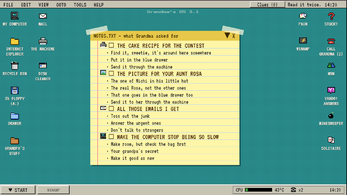
Grandma's PC is a free HTML5 puzzle and desktop-simulator that turns a malfunctioning family computer into a comedy of errors. Grandma needs three favors: recover a cake recipe she could not bring herself to discard, send a photo of Michi the cat in a Christmas hat to Aunt Rosa, and tidy an inbox. Her instructions are emotional rather than precise. The recipe is identified by sentimental attachment, memories belong in the blue drawer, Grandpa's belongings should be left alone unless handled with love, and the address book holds six people named Rosa.
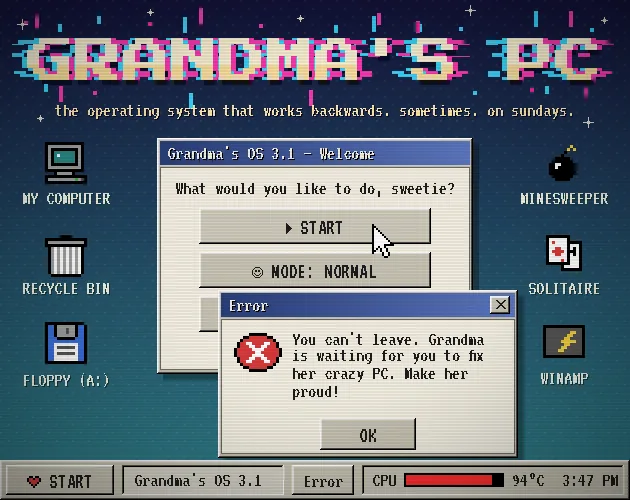
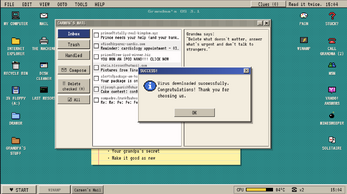
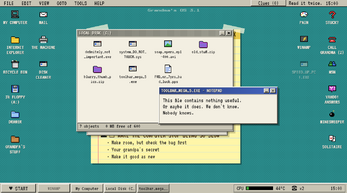
The desktop is Grandma's OS 3.1, a machine with a temper. The processor heats when you click foolishly, and reaching 100 °C ends the run. Error windows pile up, the flashiest button is usually a trap, and a dolphin is present and supposedly not a virus. The game is released, free, and carries a publication date of 23 October 2026.
How to play
The opening goal is to complete Grandma's three errands on a desktop that misbehaves at every turn. Choose Normal for icons and a little guidance, or Hard for no icons and no explanations; in Hard, the notepad and Grandma's wording are the main tools. Her phrasing is the puzzle. The recipe is tied to what she could not throw away, keepsakes go in the blue drawer, and Grandpa's things require careful handling rather than force.
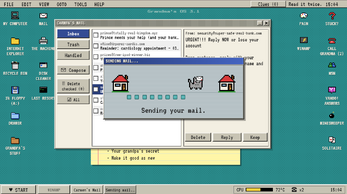
Most interactions are point-and-click. Open the inbox, read messages, send the cat photo, and use MSN Messenger. The inbox contains chain letters, a suspicious prince, and family members who should not be deleted. MSN brings endless nudges, and cousin Kevin will not talk until they are turned off.
When stuck, use a lifeline: call Grandma for riddles, ask MSN contacts, or post on Yahoo! Answers for unreliable stranger help. Then enter minigames that reverse expectations. Minesweeper asks you to catch the bomb, Solitaire fights back, and MS Pain rewards ugly drawings. A secret command in black letters is Grandpa's old fix for everything.
Controls
Standard play is mouse only. The mouse handles navigation and interaction across the desktop, pop-ups, inbox, lifelines, and minigames. No other standard control is needed. The pressure comes from interpreting Grandma's language, deciding which buttons to trust, and watching the CPU heat before it reaches 100 °C.
F8 opens the endings art menu. That menu contains spoilers, so a first run can avoid it until some endings have been found. Otherwise, the interface is built around mouse input. No other key is required for standard play.
The small control set keeps attention on the joke and the trap logic. Every pop-up, inbox message, and minigame is another chance to misread a harmless-looking option, so careful pointing matters more than speed. Standard play stays simple.
| Input | Action |
|---|---|
| Mouse | Handles all standard navigation and interaction. |
| F8 | Opens the endings art menu, which contains spoilers. |
Tips for your first run
Treat every request as a translation problem. Grandma's recipe clue is about attachment, not a file name. The blue drawer is for memories, and Grandpa's belongings should not be disturbed until the instruction about love makes sense. Write down her phrases, especially in Hard, where the notepad is a lifeline.
- Check the address book before sending Michi's photo; six people are named Rosa.
- Silence MSN nudges so cousin Kevin will finally talk.
- Read family messages carefully before cleaning the inbox; not every contact should be deleted.
- Watch the CPU temperature. Foolish clicks add heat, and 100 °C ends the run.
- Approach minigames with reversed logic: catch the bomb in Minesweeper and make deliberately ugly art in MS Pain.
- Use Yahoo! Answers and MSN contacts as fallback help when Grandma's riddle is too vague.
Content and replayability
Multiple endings give the short game a reason to be replayed. One route melts the PC, another formats away the family memories, and another makes you Grandma's Official Tech Support. The heat rule, inbox choices, and minigame results give the run several pressure points, while the endings push toward another attempt.
Normal and Hard change the information load. Normal supplies icons and a little guidance; Hard removes icons and explanations, leaving the notepad and Grandma's words. That second mode turns the same errands into a stricter reading test. F8 opens an endings art menu, which is useful after discovery but carries spoilers.
The minigames add variety between desktop tasks: a Minesweeper where the bomb is the target, a Solitaire that fights back, and MS Pain, where ugly drawings score better. The inbox, MSN Messenger, and lifelines give the comedy several surfaces to play across. The result is a compact puzzle with several joke systems rather than a single linear click path.
Presentation and performance
The presentation is built around Grandma's OS 3.1, a dated desktop stuffed with error pop-ups, gaudy buttons, and crude Paint-style drawings from the 2000s. A dolphin that is not a virus, chain letters, and family clutter sell the joke. The look is intentionally unpolished; the game is meant to be annoying, not sleek.
Design, main idea, UI/UX, and writing are credited to Grecia, while code and ugly art are credited to Claude. Music comes from The Mountain, Pydim, Bombinsound, DJArtMusic, and Moodmode. The game was made in a few days for the Your Worst Ideas game jam, which fits its short, mischievous tone.
As an HTML5 game, it presents the parody through a playable frame. The humor depends on pop-up overload, unreliable buttons, and Grandma's roundabout speech. That rough edge is the point: the desktop feels lived-in, cluttered, and ready to break.
Who should play it
Grandma's PC suits players who enjoy point-and-click puzzles, retro desktop parodies, Y2K nostalgia, and comedy that is annoying on purpose. The appeal is in reading Grandma's odd clues, spotting the six Rosas problem, switching off Kevin's MSN nudges, and deciding whether to save, melt, or erase the family computer.
It is a good fit for anyone tired of overly polished, serious games and ready for a short, mischievous experience with multiple endings. Players who like hidden commands, reversed minigames, and lifelines such as Yahoo! Answers will find plenty to poke at. The mouse-only setup keeps the barrier low.
It is less suited to players who want clear instructions at all times or who dislike trollish design. Hard mode removes icons and explanations, and the flashiest button is usually the wrong one. Those who enjoy deciphering family logic and watching a CPU temperature climb toward 100 °C are the intended audience.
Screenshots
How we tested it
The build was loaded from games.debutplay.com in a headless Chromium session on ; the canvas started and no request was blocked. The guide was last checked on .
From the developer
Grandma's computer is crazy and "acting up." She needs three tiny things: find her cake recipe, send a picture of Michi (the cat, in his little Christmas hat) to Aunt Rosa, and clean up her inbox. Easy, right? Except Grandma explains things like Grandma. The recipe is "the one she couldn't bring herself to throw away." The memories go "in the blue drawer." Leave Grandpa's things "alone"… unless you touch them with love. And Aunt Rosa? There are like six Rosas in the address book. Good luck. Do you miss those ugly drawings you created in paint in the 2000s? This game is full of that! Are you tired of extreme polished and serious games? Then you should try this! Welcome to Grandma's OS 3.1, a computer that has seen things: 🔥 A CPU that heats up every time you click something dumb. Hit 100 °C and it's game over (and a very expensive hand warmer). 🪟 Error pop-ups. So many error pop-ups. The flashiest button is almost never the right…
Frequently asked questions
Is Grandma's PC free?
Yes. It is a free HTML5 game.
What are the three main tasks?
Recover a cake recipe, send a photo of Michi in a Christmas hat to Aunt Rosa, and clean up Grandma's inbox.
What happens when the CPU reaches 100 °C?
The run ends. Foolish clicks raise the heat, so the CPU temperature is a constant pressure.
Is there a hard mode?
Yes. Normal gives icons and a little guidance. Hard removes icons and explanations, leaving the notepad and Grandma's words.
Are there multiple endings?
Yes. Endings include melting the PC, formatting away family memories, and becoming Grandma's Official Tech Support.
What lifelines are available?
Call Grandma for riddles, ask MSN contacts, or post on Yahoo! Answers for advice from strangers.
What games are similar to Grandma's PC?
The closest matches on DebutPlay are Hanamino: Block Puzzle Garden, Wordtide, Gaardoon. They share the same genre, so the controls and the pace carry over.
Something wrong or missing? Tell us. How we test games.