Survival · New game
Keep Scrolling, Keep The Flame
A free browser survival game in which a candle fed by your scrolling rhythm must outlast pop-up storms, reverse scrolling and a feed full of very strange posts.
#20 this weekAI-assisted: Code, Graphics, Sound, Text
The game runs in this tab. No install, no account.
The short answer
Keep Scrolling, Keep The Flame is a free HTML5 rhythm-survival game about a candle that burns on your scrolling. Steady motion keeps it bright, idling starves it, and frantic scrolling grinds it down. Between those extremes sits a bottomless feed of toasters, crypto gurus, fishing advice and cereal takes, plus algorithm events built to break your rhythm.
What is Keep Scrolling, Keep The Flame?
A single candle sits at the centre of the screen, and its fuel is motion. The feed only advances when the player scrolls, and the flame answers the rhythm of that scrolling rather than anything clicked elsewhere. Move at a steady pace and the candle burns bright. Leave the feed sitting still for too long and the flame starves. Tear through posts at maximum speed and friction eats the candle down from the other direction.
That three-way tension is the whole survival loop, wrapped around a satire of endless social feeds. The framing is a torch theme, so the light being protected is also the light being read by. Posts queue up faster than anyone could handle politely, and the algorithm keeps interrupting with events designed to knock a rhythm off balance.
It runs in an HTML5 browser frame, costs nothing to play, and is labelled a prototype, so what is on offer is the jam version of the idea rather than a finished commercial release. The genre blend is survival plus rhythm: one half is keeping a resource alive, the other is holding a beat while reading comedy.
How to play
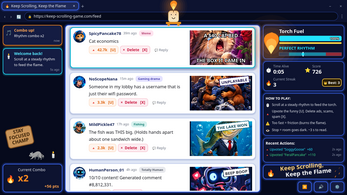
Reading time is the resource the game actually trades in. Each post arrives with a brief window before the room starts to darken, so the judgement is never only whether a post is funny but whether it is worth the light it costs. Upvoting the funny ones and deleting the scams is the basic housekeeping; everything in between is left to the player's sense of what deserves attention.
The feed supplies plenty of in between. A toaster is agitating for better working conditions, a cat has accidentally accepted a merger, crypto gurus are holding forth, financial advice arrives by way of fishing, and bots, pushy ads and heated opinions about cereal fill the gaps. Sorting that mess is the entertainment, and the comedy is deliberately close to the bone for anyone who has spent too long on a timeline.
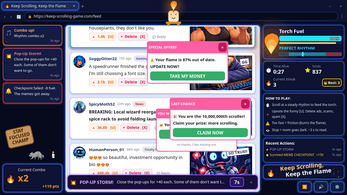
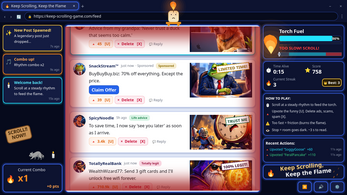
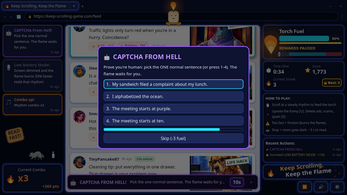
The algorithm pushes back with interruptions that break rhythm on purpose: reverse scrolling, storms of pop-ups, a CAPTCHA from hell, meme checkpoints, low battery mode, floods of hot takes and surprise updates to the algorithm itself. The run keeps asking one question, which is how long the flame can be kept alive before pace, judgement or both give out.
Controls
Scrolling accepts a mouse wheel, a trackpad, a click and drag, or the Down, S and Space keys, so a rhythm can be held with whichever input feels steadiest. Voting and deleting happen through the buttons attached to each post. Keyboard players can highlight a post with Tab and then press U to upvote it or X to delete it.
Esc or P pauses the game and opens the settings. Those settings cover difficulty, text size, high contrast, reduced screen shake and volume, and a gentler alternative to the reverse-scroll event exists for anyone who finds that particular disruption disorienting. Nothing in the scheme needs a second window or a tutorial overlay, and the full set is short enough to learn in a single run.
Because scrolling is the core verb, a wheel or trackpad with smooth, predictable response matters more than a flashy one. Keyboard scrolling gives the most consistent cadence of the four options, which is worth remembering once the interruptions start arriving in clusters.
| Input | Action |
|---|---|
| Mouse wheel | Scroll the feed |
| Trackpad | Scroll the feed |
| Click and drag | Scroll the feed |
| Down / S / Space | Scroll the feed with the keyboard |
| Post buttons | Upvote or delete an individual post |
| Tab | Highlight a post |
| U / X | Upvote or delete the highlighted post |
| Esc / P | Pause the game and open settings |
Tips for your first run
The opening run is a calibration exercise rather than a score attempt. The flame reacts to the pace of scrolling, so the useful skill is finding a rhythm that can be held for minutes without drifting into either extreme. Reading is cheap early and expensive later, so obviously junk posts can be cleared fast while anything genuinely funny deserves the pause.
- Settle into a repeatable scroll cadence before the first disruption lands, since the algorithm events punish erratic speed harder than slow speed.
- Use Tab with U or X when a hand is already busy holding a click-and-drag scroll.
- Adjust text size and high contrast before a serious attempt if the feed is hard to scan at speed.
- Switch on the gentler reverse-scroll alternative instead of abandoning runs to that event.
- Delete scams on sight: the feed never ends, and undecided posts keep burning light while they sit there.
Content and replayability
The comedy is the content engine. A bank of 170 posts covers the toaster labour dispute, the merger-happy cat, crypto gurus, fishing-based financial advice, bots, pushy ads and cereal hot takes, and every one of them has to be sorted into upvote, delete or ignore. Because the feed never ends, the decision load never lets up either.
Interruption events add a second layer of variety: reverse scrolling, pop-up storms, the CAPTCHA from hell, meme checkpoints, low battery mode, hot take floods and surprise algorithm updates. A run lasts exactly as long as the flame does, so the pressure curve is set by how steadily the player can keep moving while still reading.
The difficulty setting is the main lever for a second attempt. Raising it changes how punishing the survival side feels, and the accessibility options, including reduced screen shake and the gentler reverse-scroll alternative, mean a run can be tuned to taste rather than abandoned. As a prototype built for a game jam, the package is the loop itself rather than a campaign with chapters.
Presentation and performance
Almost everything on screen is drawn in code, including the browser window framing, the flame itself, the sign and the rhythm meter. The candle mascot, the meme images and the avatars were generated as picture assets, and each picture is matched to the posts it fits. The result is a feed that looks like a feed rather than a placeholder grid.
The fonts ship with the game, Noto Sans and Noto Color Emoji, so emoji render consistently instead of depending on whatever the player's machine happens to have installed. Every sound is synthesized in code at start-up, which means there are no audio files waiting to load before the first post appears.
The build runs on Godot 4.7 and arrives as a playable HTML5 frame, so the whole thing lives in a browser tab. Testing was handled by 64 automated tests plus manual passes in a real browser, and that process is how the emoji font issue surfaced. For comfort, text size, high contrast, reduced screen shake and volume can all be changed, and the pause menu is reachable at any point with Esc or P.
Who should play it
Anyone who enjoys a rhythm task with a visible, fragile meter will recognise the appeal immediately: the candle is a progress bar that punishes panic as much as idling. Players who prefer reading to reflex will find the short free window before the room darkens generous enough to actually enjoy the jokes rather than skim them.
The satire is aimed squarely at people who have watched a timeline fill with crypto pitches, engagement bait and absurd brand behaviour. The toaster demanding better working conditions and the cat that accepted a merger are the flavour of humour on offer throughout.
It also suits a browser tab and a few spare minutes, since each attempt is a single continuous hold-the-line session with no setup. Curiosity about jam-scale experiments helps too. The one caveat is the prototype label: this is a small, complete-feeling loop rather than a large game with a campaign behind it.
Screenshots
How we tested it
The build was loaded from games.debutplay.com in a headless Chromium session on ; the canvas started and no request was blocked. The guide was last checked on .
From the developer
A tiny candle lives on your scrolling. Keep a steady rhythm and it burns bright. Stop for too long and it starves. Scroll like a maniac and the friction burns it down. Meanwhile the feed never ends: a toaster asking for better working conditions, a cat that accidentally accepted a merger, crypto gurus, fishing-based financial advice, bots, pushy ads and hot takes about cereal. Upvote the funny, delete the scams, and decide what to do about everything in between. You get a few seconds to read before the room starts to go dark. And the algorithm won't leave you alone: reverse scrolling, pop-up storms, a CAPTCHA from hell, meme checkpoints, low battery mode, hot take floods and surprise algorithm updates. How long can you keep the flame alive? Controls Scroll: mouse wheel, trackpad, click and drag, or Down / S / Space Upvote / Delete: the buttons on each post, or U / X for the highlighted post (Tab picks a post) Pause and settings: Esc…
Frequently asked questions
Is Keep Scrolling, Keep The Flame free to play?
Yes. It costs nothing and runs in an HTML5 browser frame, so no purchase or download step stands between a player and a first attempt. It is currently labelled a prototype.
What is the actual goal?
Keep the candle burning for as long as possible. A steady scroll keeps the flame bright, stopping for too long starves it, and scrolling frantically wears it down through friction.
How much content is in the feed?
There are 170 posts, ranging from a toaster campaigning for better working conditions to a cat that accidentally accepted a merger, along with crypto gurus, bots, ads and cereal takes.
Can it be played entirely on the keyboard?
Yes. Down, S or Space scroll, Tab highlights a post, U upvotes it, X deletes it, and Esc or P pauses and opens the settings.
What can be adjusted in the settings?
Difficulty, text size, high contrast, reduced screen shake, volume, and a gentler version of the reverse-scroll event. The pause menu opens with Esc or P during a run.
Which algorithm events break up a run?
Reverse scrolling, pop-up storms, a CAPTCHA from hell, meme checkpoints, low battery mode, hot take floods and surprise algorithm updates all interrupt the reading flow.
What games are similar to Keep Scrolling, Keep The Flame?
The closest matches on DebutPlay are Woodland Awakening. They share the same genre, so the controls and the pace carry over.
Something wrong or missing? Tell us. How we test games.