Platformer · New game
//TODO: Save the Dev
Pixel must repair an unfinished game from inside its own tools, slowing time and rewriting levels to reach the desktop and save a collapsed developer.
#16 this weekAI-assisted: Code
The game runs in this tab. No install, no account.
The short answer
//TODO: Save the Dev is a meta puzzle-platformer about Pixel, a character left inside an unfinished project. Players edit levels with development tools, slow time to 25 percent, and confront five bosses tied to game-making nightmares. It costs $7.00 and is available in HTML5 and on Windows, telling a story about crunch and burnout.
What is //TODO: Save the Dev?
//TODO: Save the Dev begins at 3:41 AM with Chris, a solo indie developer who has spent six weeks in crunch and faces a Friday deadline. He collapses at his desk before the build is finished, leaving Pixel behind inside the code. Pixel takes control of the editor cursor and must work through an incomplete game to reach the developer's desktop and call for help. The premise drives a fourth-wall-breaking meta puzzle-platformer in which players do not simply clear levels; they build, edit, and debug them in real time. The tone is emotional and tied to game-making culture, with the unfinished project itself becoming the obstacle. The game is priced at $7.00 and is available in HTML5 and on Windows. Its 2D pixel-art presentation supports the retro, singleplayer framing, while the story keeps the focus on Chris, Pixel, and the cost of pushing too hard.
How to play
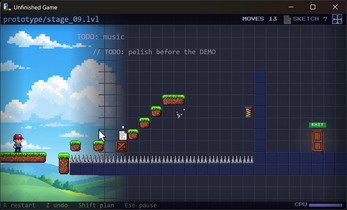
Classic platforming is only part of the loop. When a route ends at a missing bridge, a dead end, or a wall of spikes, players open the engine's development tools and alter the room. The move tool lets them pick up tiles, platforms, and obstacles and place them elsewhere. Springs and hazards can be rotated to launch Pixel over gaps that would otherwise be impossible. The layer tool shifts hidden elements between background and foreground, which changes what the level exposes. The inspector changes object physics on the spot, such as turning a static floor into a high-bounce surface or disabling gravity. The dev console accepts live commands including spawn box, freeze, and gravity off. Planning Mode, or simply grabbing a tile, slows time to 25 percent so players can study a room and place platforms with care. The aim is to debug a path through unfinished spaces, confront the bosses that embody development problems, and eventually break out toward the desktop.
Controls
Control is built around direct touch and drag-and-drop, with tactile haptic feedback. Players grab level pieces and set them down where the puzzle needs them, rather than steering Pixel through a finished route alone. Planning Mode can be activated or triggered by holding a tile; either way, time drops to 25 percent, giving space to inspect hazards and line up a placement. The rotate tool turns springs and hazards so they fire in a useful direction. The layer tool moves hidden elements between foreground and background. The inspector adjusts physics values for objects, including bouncy floors and gravity changes. The dev console is the widest control surface, with live commands such as spawn box, freeze, and gravity off. The design emphasizes touch interaction and haptic response, while the cursor-driven premise keeps the editing tools central to every action. A player who ignores the tools will find that platforming alone does not solve unfinished rooms.
| Input | Action |
|---|---|
| Direct touch drag-and-drop | Grab level pieces and set them down at a chosen spot. |
| Planning Mode or tile grab | Slow time to 25 percent to study a room and place platforms. |
| Rotate tool | Turn springs and hazards to send Pixel over gaps. |
| Layer tool | Move hidden elements between foreground and background. |
| Inspector | Change object physics, such as making a floor bouncy or turning gravity off. |
| Dev Console | Run live commands, including spawn box, freeze, and gravity off. |
Tips for your first run
Start with Planning Mode before making a jump or moving a platform. The 25 percent slowdown is most useful when a room shows several hazards at once, because it gives time to check the route and the placement point. Inspect physics early: a static floor can become a high-bounce surface, and gravity can be disabled when a fall would otherwise end the attempt. Rotate springs and hazards rather than treating them as fixed parts of the room. If a gap seems impossible, try shifting a hidden element between background and foreground before spending time on a complex jump. The dev console is a problem-solving tool as much as a cheat surface; commands such as spawn box, freeze, and gravity off can change the terms of a puzzle. Keep an eye out for sketches while exploring, because the 45 collectibles reward a slower look at each stage.
- Slow time before committing to a difficult platform sequence.
- Check whether a floor can be made bouncy in the inspector.
- Rotate hazards to create a launch path across a gap.
- Use layers when an object seems absent from the active plane.
- Try a console command when a room's rules block progress.
Content and replayability
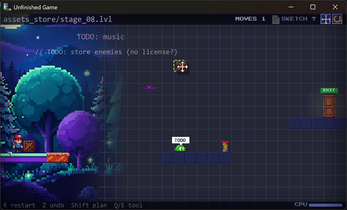
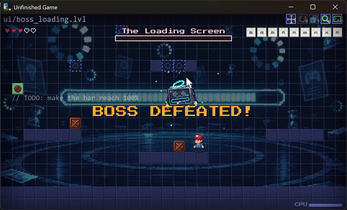
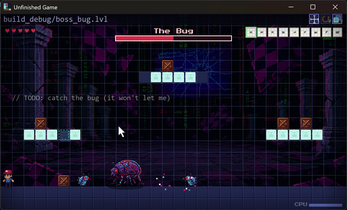
The campaign spans five worlds and 50 stages. The worlds are Prototype, Asset Store, Debugging, UI Menus, and Final Build, each drawing on a different part of the game-making process. Five boss encounters break up the puzzle-platforming: the Placeholder is a raw greybox whose welcome has worn out; the Chimera is stitched from four conflicting asset packs; the Bug teleports and resists reproduction; the Loading Bar turns progress into a tense race; and the Deadline is a merciless countdown where survival is the goal. Across the code, 45 collectible sketches hold Chris's lost concept art and personal notes, giving explorers a second layer to find. The escape to the desktop is part of the content as well: players break through the game window, manipulate desktop files, and uncover more of the story. The collectible sketches and notes give explorers a reason to search rooms carefully. The singleplayer structure keeps the focus on Pixel's route through an unfinished build, with boss fights and collectible lore adding variety to the 50 stages.
Presentation and performance
The visual identity is 2D pixel art with a retro finish. That style fits the premise: the Placeholder appears as an untextured greybox, the Chimera reads as a mismatch of four asset packs, and the Bug is built around a teleporting glitch. The game uses the look of an unfinished project as part of its storytelling rather than as a separate backdrop. Haptic feedback adds a tactile layer to the drag-and-drop interaction. The HTML5 build can be played in a browser, and a Windows version is also available. The game's emotional tone comes through the story of Chris, Pixel, and a project that was pushed to the breaking point, while the bosses turn common development problems into clear visual antagonists. The central figures are the developer, the character left in the code, and the manifestations of crunch and unfinished work. The result is a story-led look built around editable rooms and the tools that reshape them.
Who should play it
This game suits players who want a puzzle-platformer with an editing twist rather than a straight run to the exit. Anyone drawn to meta stories about games, code, and the people who make them will find the premise of Chris, Pixel, and the unfinished build central. Players who enjoy experimenting with physics will get the most from the inspector, especially when turning a floor into a trampoline or switching gravity off. The five bosses give goal-driven players clear targets, from the Placeholder to the Deadline, while the 45 sketches reward careful exploration. Touch players are addressed directly through drag-and-drop controls and haptic feedback, and the HTML5 build offers a browser route into the same premise. The story also raises awareness of burnout, crunch culture, and cardiovascular health, so it may appeal to players who want those themes handled through a game-making metaphor. It is less suited to someone seeking a purely twitch-based platformer, because the rooms are designed around rewriting the level when the route fails.
Screenshots
How we tested it
The build was loaded from games.debutplay.com in a headless Chromium session on ; the canvas started and no request was blocked. The guide was last checked on .
From the developer
What if the only way out of an unfinished game... was to finish it yourself?It's 3:41 AM. Six weeks of relentless crunch. The deadline is Friday. At his desk, Chris—a solo indie developer—is pushing his limits to ship the game of his dreams. But his body gives out, and he collapses before he can finish the build.Left behind in the code is Pixel. With no developer left to guide him, Pixel takes hold of the editor's cursor.//TODO: Save the Dev is an emotional, fourth-wall-breaking meta puzzle-platformer where you don't just play the level—you build, edit, and debug it in real time to reach the developer's desktop and call for help.REWRITE THE RULES OF THE GAMEClassic platforming won't save you here—the game isn't finished! When you hit a dead end, a missing bridge, or a wall of spikes, reach into the engine's development tools:• MOVE: Pick up tiles, platforms, and obstacles with direct touch and place them where you need them.• ROTATE:…
Frequently asked questions
What is //TODO: Save the Dev about?
//TODO: Save the Dev follows Pixel, a character stranded in an unfinished project after developer Chris collapses. The goal is to use editing tools, reach the desktop, and call for help. The game mixes platforming with real-time level repair.
How much does the game cost?
The game is priced at $7.00.
Which platforms are supported?
The supported platforms are HTML5 and Windows.
How many bosses and stages are there?
There are five boss encounters and 50 stages across five worlds. The worlds are Prototype, Asset Store, Debugging, UI Menus, and Final Build.
What does Planning Mode do?
Planning Mode slows time to 25 percent. It can be activated directly or triggered by grabbing any tile, giving time to study hazards and place platforms.
Are there collectibles?
There are 45 collectible sketches. They include Chris's lost concept art and personal notes, scattered across the game's code.
What games are similar to //TODO: Save the Dev?
The closest matches on DebutPlay are Starbase Breach, Heroic Henry, Demian buscando donde pertenece. They share the same genre, so the controls and the pace carry over.
Something wrong or missing? Tell us. How we test games.