Puzzle · New game
Finders’ Bureau
A cooperative browser hidden-object hunt for one to four players, built around shared discoveries, four illustrated scenes and a relaxed pace without countdown failure.
#25 this weekAI-assisted: Code, Graphics, Text
The game runs in this tab. No install, no account.
The short answer
Finders’ Bureau is a free browser hidden-object game for one to four players, with four illustrated scenes and shared team progress. Players search the same picture, mark spots, zoom in, use hints and compare contributions. There is no countdown failure, and solo play starts without bots or forced waiting.
What is Finders’ Bureau?
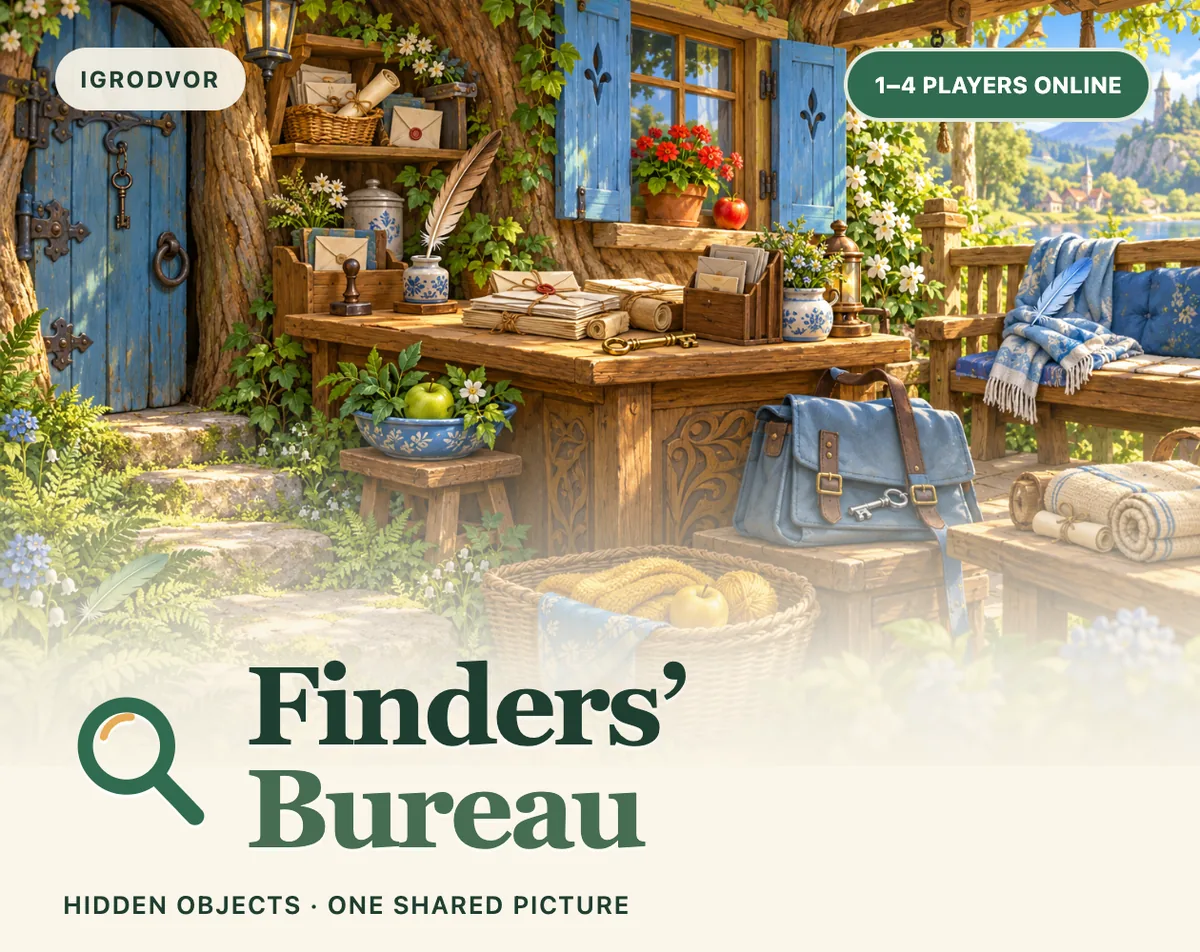
Finders’ Bureau is a cooperative hidden-object game played in a browser, built for one to four people online. Everyone searches the same illustrated scene, shares discoveries and works toward finding every object as a team. The appeal is in close looking: a key can disappear into a cluttered desk, while a feather can follow the grain of a wooden beam, so the scene rewards patience rather than rushed clicking.
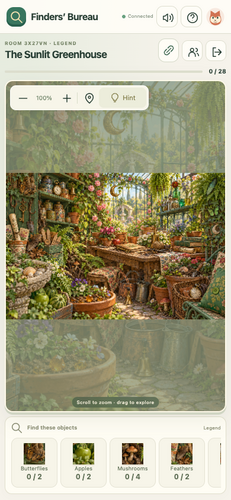
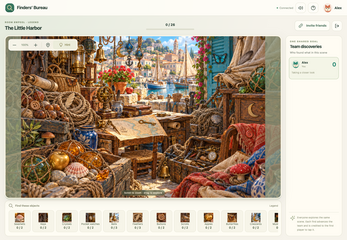
The first release is free and currently in development. It includes Woodland Post Office on Easy with 13 objects, plus three Legend scenes: The Curiosity Shop with 24 objects, The Sunlit Greenhouse with 28, and The Little Harbor with 26. A contribution panel shows who found each kind of object, making shared progress visible.
Rooms support solo play as well as group play, with no bots and no forced waiting before the search begins. Players can create a room, invite others with a link or a six-character code, and each person plays on their own device. The game runs without account registration or installation, though an internet connection is required, including for solo play.
How to play
Begin by launching the browser game, choosing English, Russian or Simplified Chinese, and setting a seeker name in the profile menu. Language can be changed in the lobby before joining a room. From there, select a scene and create a room for one to four people. The host shares an invite link or a six-character room code, and friends join from their own devices. The host starts the search when the group is ready; a full team is not required, so a solo start is valid.
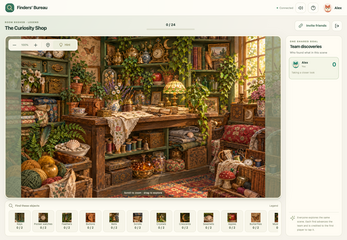
The search is a matching task. Below the picture, object samples and quantities show what the team needs. Players click or tap the objects they spot. Every find helps the whole team, and the contribution panel records who found each kind of object. The guest profile keeps completed scenes, finds and personal points between sessions.
The pace is deliberately relaxed. There is no countdown failure, so a difficult object does not end the run. Zoom and pan help inspect dense areas; marking tools let one player point out a spot for friends, and hints are available with a cooldown. Online play is required for solo and group sessions alike.
Controls
On a computer, clicking an object claims it. Dragging the enlarged scene pans the view, while the mouse wheel or the plus and minus buttons zoom in and out. Those controls support careful inspection of busy illustrations where a key might sit against a cluttered desk or a feather might blend into wood grain.
On a phone or tablet, players tap objects to claim them, pinch with two fingers to zoom and drag to explore the scene. The marker tool lets a player point something out for the team, which helps when an object is obvious to one set of eyes but not another. Hints are also part of the control set, with a cooldown between uses.
The game runs in a browser and does not require installation or account registration. An internet connection is required even for solo play. If a connection drops, a reconnecting state appears, and the same room can be restored when the saved guest session is available. Wiping browser storage or moving to another device produces a separate guest, and blocked embedded storage can force a temporary profile that might not last through a reload.
| Input | Action |
|---|---|
| Mouse click | Claim an object |
| Mouse drag | Pan the enlarged scene |
| Mouse wheel or plus / minus buttons | Zoom in and out |
| Tap | Claim an object on phone or tablet |
| Two-finger pinch | Zoom on phone or tablet |
| Touch drag | Explore the scene on phone or tablet |
| Marker tool | Point out a spot for the team |
| Hint | Use a hint after a cooldown |
Tips for your first run
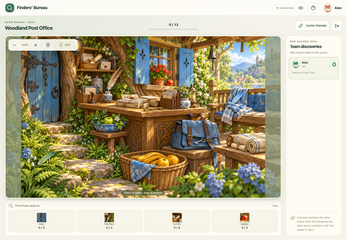
Start with Woodland Post Office, the Easy scene with 13 objects, to learn how the object samples and quantities work before moving into the denser Legend scenes. The scene is built from letters, parcels, wooden shelves and warm woodland light, which gives plenty of edges for objects to hide against. Use the contribution panel to see what has already been found and where the team may be duplicating effort.
Look for shapes that follow existing lines. A key can blend into a cluttered desk; a feather can follow the grain of a wooden beam. Zoom in early rather than scanning at full size, then pan across the picture in sections. If a room has several players, split the scene into zones and use the marker tool to flag uncertain spots. Hints have a cooldown, so save them for a stubborn object.
- Begin on the Easy Woodland Post Office scene with 13 objects.
- Check the sample objects and required quantities under the scene.
- Zoom and pan in sections instead of scanning the whole illustration.
- Use the marker tool to point out suspicious details.
- Check the contribution panel to avoid covering the same ground twice.
- Save hints for the last few objects because a cooldown applies.
Content and replayability
The content set is compact and clearly themed. Woodland Post Office is the Easy scene, with 13 objects hidden among letters, parcels, wooden shelves and warm woodland light. The Curiosity Shop is a Legend scene with 24 objects in a busy workshop full of curious treasures. The Sunlit Greenhouse is another Legend scene, with 28 objects among plants, pots and intricate garden details. The Little Harbor has 26 objects in a cozy waterfront scene.
The opening content has one Easy scene and three Legend scenes. The remaining difficulty settings still lack playable scenes, so the current choice is between the gentler post office and the three denser Legend locations. Each scene has a stated object count, which makes the scale of a search clear before the team begins.
Replay value comes from the saved guest profile: completed scenes, finds and personal points persist for that browser profile. A completed-scene badge is saved when the team finds everything, and the contribution panel gives each session a record of who found which kind of object. Players can return for another search, try a different scene, or replay a favorite with a new group.
Presentation and performance
Finders’ Bureau uses a 2D illustrated style with colorful, cozy scenes. The settings are specific: a post office with letters, parcels and wooden shelves; a curiosity shop packed with treasures; a greenhouse of plants, pots and garden details; and a waterfront harbor. The hidden-object design depends on those details, because objects merge into desks, beams and other illustrated surfaces.
The game runs as an HTML5 browser game, with no installation and no account registration. Solo play also depends on an online connection. A dropped connection shows a reconnecting state, and the same room can be restored when the saved guest session is available. Players who clear browser storage or switch devices create a different guest profile.
Guest profiles are tied to the browser. If embedded storage is blocked, a temporary profile allows play, but that profile might not last through a reload. A stable browser and connection help a shared room, especially after the team has made progress. The presentation leans on close observation rather than fast reactions or countdown pressure.
Who should play it
This is a natural fit for players who enjoy hidden-object puzzles and want company without competition. The cooperative structure means every discovery helps the whole team, and the contribution panel keeps group finds visible. A player who prefers to work alone can start solo, but the online requirement still applies.
The relaxed pace suits casual sessions. There is no countdown failure, and hints are available with a cooldown, so a missed object does not punish the group with a loss screen. Friends can share a link or six-character room code and join from separate devices, which fits a low-pressure co-op evening.
The current scope is worth knowing before starting. The first release has one Easy scene with 13 objects and three Legend scenes with 24, 28 and 26 objects; the remaining difficulty settings still lack playable scenes. Players who want a large library on day one will find a focused set, while those who want to learn one scene carefully and replay it with friends have a clear starting point. The game is free and in development.
Screenshots
How we tested it
The build was loaded from games.debutplay.com in a headless Chromium session on ; the canvas started and no request was blocked. The guide was last checked on .
From the developer
Little mysteries. A great little team. Finders’ Bureau is a cooperative hidden object game for 1–4 players online. Search the same beautifully illustrated scene, share discoveries and find every last object together. A key may blend into a cluttered desk; a feather may follow the grain of a wooden beam. Take a closer look. Play alone or with friends. Create a room and invite your team with a link or a six-character code. Everyone plays on their own device.One picture, shared progress. Every discovery helps the whole team. See who found each kind of object in the contribution panel.Search at your own pace. There is no countdown failure. Zoom, pan, mark interesting places for friends and use a hint when you need one.Remember your discoveries. Completed scenes, finds and personal points are saved to your guest profile. Four places to explore Woodland Post Office — Easy, 13 objects. Start among letters, parcels, wooden shelves and warm…
Frequently asked questions
Is Finders’ Bureau free?
Yes. The game is free to play in the browser, with no account registration or installation required.
How many players can join a room?
A room supports one to four players online. The host creates the room and shares either an invite link or a six-character code.
Can Finders’ Bureau be played solo?
Yes. A player can start alone without bots or forced waiting. An internet connection is still required, and solo play uses the same online room structure.
Is there a timer or fail state?
There is no countdown failure. Players can search at their own pace, zoom and pan, mark spots and use hints with a cooldown.
What scenes are in the first release?
The first release has Woodland Post Office (Easy, 13 objects), The Curiosity Shop (Legend, 24), The Sunlit Greenhouse (Legend, 28) and The Little Harbor (Legend, 26).
Does Finders’ Bureau work on phones and tablets?
The browser game includes touch controls for phones and tablets: tap objects, pinch to zoom and drag to explore.
What games are similar to Finders’ Bureau?
The closest matches on DebutPlay are BATHORY: BLOODLINE — The Ten Rites, Kortzale Solitaires, Before You Wake. They share the same genre, so the controls and the pace carry over.
Something wrong or missing? Tell us. How we test games.