Platformer · New game
Lifeline Lab: Health & Safety
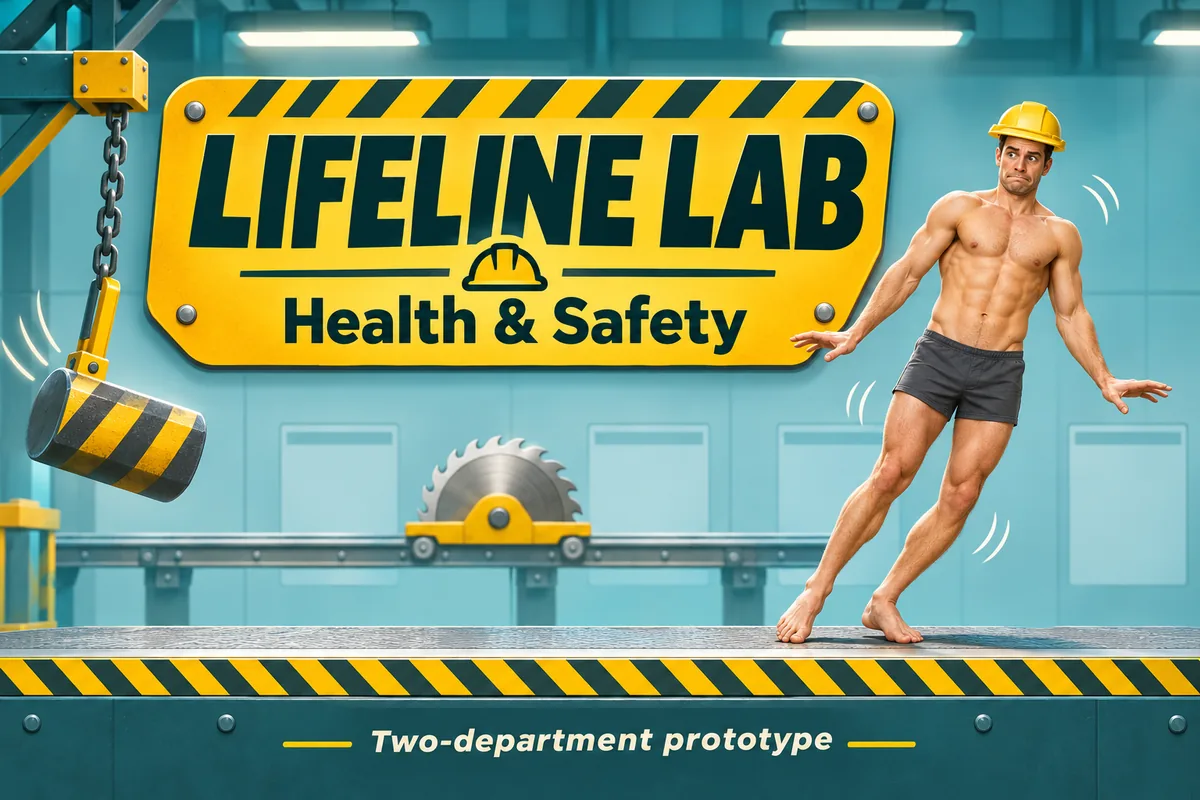
A free physics platformer prototype that turns workplace safety into a limb-by-limb ragdoll escape through two departments.
#41 this weekAI-assisted: Code, Graphics, Text
The game runs in this tab. No install, no account.
The short answer
Lifeline Lab: Health & Safety is a free HTML5 prototype that puts Buddy through a comic factory induction where each arm and leg has its own control. Two departments, persistent ragdoll damage, obstacle courses and condition-based scoring make it worth trying now, with Safe practice and touch buttons available.
What is Lifeline Lab: Health & Safety?
Lifeline Lab: Health & Safety is a free HTML5 physics platformer prototype from Tutorium and Steven Ross. Buddy enters a factory where employee wellbeing is treated with grim literalness, and the result is a comic workplace induction built around a breakable ragdoll rather than a conventional hero. The current build is labelled v0.3.0 and contains two playable departments: Mandatory Induction and Staff Wellness. This is not the planned full campaign, so the scope is narrow but the central joke and the movement system are immediately present.
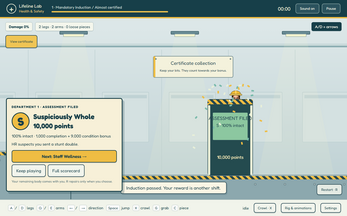
The platforming hook is that each arm and leg has its own control. Damage persists, joints and layered tissue respond to impacts, and injuries alter how Buddy can move. Every surviving piece can become part of an escape plan, which makes the body itself the main resource. A failed state does not trigger an automatic death screen, and the game does not force a restart; a run can continue with what remains, or a checkpoint can be restored. Condition-based grading awards up to 10,000 points per department, and local best scores record the results. The same damaged Buddy can be taken into Staff Wellness.
How to play
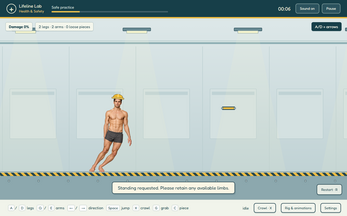
Movement is deliberately physical. Keep a left or right arrow held, then tap A and D in alternation to drive Buddy’s legs, lifting each key before the following stroke. A direction key by itself will not walk. That rhythm is the first skill to learn, and Safe practice exists to teach it before the obstacle courses begin. A jump or hop of a remaining piece requires Space from a real floor contact, so footing matters.
The two departments are obstacle courses rather than open stages. The routes mix saws and spikes with hammer and anvil hazards, moving floors, gaps and rescue lifts. Crawl can be toggled, and Q/E arms plus A/D legs can be used with a direction while crawling. Crouch, grab and flop share S, down, G and F. C switches to a remaining piece when the current one is badly damaged. If a section goes wrong, R restarts a checkpoint, Escape pauses and M mutes. A failed state does not trigger a death screen, so a messy finish is still a finish, but checkpoint reloading does not restore the complete damaged-body simulation.
Controls
Keyboard play maps each body part to a separate key. A held left or right arrow sets direction, while alternating A and D performs left and right leg strokes. Q and E raise the left and right arms. X toggles crawl, and while crawling the arms use Q/E and the legs use A/D with a direction. Space jumps or hops a remaining piece from a real floor contact. Crouch, grab and flop use S, down, G or F. C switches to a remaining piece. R restarts a checkpoint, Escape pauses and M mutes.
Touch buttons provide the same actions, so the limb-by-limb scheme carries over to a phone. Fullscreen gives more room for the controls and the factory. A desktop setup is advised for the initial try, and performance on an actual phone remains under evaluation. The safest introduction is Safe practice, because a direction key alone does not produce walking and the limb rhythm takes repetition. A rig inspector and the standard and Extra wobbly modes are also available for tuning the experience.
| Input | Action |
|---|---|
| Left or right arrow plus A and D | Hold a direction and alternate leg strokes, releasing each key before the next |
| Q and E | Raise the left or right arm |
| X | Toggle crawl; use Q/E for arms and A/D for legs with a direction |
| Space | Jump or hop a remaining piece from a real floor contact |
| S, Down, G, F | Crouch, grab or flop |
| C | Switch to a remaining piece |
| R | Restart checkpoint |
| Escape | Pause |
| M | Mute |
| Touch buttons | Provide the same actions as the keyboard controls |
| Fullscreen | Gain more room for the controls and the factory |
Tips for your first run
Start in Safe practice. Movement is not a standard walk cycle: a held direction plus alternating A and D leg strokes is required, and the keys must be released between strokes. A direction key alone will not move Buddy. Once that rhythm is comfortable, the standard and Extra wobbly modes offer different degrees of instability.
Mandatory Induction is a place to learn how injuries change movement before carrying the same damaged Buddy into Staff Wellness. Condition-based grading rewards survival and function rather than a clean run, so a limping finish can still be useful. Safe practice, the rig inspector and the mode options are there to be used before the saws, spikes, hammer and anvil hazards, moving floors, gaps and rescue lifts demand a cleaner response.
- Use Space only from a real floor contact; a hop with a remaining piece depends on footing rather than midair freedom.
- If the body’s support is in poor shape, crawl or move to a different surviving piece with C instead of forcing the same limb pattern.
- Restart a checkpoint with R when a hazard sequence becomes unwinnable; there is no forced restart, so the choice remains with the player.
- Try fullscreen for more control room, and use a desktop for the first attempt if possible.
Content and replayability
The prototype contains two departments, Mandatory Induction and Staff Wellness, each with an obstacle course. The routes combine saw blades and spike traps with hammer or anvil hazards, shifting floors, gaps and rescue lifts. Condition-based grading tops out at 10,000 points per department, and local best scores provide a reason to retry a route with a less damaged body or a more improbable finish. The same damaged Buddy can be carried from one department into the next, which connects the two courses rather than treating them as separate demos.
Replay value comes from the damage model and the scoring conditions rather than a large level count. Persistent injuries change movement, so a run with fewer working limbs becomes a different problem. A death screen does not appear automatically and a restart is not forced; continuing with what remains is a valid approach, and restoring a checkpoint is a choice. Local records and unlocked departments save on the device. Reloading restarts a saved checkpoint rather than restoring the complete damaged-body simulation, which is a practical limit to keep in mind.
The build is explicitly v0.3.0 and contains two departments, not the planned full campaign. That makes the current offering a focused prototype: learn the limb controls, test the grading and see how far a damaged Buddy can travel. Settings include a green-blood option for players who want the comic workplace violence without the standard red.
Presentation and performance
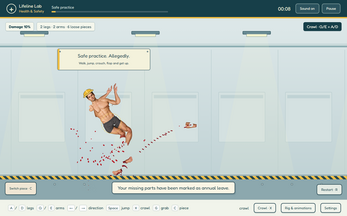
The look is 2D and physically driven, with a ragdoll body built from layered tissue and joints. Damage is persistent and visible in how Buddy moves, while blood, dismemberment and exposed anatomy are part of the fictional comic workplace. A green-blood setting changes the presentation. Music and effects use procedural audio, and the bundled Fredoka font is included under its SIL Open Font License. Steven Ross and Tutorium are credited as creators.
The game runs in a current browser, and an offline ZIP is available; extracting it and opening index.html starts the build. A desktop setup is advised for the initial try. Touch buttons and phone controls are included, but performance on an actual phone remains under evaluation. Fullscreen helps with control space. The available languages are French, Spanish, Arabic, Hindi, Simplified Chinese and English (UK). The translations used artificial-intelligence assistance and have not gone through a full native-speaker review; artificial-intelligence tools also helped with code, artwork, writing and translation.
Who should play it
This is for players who enjoy difficult physics platformers, ragdoll comedy and the strange satisfaction of steering a body that is falling apart. The limb-by-limb controls, persistent injuries and condition-based scoring reward patience and experimentation more than quick reflexes alone. Fans of experimental prototypes will also appreciate that the current build is honest about its scope: two departments, not a full campaign.
It is less suitable for players who want a complete, polished campaign or who dislike gore; blood, dismemberment and exposed anatomy are central, though a green-blood option exists. The touch controls make a phone attempt possible, while a desktop setup is advised for the first try and performance on an actual phone remains under evaluation. Safe practice, the rig inspector, standard and Extra wobbly modes give newcomers a way to learn the rhythm before the saws, spikes, hammer and anvil hazards, moving floors, gaps and rescue lifts take over. The free HTML5 prototype is ready for a first shift.
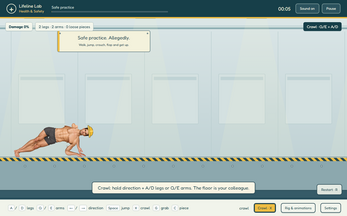
Screenshots
How we tested it
The build was loaded from games.debutplay.com in a headless Chromium session on ; the canvas started and no request was blocked. The guide was last checked on .
From the developer
Please retain any available limbs. Buddy’s mandatory workplace induction has begun. Walk, wobble, crawl and occasionally hop your way through a factory that takes employee wellbeing far too literally. Lifeline Lab: Health & Safety is a free physics platformer prototype with two playable departments: Mandatory Induction and Staff Wellness. Each leg and arm has its own controls. Every surviving piece can become part of your escape plan. Your shift includes Two obstacle courses with saws, spikes, hammers, anvils, moving floors, gaps and rescue lifts.A physical ragdoll with layered tissue, joints and persistent damage. Injuries change how Buddy can move.No automatic death screen or forced restart. Keep going with what remains, or choose to restart a checkpoint.Condition-based grading, up to 10,000 points per department, and local best scores. Take the same damaged Buddy into Staff Wellness.Safe practice, a rig inspector, standard and…
Frequently asked questions
Is Lifeline Lab: Health & Safety free?
Yes. It is a free HTML5 physics platformer prototype, labelled v0.3.0, with two playable departments.
How many departments are included?
Two: Mandatory Induction and Staff Wellness. Each is an obstacle course with hazards such as saws, spikes, hammers, anvils, moving floors, gaps and rescue lifts.
Does Buddy die automatically?
No automatic death screen or forced restart is used. A run can continue with what remains, or a checkpoint can be restarted with R.
Does it work on phones?
Touch buttons and phone controls are included. A desktop setup is advised for the first attempt, and performance on an actual phone remains under evaluation.
How does scoring work?
Condition-based grading awards up to 10,000 points per department, and local best scores are saved on the device.
Is there gore?
Yes. The comic workplace includes blood, dismemberment and exposed anatomy. A green-blood option is available in settings.
What games are similar to Lifeline Lab: Health & Safety?
The closest matches on DebutPlay are FufyPunk, ONE SECOND LEFT, RUN. They share the same genre, so the controls and the pace carry over.
Something wrong or missing? Tell us. How we test games.