Action · New game
MegaSurvivor
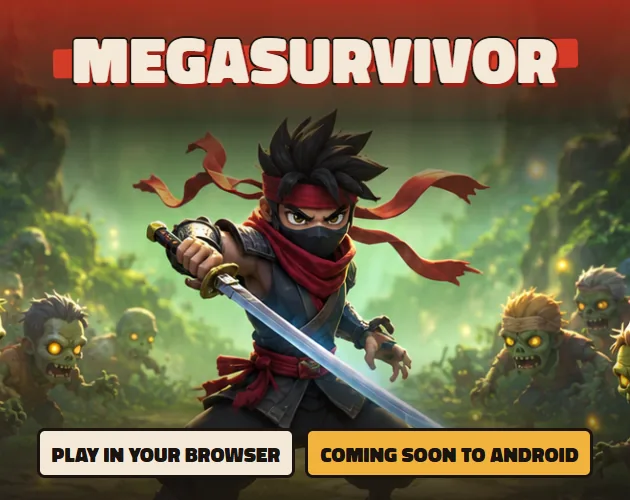
A free browser slice of a 3D survivor roguelite in which a lone ninja moves, dashes and lets auto-firing weapons clear hundreds of enemies before a giant boss arrives.
#48 this weekAI-assisted: Graphics
The game runs in this tab. No install, no account.
The short answer
MegaSurvivor is a free browser demo of a 3D survivor roguelite: one ninja, hundreds of enemies, weapons that fire themselves, glowing level-up pickups and a giant boss at the end. A run here lasts about half a minute, restarts on a fresh seed, and asks for nothing beyond movement and a dash.
What is MegaSurvivor?
MegaSurvivor is a 3D survivor roguelite built on a deliberate mismatch: a single ninja against hundreds of enemies. The version playable in a browser is a demo of the run loop rather than the whole project, and it is short by design, offering roughly thirty seconds of what a run feels like.
That browser build is a lightweight re-creation of the loop instead of the Unity build, so the look and the numbers behind things like damage are simpler than the finished game intends. The demo carries no progression, no saving and no co-op. What it does carry is the core exchange: keep moving, let the weapons handle the shooting, gather experience, choose upgrades and finish by bringing down a giant boss.
The project belongs to a solo developer, AgustinLoza, and it is a first game. The background behind it is technical art: four years as a Technical Director working on character rigging, with C# learned specifically for this project and the 3D, the rigs, the animation, the shaders and the code built by the same person.
How to play
A run begins with movement. Drag across the play area with the mouse or with a finger, or hold WASD or the arrow keys, and the ninja follows. Weapons are never aimed by hand, since they fire on their own, so the input that matters most is where the character is standing when the crowd closes in.
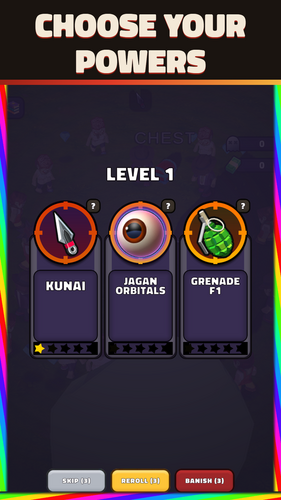
Enemies feed the experience bar, and each level gained drops glowing pickups onto the ground. Walking into one of those pickups opens a choice of upgrade. Claiming them promptly is the main decision the demo asks for; the rest is staying alive long enough to make use of what gets chosen.
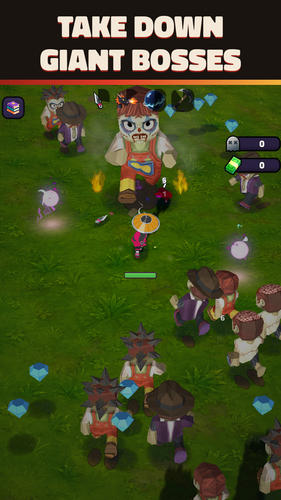
The run finishes in a boss fight, and surviving to that point and taking the boss down is the objective. Because the browser build is a slice of the loop, nothing carries between attempts, and there is no progression, no saving and no co-op. PLAY AGAIN launches a fresh run on a different seed.
If nothing is touched, the demo plays itself so a run can be watched before joining in, and a click or a touch hands over control. A single click on the game also grants it keyboard focus and turns the sound on.
Controls
Movement maps to two styles of input. A mouse drag or a finger drag steers the ninja, and on a keyboard the same job falls to WASD or the arrow keys. There is no shoot button to learn, because the weapons handle firing themselves.
Dashing is the only button action. Space, Shift or the on-screen DASH button pushes the ninja in a burst of movement, which is the tool for slipping out of a tight cluster of enemies when standing still would be punished.
Two setup details matter before the first attempt. The game needs one click before the keyboard responds and audio is enabled, so a player who starts mashing keys on arrival may find nothing happens. And with no input at all, the demo runs an automated showcase of a run; any click or touch takes over from it immediately.
PLAY AGAIN restarts from the beginning with a different seed, which makes it the fastest way to see how much the loop varies between attempts.
| Input | Action |
|---|---|
| Mouse drag | Move the ninja |
| Finger drag | Move the ninja on a touch screen |
| WASD | Move the ninja |
| Arrow keys | Move the ninja |
| Space | Dash |
| Shift | Dash |
| DASH button | Dash |
| Click on the game | Give the game keyboard focus and enable sound |
| No input | Watch the demo play itself; click or touch to take over |
| PLAY AGAIN | Start a new run with a different seed |
Tips for your first run
Treat the opening half minute as a reading exercise. The demo is a short slice of the loop, so there is little time to spend on hesitation; the aim is to understand how the pieces connect, not to build a character for the long haul.
Positioning is the skill the demo actually tests. Since weapons fire without input, every decision about where to stand is the player's contribution to the fight, and the crowd only becomes dangerous when it is allowed to surround the ninja.
- Keep moving rather than standing ground, because a stationary ninja gives up the one thing that keeps a crowd from closing in.
- Walk into glowing pickups the moment they land; each one is an upgrade choice, and an unclaimed pickup leaves that choice unmade.
- Hold the dash for the moments that matter, whether that is Space, Shift or the DASH button, and use it to break out rather than to travel.
- Click the game once before starting so keyboard focus and sound are both active.
- Watch one self-playing run first if the controls feel unclear, then click to take over mid-action.
- Restart with PLAY AGAIN on purpose, since a different seed means the second run will not mirror the first.
Content and replayability
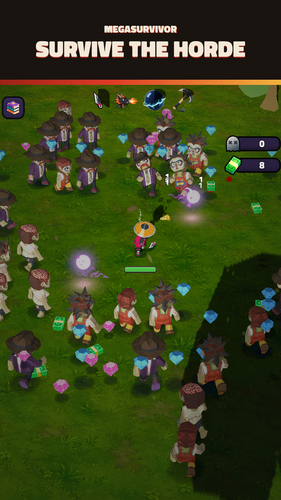
Content here is measured in seconds rather than hours. The browser demo is a single short slice of about thirty seconds of run gameplay, and within that slice sit the pieces of the loop: a ninja, a crowd of enemies, weapons firing automatically, pickups that turn into upgrade choices, and a giant boss waiting at the end.
Replay value comes from variation rather than persistence. PLAY AGAIN starts a new run on a different seed, so encounters and upgrade options will not repeat exactly, which rewards a second or third attempt with a slightly different shape. Nothing is stored between attempts, and this build has no progression, no saving and no co-op.
The larger game is a separate Android project currently in closed testing on Google Play, with no store page yet. That test build adds a two-player DUO mode, playable with a friend or with a bot partner, which the browser slice does not include. For now the demo stands alone as a short, self-contained sample.
Presentation and performance
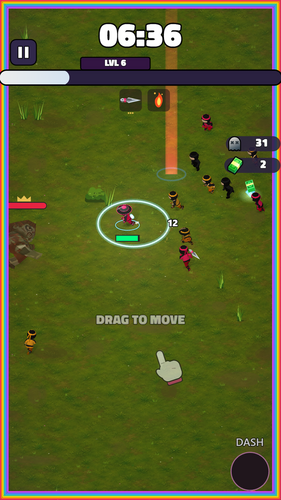
MegaSurvivor presents in 3D from a top-down perspective, with the browser build described as lighter and simpler than the Unity version of the project. Numbers and visual polish are pared back for the web re-creation, so the feedback on screen is more modest than the finished game is meant to be, and four screenshots accompany the release.
Sound exists but is gated behind an initial click on the game, the same click that gives the keyboard focus. Without it, keys will not register and audio stays silent, which can make a first attempt feel broken when it is simply waiting for that one interaction with the mouse.
The assets mix hand work with generated starting points. Some base meshes began as Meshy geometry and were repainted by hand, and a small number of UI icons and pieces of promotional art came out of a local ComfyUI workflow. Rigging, animation, shaders, visual effects, tooling and all of the code are the developer's own work.
Who should play it
Players who enjoy bullet-hell pressure in short bursts are the natural audience. The demo is built for a quick look rather than a long session, and it closes on a boss rather than an open-ended grind, which suits anyone with thirty seconds and a browser tab to spare.
It also suits players curious about early builds. The developer is openly asking for feedback on one specific question: whether the first ten seconds make the objective clear, and at what point the screen stops being readable. Anyone who enjoys diagnosing that kind of clarity problem will get something out of a single run.
Roguelite players who need meta-progression, saving or co-op should hold off for now, because the browser slice has none of those. Those features, along with the DUO mode, belong to the Android build in closed testing, and the demo is best approached as a preview of a loop rather than a home for long-term play.
Screenshots
How we tested it
The build was loaded from games.debutplay.com in a headless Chromium session on ; the canvas started and no request was blocked. The guide was last checked on .
From the developer
MegaSurvivor is a 3D mobile survivor roguelite for Android: - You are one ninja, they are hundreds. Move, let your weapons fire on their own, collect XP, grab upgrades and take down a giant boss. "IMPORTANT THIS IS A BROWSER DEMO"" of the run gameplay: one short slice (about 30 seconds) of what a run feels like. It is a lightweight web re-creation of the run loop, not the Unity build, so the look and the numbers are simpler than the real game. There is no progression, no saving and no co-op in this demo.-------------------------------HOW TO PLAY- Drag with the mouse or your finger to move. On a keyboard: WASD or the arrow keys.- Space or Shift (or the DASH button) to dash.- Your weapons fire on their own. Walk into the glowing pickups that drop when you level up to choose an upgrade. Survive, and bring down the boss.- If you do not touch anything, the demo plays itself so you can see a run; touch or click to take over. PLAY AGAIN…
Frequently asked questions
Is MegaSurvivor free to play in a browser?
Yes. The browser demo carries no price and runs directly in a browser as a lightweight web build of the run loop, so there is nothing to buy before trying it.
Do the weapons fire automatically?
They do. Shooting and aiming are handled by the game itself, which leaves the player responsible for moving the ninja, dashing clear of danger and collecting the glowing pickups that appear on level-up.
How long is the demo?
About thirty seconds of run gameplay. It is a short slice of what a run feels like rather than a full session, and it ends with a giant boss rather than a continuing campaign.
Can two people play together?
Not in the browser demo, which has no co-op. The Android build in closed testing includes a DUO mode for two players, either with a friend or alongside a bot partner.
What happens if nothing is touched?
The demo plays itself so a run can be watched from start to finish. A click or a touch takes over control, and the first click also gives the game keyboard focus and switches the sound on.
Does progress carry over between runs?
No. There is no progression and no saving in the demo. PLAY AGAIN restarts from the beginning with a different seed, so each attempt is complete on its own.
What games are similar to MegaSurvivor?
The closest matches on DebutPlay are Tidy Tornado, Shadows of the Arcane, Cat abdutor. They share the same genre, so the controls and the pace carry over.
Something wrong or missing? Tell us. How we test games.