Survival · New game
Orbitguard: Planet Defense
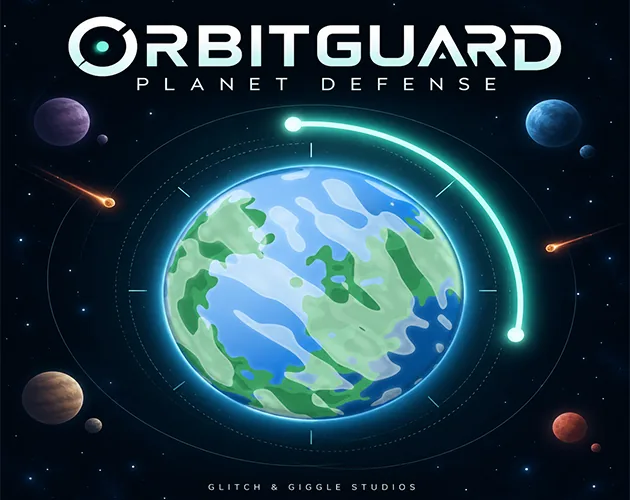
A mouse-driven survival arcade game about holding a single shield steady while six worlds spin beneath a storm of falling rock.
#2 this week
The game runs in this tab. No install, no account.
The short answer
Orbitguard: Planet Defense is a free browser survival game where one orbital shield is steered with the mouse to intercept meteors above six inhabited worlds. Gravity shapes every approach, supply capsules and a repulsor pulse buy extra time, and endless mode tightens the waves every 25 seconds.
What is Orbitguard: Planet Defense?
Orbitguard: Planet Defense is a browser survival game built around one job: keep the sky from falling on people who cannot move out of the way. A debris storm is sweeping across inhabited space, and the player steers an orbital shield above a planet, meeting meteors before they reach the surface. Six worlds sit under that shield during the campaign, each with its own gravitational pull and pace, so a familiar task keeps changing shape.
The studio behind it is Glitch & Giggle Studios, with sprite art credited to Kenny Assets. It carries arcade, casual, sci-fi, space, high score and story rich tags, and it is built as a single-player experience with the mouse at the centre of input. A run mixes interception with recovery: supply capsules drift into orbit and can be caught, and an emergency repulsor pulse clears nearby threats when the orbit gets crowded.
Progress is not thrown away between attempts. Credits earned in play feed permanent upgrades, so a failed defense still leaves something behind for the next one.
How to play
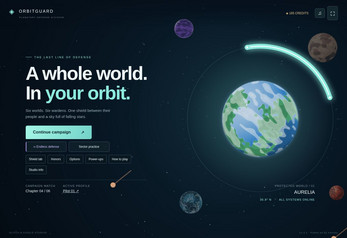
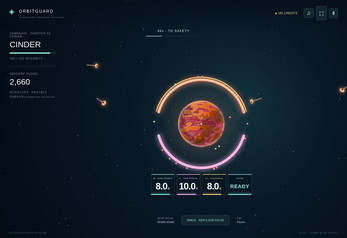
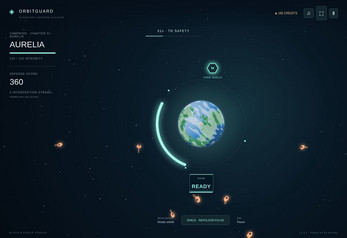
A mission opens with a planet below and rock arriving from above. The shield travels around the planet's orbit, so wherever it sits is the section that is covered and everywhere else is exposed. Meteors do not fall in straight lines; gravity bends each approach, and reading that curve is the real skill. Worlds with stronger pulls, faster threats and tighter shield coverage shorten the time available to slide into position.
Supply capsules are the bright spot in the debris. Catching one adds to the run, and the repulsor pulse is the panic button for the moment when the orbit fills faster than the shield can travel. Between runs, credits go into permanent improvements: planet integrity, shield coverage, pulse recharge and salvage earnings.
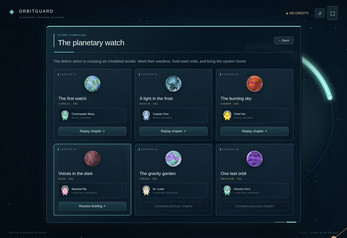
The campaign carries the player through mission briefings, alien portrait dialogue and live radio messages from six planetary wardens, which gives each world a voice rather than just a difficulty step. Endless mode drops the script entirely. Waves stiffen every 25 seconds, and the goal narrows to survival time and score.
Controls
The input set is deliberately small. Moving the mouse slides the shield around the planet, which is the whole of the aiming system, and the space bar fires the repulsor pulse once it has recharged. Nothing else competes for the same hand at the same moment.
Players who would rather not rely on a pointer can steer with A and D or the arrow keys instead, switching to an alternative shield control scheme without giving up precision. Escape or P pauses the action whenever a break is needed.
That is the entire scheme, and it suits the pace. There are no ability bars to cycle or menus to open mid-fall; the difficulty lives in judging where a curved meteor will land and whether the shield can cross the distance in time. Because the pointer does all the aiming, a session can be started within seconds of the page loading, which is part of why the game carries a mouse only tag alongside arcade and casual.
| Input | Action |
|---|---|
| Mouse | Move the orbital shield around the planet to meet incoming threats |
| Space | Activate the repulsor pulse |
| A / D or Arrow Keys | Alternative shield controls |
| Esc / P | Pause |
Tips for your first run
Early attempts usually go wrong in the same place: the shield commits to one side of the planet and the threat arrives on the other. Gravity is the reason. Every approach is bent by the world beneath it, so the visible position of a meteor is not where it will be when it matters. A few habits make the first hour smoother:
- Read the arc before moving. Gravity curves each approach, so track the path rather than chasing the rock's current position.
- Save the pulse for a crowd. The repulsor clears nearby threats, which makes it most valuable when several objects converge at once.
- Spend early credits on coverage. Shield coverage sits alongside planet integrity, pulse recharge and salvage earnings as a permanent upgrade track.
- Revisit worlds you have already unlocked. The campaign allows a return to cleared planets, which is a low-pressure way to test a fresh upgrade.
- Switch to keys if the pointer feels twitchy. A and D or the arrow keys drive the shield just as well.
- Pause freely. Escape or P stops the action, so nothing is lost by taking a breath mid-wave.
Content and replayability
The campaign runs across six distinct worlds, including icy, volcanic and alien planets, and difficulty climbs with each one. Six planetary wardens carry the story through portrait dialogue, mission briefings and radio chatter delivered while the defense is happening, which keeps narrative and play in the same frame instead of separating them into cutscenes.
Seven collectible power-ups widen the options mid-run. They include a broader shield, slowed meteors, twin shields and a protective bubble, so two attempts at the same planet can feel different depending on what turns up and what gets caught.
Endless mode is where the long tail sits. Waves grow harder every 25 seconds, records are tracked per planet, and the chase becomes a personal best for survival time and score. Service honors arrive as achievements along the way. Permanent upgrades give those repeated attempts a direction, and three pilot profiles keep separate progress with automatic browser saves, so more than one player can share a browser without overwriting each other.
Presentation and performance
The look leans into the setting: glowing shields, colorful worlds and a space backdrop that keeps the shield legible against everything falling toward it. Sprite art comes from Kenny Assets, and the visual language stays consistent from the icy worlds to the volcanic ones.
Sound is treated as part of the package rather than an afterthought. Music plays across the defense, and the audio can be adjusted to taste. Fullscreen support is there for players who want the orbit to fill the display instead of sitting in a browser frame.
Because the game runs as an HTML5 build inside the browser, there is nothing to install before the first run. The frame is playable directly on the page, so the distance between deciding to try it and steering a shield is a single click. The presentation stays out of the way of the read: threats, shield position and planet surface remain distinguishable even when the screen is busy.
Who should play it
This is a good fit for players who like a short, repeatable arcade challenge with a score to beat rather than a long campaign to complete. The 25-second wave escalation in endless mode rewards attention and reflexes, and the per-planet records give that repetition a target.
It also suits anyone who wants mouse-only play. The entire defense is handled by moving a pointer and tapping a pulse key, which makes it approachable for players who bounce off keyboard-heavy action games or who are playing in a browser tab between other things.
The story layer is a genuine draw as well. Six wardens, briefings and live radio messages give the campaign a reason to continue past the next unlock, and the dialogue arrives during play instead of interrupting it. Players who enjoy watching a defense hold together by a narrow margin, then spending credits to make the next attempt a little sturdier, will find the loop familiar and well stocked.
Screenshots
How we tested it
The build was loaded from games.debutplay.com in a headless Chromium session on ; the canvas started and no request was blocked. The guide was last checked on .
From the developer
🌍 Orbitguard: Planet DefenseOne shield. Six worlds. Keep the sky from falling.A storm of debris is sweeping across inhabited space—and you’re the last line of defense. Guide an orbital shield with your mouse, intercept incoming meteors, and protect the people waiting beneath you.Gravity bends every approach. Different planets bring stronger pulls, faster threats, and tighter shield coverage. Catch supply capsules, unleash an emergency pulse, and turn a desperate defense into another sunrise.🛡️ FeaturesMouse-controlled shielding: Move around the planet to meet incoming threats.Six distinct worlds: Defend icy, volcanic, and alien planets with increasing difficulty.Story campaign: Meet six planetary wardens through alien portrait dialogue, mission briefings, and live radio messages.Endless defense: Face harder waves every 25 seconds and chase your best survival time and score.Seven collectible power-ups: Widen your shield, slow…
Frequently asked questions
Is Orbitguard: Planet Defense free to play?
Yes. It costs nothing to play, and it runs in the browser as an HTML5 game, so there is no purchase step between opening the page and starting a defense.
What platforms does it run on?
It is an HTML5 browser game with a playable frame on the page. A desktop browser with a mouse is the natural fit given the pointer-based shielding.
Can two people play at once?
No. It is built as a single-player experience. Three pilot profiles do let several people keep separate progress and records on the same browser through automatic saves.
How do the controls work?
Moving the mouse steers the shield around the planet. Space fires the repulsor pulse, A and D or the arrow keys offer alternative shield control, and Escape or P pauses.
What is endless mode?
Endless mode drops the campaign structure and raises the difficulty every 25 seconds. The aim is to last as long as possible and improve your survival time and score on each planet.
Do upgrades carry between runs?
Yes. Credits earned in play go into permanent upgrades covering planet integrity, shield coverage, pulse recharge and salvage earnings, so progress persists across attempts and sessions.
What games are similar to Orbitguard: Planet Defense?
The closest matches on DebutPlay are Last Light, The Last Saint, All Souls: The Haunted Forest. They share the same genre, so the controls and the pace carry over.
Something wrong or missing? Tell us. How we test games.