Educational · New game
Packet Adventure: Even a Silly Photo Gets the Full Effort
A free browser game that stretches the under-one-second trip of a kitten photo into a run of cybersecurity mini-games, each about a minute long.
#14 this weekAI-assisted: Code, Graphics, Sound, Text
The game runs in this tab. No install, no account.
The short answer
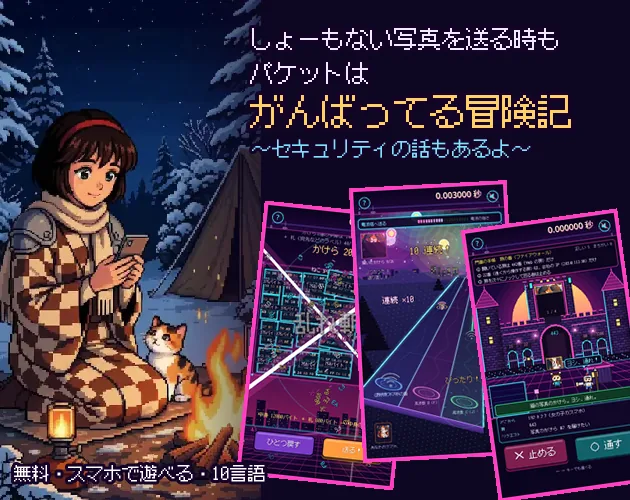
Packet Adventure turns a sleepy kitten's bad photo into a lesson on how the internet actually moves data. A girl at a snowy campsite sends a picture to a friend a few tents away, and the game pulls apart the less-than-a-second round trip into short playable jobs: address lookups, connection volleys, certificate checks, packet slicing, a radio rhythm round, router switching, congestion control, an undersea cable stretch and firewall duty. It runs in the browser, takes 15 to 20 minutes, and costs nothing.
What is Packet Adventure?
A kitten's deeply unflattering sleeping face is the excuse for the whole trip. A girl at a snowy campsite photographs the cat dozing on her lap and taps send so a friend in the next tent can see it. That friend is only a few meters away, yet the picture leaves the campsite, crosses an ocean to a server abroad and comes back, and the entire round trip fits inside a single second. Packet Adventure stretches that sliver of time into something playable.
Every stop on the route hands the player one job. The photo is only the pretext; the real subject is the pile of work that has to happen before a message arrives, from looking up an address to keeping a light burning on the ocean floor. Explanations stay short and lean on pictures and motion instead of paragraphs, and a question-mark button on every screen freezes the action to spell the idea out in plain language.
It is a browser game built with Godot, made for Computer Science Education Week in December, and free to play.
How to play
The journey is broken into a run of short stops, each running about a minute and each casting the player as the worker responsible for that step. One early stop is an address lookup, where the choice is between answering from a nearby cache and sending the question far away. A brick-breaker volley follows, standing in for the call-and-response that opens a connection. Then comes a verification round that asks the player to pick out a counterfeit server before trusting it.
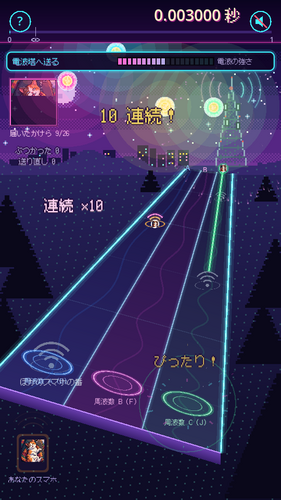
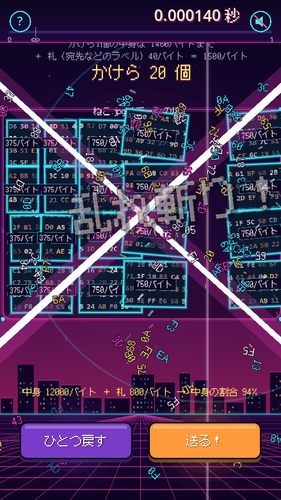
Further along, a data block has to be sliced into chunks no larger than 1,500 bytes. A radio stop turns transmission into a rhythm game where sending works only on the player's own beat. Routers demand track switching based on the address printed on each packet, and a congestion stop asks for a held input that keeps traffic moving without flooding the queue.
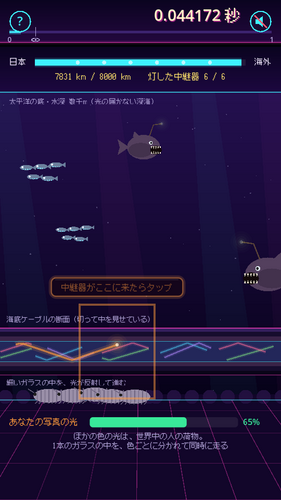
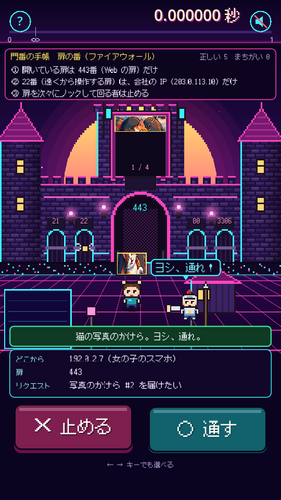
The last stretch crosses 8,000 km of seabed with a light that must not go out, then becomes guard duty at a firewall and WAF, where the goal is turning away attackers while genuine customers still get through. A final hold defends the gate until a patched server worker arrives. Clearing it all triggers a fast rewind of the confirmation racing back until the screen reads Read.
Controls
Everything is designed for a single finger: tapping, holding, dragging and swiping cover the whole game. On a computer the mouse behaves the same way, so the same gestures translate to clicks and drags. A few of the mini-games also accept keyboard input for players who prefer keys.
The layout is portrait, and the game plays in the browser on phones and on PCs without leaving the page. Because the mini-games differ so much, the input style changes with the stop: the congestion round wants a sustained hold rather than repeated tapping, the radio round wants a timed press on the beat, and the slicing round wants a decisive motion across the block.
| Input | Action |
|---|---|
| Touch (one finger) | Tap, hold, drag and swipe through each stop |
| Hold | Keeps data flowing in the congestion-control stop without overflowing the queue |
| Mouse | Mirrors the touch gestures on a computer |
| Keyboard | Accepted in some of the mini-games |
Tips for your first run
The game explains itself well if it is given the chance, so treat the help button as part of play rather than a last resort. The stops that punish impatience are the ones worth slowing down for.
- Press the question-mark button whenever a rule feels unclear; it pauses play and gives a plain-language explanation of the screen.
- In the address lookup stop, actually weigh the cache against a distant query instead of always defaulting to one answer.
- The radio round rewards timing rather than speed: send only on your own beat, not on every beat.
- Hold steadily in the congestion stop; pushing traffic too hard overflows the queue.
- Keep the phone in portrait orientation, since the layout is built for it.
- After the first clear, use the menu to replay any single stop that did not click.
Content and replayability
A full run takes roughly 15 to 20 minutes, with each mini-game lasting about a minute, so the whole thing fits into a coffee break or a single class warm-up. Nothing in the pacing demands a long sitting, and the stops vary enough in feel that the short length does not turn into repetition.
The ending is deliberately honest about security. On the road, the data is locked by encryption; most real-world leaks happen at the destination server. From there the game closes with practical moves: replace reused passwords, switch on two-step login, and refuse to open links in fake emails.
Ten interface languages are available, covering Japanese, English, Korean, Traditional and Simplified Chinese, French, Spanish, Brazilian Portuguese, Indonesian and Vietnamese. Once the journey is finished, a menu opens up so any individual mini-game can be replayed on its own, which makes it easy to revisit the certificate check or the rhythm round without sitting through the rest.
Presentation and performance
The visual language is pixel art with a strong cat motif, and the tone stays light: the kitten's terrible sleeping face is the joke that carries the opening, and the humour keeps the technical material from feeling like a lecture. Text is kept brief, with the heavy lifting done by animation and illustrated diagrams.
A rhythm round sits inside the journey, which explains the musical framing, and the whole experience is sized for a portrait screen so it reads comfortably on a phone held upright. Running in the browser through HTML5 keeps the barrier low, and the Godot-built package is scaled for a short session rather than a sprawling campaign.
Because every screen is a self-contained mini-game with a one-line premise, the game stays legible even when the underlying topic, such as certificate validation or congestion control, is genuinely technical.
Who should play it
Students reviewing high-school computer science material are the most obvious audience, since the topics line up with networks, protocols, encryption and security coursework, and the December timing ties it to Computer Science Education Week. Teachers looking for a short, self-explanatory activity can hand it over without a setup speech, because the help button does the explaining.
Curious adults who have never quite understood what a handshake or a firewall does will find the format friendly: each concept gets a minute and a physical metaphor rather than a diagram with labels. Cat people get a kitten, a snowy campsite and a running joke about how much effort goes into delivering an unflattering photo.
Anyone who wants a complete, finite experience rather than an endless one will appreciate a game that ends. The 15-to-20-minute length and the replay menu suit players who like to sample a mechanic, understand it, and move on.
Screenshots
How we tested it
The build was loaded from games.debutplay.com in a headless Chromium session on ; the canvas started and no request was blocked. The guide was last checked on .
From the developer
It's just a silly photo of a sleeping kitten. The Internet still gives it everything. A girl at a snowy campsite snaps a photo of her kitten's (very unflattering) sleeping face and taps "Send" to her friend in the next tent. The friend is a few meters away — but the photo travels across the ocean to an overseas server and back. The whole trip takes less than one second. This game stretches that second into a short adventure. At each stop, you become the one doing the job: Number lookup (DNS) — answer from the cache, or ask far away? Calling out (TCP handshake) — a brick-breaker volley of "Can you hear me?" ID check (TLS certificates) — spot the fake server before you trust it Slicing (packets) — slash the data block into pieces of 1,500 bytes or less Radio (cell tower) — a rhythm game: send only on your own beat Routers — switch the tracks by reading each packet's address Traffic jam (congestion control) — hold to send, but don't…
Frequently asked questions
Is Packet Adventure free to play?
Yes. The game costs nothing and runs directly in the browser, with no purchase needed to reach the ending or replay the mini-games.
How long does a full run take?
About 15 to 20 minutes. Each individual mini-game lasts roughly a minute, and a menu after clearing the story lets any single one be replayed.
What topics does it actually cover?
Address lookups, connection handshakes, certificate checks, packet slicing, routers, radio transmission, congestion control, undersea cables, firewalls and web application firewalls, plus a server software vulnerability.
Can it be played on a phone?
Yes. It plays in the browser on phones and PCs, is laid out for portrait screens, and is controlled with one finger; on a computer the mouse behaves the same way.
Which languages are supported?
Ten: Japanese, English, Korean, Traditional Chinese, Simplified Chinese, French, Spanish, Brazilian Portuguese, Indonesian and Vietnamese.
Is it suitable for a classroom?
It was made for Computer Science Education Week in December and covers material from high-school computer science courses, with a question-mark button on every screen that pauses play for a plain explanation.
What games are similar to Packet Adventure: Even a Silly Photo Gets the Full Effort?
The closest matches on DebutPlay are Wordtide, Mate in One — Shogi Puzzles, Kanji Atlas. They share the same genre, so the controls and the pace carry over.
Something wrong or missing? Tell us. How we test games.