Sports · New game
SPINATOR
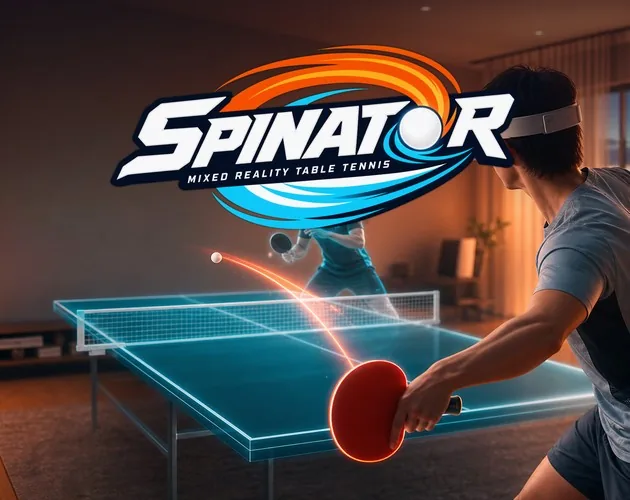
SPINATOR brings a full-size table tennis table to a living room in mixed reality or a rooftop at night in VR, with free online matches, AI practice, and spin-based play.
#16 this weekAI-assisted: Code, Graphics, Sound, Text
The game runs in this tab. No install, no account.
The short answer
SPINATOR is a free browser-launched table tennis game for Meta Quest and Pico headsets, offering mixed-reality play in a living room or nighttime rooftop VR. Quick matches find an opponent while an AI rally fills the wait. Solo drills, knockout cups, ranked divisions, and adjustable paddle settings give new players clear ways to start.
What is SPINATOR?
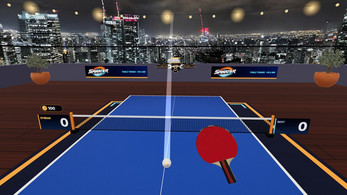
SPINATOR is a table tennis game built for virtual reality and mixed reality. A full-size table can appear in a living room through mixed reality, or sit on a rooftop at night facing the city in VR. The sport stays familiar, but the setting changes how the table feels in the room or in the open air.
The game runs from a browser on a Meta Quest or Pico headset and is free to play, with no account required. Meta Quest 3 and Quest 3S are the intended headsets, while Pico 4 support is experimental. The core offer is direct: a paddle, a ball, a table, and an opponent.
Online 1 versus 1 play is central, but solo practice and ranked competition sit alongside it. A generated nickname can be changed, and online play keeps a nickname, country flag, and ranking points on the game server. The result is a focused sports game rather than a broad VR playground.
How to play
Start in the browser on a Meta Quest or Pico headset. Press Run game, then choose Play in VR or Play in MR. On a computer or a phone, the live matches can be watched, but a VR headset is required to play.
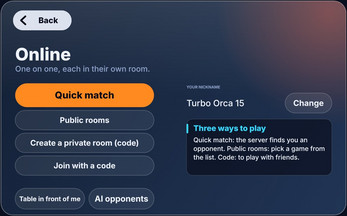
Once inside, choose a 1 versus 1 Quick match and let the server find an opponent. The wait is not empty: a rally against an AI player runs until someone joins, and the online match begins at that point. Public rooms, a private room with a 4-digit code, and an invite link give other ways to meet friends or other players.
A match can be followed by a rematch in one press. Reporting or blocking a player is available at any time. Online results count toward the world ranking, which uses six divisions from Bronze to Champion and World, Country, and Week boards. New players can also head to solo AI matches or practice drills before testing the ranking.
Controls
SPINATOR supports controllers and bare hands through hand tracking. With hand tracking, close a fist and the paddle sits in it. The free hand serves with a short press or a pinch. B or Y, or the MENU tab, pauses the action and opens the menu. Paddle angle, grip, and position can be adjusted in the settings, so the setup can be tuned before a match rather than endured. That small set of inputs keeps the focus on the table. Serving with the free hand and pausing with a button or menu tab are the main inputs outside of holding the paddle. The settings cover paddle angle, grip, and position, giving a player three adjustments before a match. The control set is short and direct.
| Input | Action |
|---|---|
| Controllers | Play the match with controllers. |
| Bare hands (hand tracking) | Close a fist and the paddle sits in it. |
| Free hand | Short press or pinch to serve. |
| B button or Y button | Pause and open the menu. |
| MENU tab | Pause and open the menu. |
| Settings | Adjust paddle angle, grip, and position. |
Tips for your first run
First sessions go better with a short warm-up. The launcher drone offers ball-by-ball practice, a rally mode where the drone moves and speeds up, and target drills that award medals. Use those drills to learn the paddle angle and grip settings before entering a Quick match. The colour trail is the fastest read: orange for topspin, blue for backspin, purple for sidespin. Watch the trail as the ball leaves the opponent's paddle, then adjust the return. Solo play against the eight AI players also helps, because each opponent has a distinct style such as attacker, chopper, wall, or showman. Those AI opponents are always marked AI, so there is no confusion about who is on the other side. When online, use the AI rally during matchmaking as a live warm-up rather than waiting idle. Keep the first ranked sessions simple: serve with the free hand, return with controlled paddle angles, and pause through B, Y, or the MENU tab when a settings change is needed.
- Start with ball-by-ball drone practice before a rally drill.
- Use the coloured trail to identify topspin, backspin, and sidespin.
- Try target drills for medals when working on placement.
- Tune paddle angle, grip, and position in settings before ranked play.
- Use the AI rally during Quick match waiting time as a warm-up.
Content and replayability
SPINATOR's content is built around repeatable matches rather than a single campaign. Solo play includes eight AI players with individual styles, including attacker, chopper, wall, and showman. Every AI opponent is marked AI, which keeps the distinction clear. The Circuit adds three knockout cups: Bronze, Silver, and Gold. Practice has three forms through the launcher drone: ball by ball, rally with a moving and accelerating drone, and targets with medals.
Online play supplies the long tail. Quick match finds a 1 versus 1 opponent, public rooms open the field, a private room uses a 4-digit code, and an invite link brings friends in. Voice chat, live spectators, one-press rematches, and report or block tools support the social side. Ranking adds six divisions from Bronze to Champion plus World, Country, and Week boards. Because online matches count for ranking, every result can feed the next session. The mix of AI styles, knockout cups, drone drills, and ranked 1 versus 1 play gives a new player several routes into the same table tennis core.
Presentation and performance
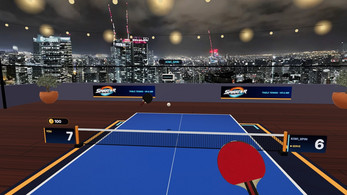
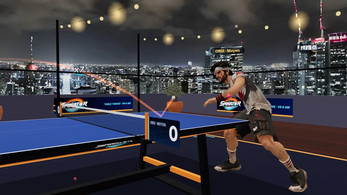
The presentation leans on two settings: a living room table through mixed reality and a rooftop at night facing the city in VR. Meta Quest 3 and Quest 3S are built for colour mixed reality, which suits the living-room table. Pico 4 support is experimental, so that headset path should be treated as a test rather than the main route.
The ball carries a coloured trail: orange for topspin, blue for backspin, and purple for sidespin. Those colours make the Magnus effect readable during a rally. Hand tracking supports a bare-hand style, with the paddle sitting in a closed fist and the free hand serving by short press or pinch. Controllers remain an option. The game supports English and French.
The game launches from a browser, and live matches can be watched on a computer or phone. The game is made by Immergence Studio. The supported headsets set the practical expectation for the launch route.
Who should play it
SPINATOR suits players who already have a Meta Quest 3 or Quest 3S and want a sports game that uses the headset's mixed-reality colour view. Table tennis fans get a full-size table, spin physics based on the Magnus effect, and a clear colour code for topspin, backspin, and sidespin. Players who prefer solo structure can work through eight AI styles, three knockout cups in The Circuit, and drone drills with ball-by-ball, rally, and target modes.
Competitive players have six ranking divisions from Bronze to Champion, plus World, Country, and Week boards. Social players can use public rooms, a private room with a 4-digit code, invite links, voice chat, live spectators, one-press rematches, and report or block tools. The game is free and needs no account. A computer or phone is enough to watch live matches, but not to play. Pico 4 owners can try the experimental support, though Meta Quest 3 and 3S are the clearest fit.
Screenshots
How we tested it
The build was loaded from games.debutplay.com in a headless Chromium session on ; the canvas started and no request was blocked. The guide was last checked on .
From the developer
How to play: open this page in the browser of your Meta Quest (or Pico), press Run game, then Play in VR or Play in MR. On a computer or a phone you can watch live matches, but you need a VR headset to play. Table tennis in VR and mixed reality SPINATOR puts a full-size table tennis table in your living room (mixed reality) or on a rooftop at night facing the city (VR). Free, no account needed. Play online, 1 vs 1 Quick match: the server finds you an opponent. While you wait, you rally against an AI player, and the online match starts as soon as someone joins.Public rooms, a private room with a 4-digit code, or an invite link for your friends.Voice chat, live spectators, rematch in one press, report or block a player at any time.Online matches count for the world ranking: 6 divisions from Bronze to Champion, World, Country and Week boards. Play solo 8 AI players, each with their own style (attacker, chopper, wall, showman...), always…
Frequently asked questions
Is SPINATOR free to play?
Yes. The game is free and requires no account or email.
What headset is needed to play?
A VR headset is required. Meta Quest 3 and Quest 3S are the intended fit; Pico 4 support is experimental. A computer or phone can watch live matches but cannot play them.
Can a phone be used to play?
No. A phone can be used to watch live matches, but play requires a VR headset.
Does SPINATOR require an account?
No account and no email are needed. A nickname is generated at random and can be changed.
How does ranked play work?
Online matches count toward a world ranking with six divisions from Bronze to Champion, plus World, Country, and Week boards.
Is voice chat recorded?
Voice chat runs directly between the two players and is never recorded.
What games are similar to SPINATOR?
The closest matches on DebutPlay are Skate U, BOARDBLAST, Jumping Ball. They share the same genre, so the controls and the pace carry over.
Something wrong or missing? Tell us. How we test games.