Simulation · New game
3D Printer Constructor
A hands-on launch guide to building, calibrating, and diagnosing four printer designs in a free simulation with orders, repairs, and a print farm.
#28 this weekAI-assisted: Code, Text
The game runs in this tab. No install, no account.
The short answer
3D Printer Constructor is a free simulation about assembling a printer, wiring it, calibrating it, and reading the defects that appear in each print. Play it in a browser or download it for Windows or Linux, then take on orders, repairs, and a print farm while learning why belts, frames, nozzles, and firmware settings change the result.
What is 3D Printer Constructor?
3D Printer Constructor is a free simulation and educational game about the hardware behind a print. The task is not merely to choose a model and hit start; it is to select a frame, motors, belts, hotend, and board, then assemble the machine with screws of the right length, tension the belts, route every wire to its port, level the bed, and pass a self-test. Once printing begins, the build follows the model: a slack belt can produce layer shifts, a wobbly frame can leave ripples after corners, a nozzle set too low can create elephant's foot, and a Bowden extruder can bring stringing. Each finished print is diagnosed, with defects named and traced to the part responsible. That loop makes it a practical way to learn printer behavior rather than a pure factory game. It runs in a browser and is also available for Windows and Linux. A tutorial covers the first printer, and a handbook collects defects for reference.
How to play
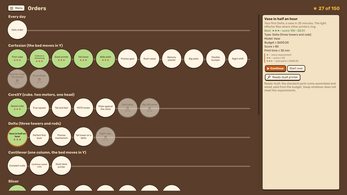
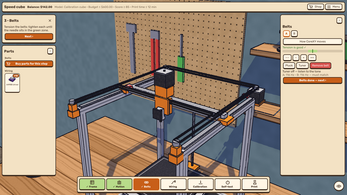
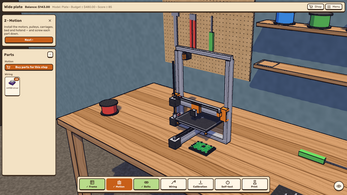
Play begins with assembly. Choose a printer architecture and its major components, then complete the physical build: install the frame, fit motors, belts, hotend, and control board, use the correct screw lengths, set belt tension, connect wiring to matching ports, level the bed, and run the self-test. Printing is where diagnosis starts. Each finished print can reveal a fault, and the game names the defect and identifies the part to blame. The wider loop adds client work: 50 orders carry budgets and requirements such as quiet operation, speed, precision, strength, and the right plastic, with a fresh order each day. Repairs ask you to inspect a test print, locate a fault, and fix it. A service career lets you bring broken printers into bays, earn pay and experience, improve skills, buy a power driver, and restore flea-market machines for resale. The workshop layer adds several printers, a job queue, deadlines, wearing parts, and reputation.
Controls
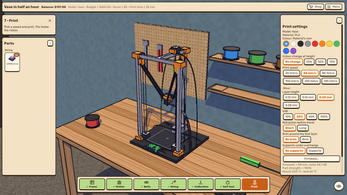
The interaction is a build-and-adjust loop rather than an action sequence. You choose the frame, motors, belts, hotend, and board; drive screws of the correct length; tension belts; plug wires into their ports; level the bed; and run the self-test. In the slicer, you set layer height, infill, retraction, supports, orientation, and a brim. In firmware, you work with e-steps, PID autotune, acceleration, and Linear Advance. The workshop adds management actions: queue jobs, watch deadlines, track wearing parts, and protect reputation across several printers. Repair work starts from a test print, then moves to the faulty part. The game can be played in the browser frame, and Windows and Linux downloads are available. The free mode opens the same toolset without limits and supports printing your own STL models.
The game page does not list its controls. Check the in-game tutorial or pause menu for the current scheme.
Tips for your first run
Start with the tutorial for the first printer, then keep the defect handbook nearby. The fastest way to improve is to treat every bad print as evidence and use the handbook to connect the symptom to a part. Run the self-test before chasing subtle print issues. Orders add budgets and requirements, so read the brief before choosing parts or slicer settings; every slicer choice has a cost. In repair work, use the test print to narrow the fault before replacing anything. When a client job includes a material demand, check the hotend, extruder, and enclosure against that plastic rather than assuming a general-purpose setup.
- Complete the tutorial before taking on client work.
- Use the defect handbook to name a symptom before changing parts.
- Run the self-test and confirm belt tension and bed level.
- Read order budgets, strength or quiet requirements, and plastic demands.
- In repairs, begin with the test print and isolate the fault.
- Treat slicer settings as trade-offs rather than free improvements.
Content and replayability
Replay value comes from the range of machines and the pressure of client work. Four architectures change the build and the failure modes: Cartesian, a classic bed-slinger; CoreXY, where two motors move one head; Delta, with three towers and matched arm lengths; and Cantilever, a single-column design that can ring. Dozens of parts differ in rigidity, backlash, torque, noise, melt rate, and lifespan, while upgrades address the bed surface, driver noise, input shaping through an accelerometer, damping, and an enclosure. Four plastics, PLA, PETG, ABS, and TPU, place different demands on the hotend, extruder, and enclosure. The slicer controls layer thickness, infill density, retraction behavior, support generation, model orientation, and a brim, each with a price. Firmware tuning includes e-steps, automatic PID calibration, acceleration, and Linear Advance. A print farm introduces several printers, a job queue, deadlines, wearing parts, and reputation. The free mode removes limits and accepts your own STL models. Fifty orders, a daily order, and a service career keep the workshop busy.
Presentation and performance
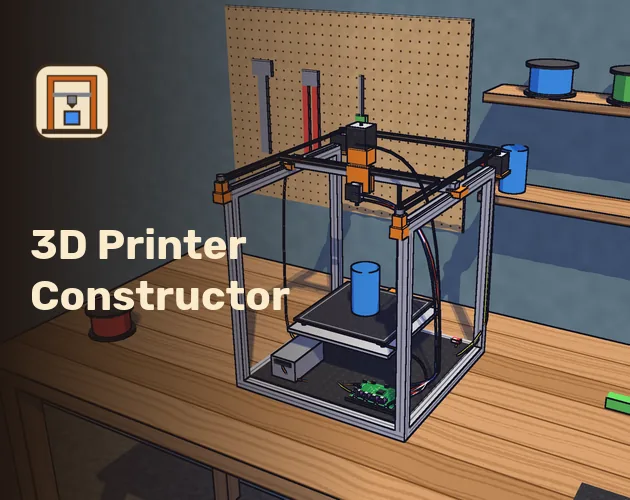
3D Printer Constructor uses a stylized 3D look for its workshop and printer builds. The music and sounds are synthesized within the game rather than supplied as external tracks, which fits the self-contained design. No internet connection is needed to play. The game runs in a browser frame and is also available for Windows and Linux. The launch date is 28 October 2026. On-screen text is localized in English, Ukrainian, German, Spanish, French, Italian, Polish, and Brazilian Portuguese. The subject is technical, but the presentation is built around readable cause and effect: a defect is named, then a part is identified as the culprit. That makes the visual language practical as well as decorative. The workshop view also has to communicate orders, deadlines, wearing parts, and reputation across a print farm, so clarity matters more than spectacle. Four screenshots and a playable browser build give a direct look at the game.
Who should play it
This game suits players who enjoy taking a machine apart in their head. The appeal is in matching a symptom to a part, then changing the build or a setting and seeing the result: belt tension, frame rigidity, nozzle height, extruder type, slicer choices, and firmware values all feed into the print. It also fits players who like workshop management: 50 orders with budgets and requirements, a daily order, repair bays, a skills path, flea-market restorations, and a print farm with deadlines, wearing parts, and reputation. The educational angle is strong because each defect is named and tied to a culprit. A player who wants a calm, systems-heavy sandbox with a free mode and support for personal STL models has plenty to inspect. The game is free, runs in a browser, and has Windows and Linux downloads. It also works without an internet connection.
Screenshots
How we tested it
The build was loaded from games.debutplay.com in a headless Chromium session on ; the canvas started and no request was blocked. The guide was last checked on .
From the developer
Build it. Wire it. Print it. Build your own 3D printer from scratch, and find out why your prints come out the way they do. Pick the frame, motors, belts, hotend and board, drive in screws of the right length, tension the belts, plug every wire into its port, level the bed and run the self-test. Then print, and watch every choice show up in the model: layer shifts from a slack belt, ripples after corners from a wobbly frame, elephant's foot from a nozzle set too low, stringing from a Bowden extruder. After each print the game names every defect and points at the part to blame — you learn to diagnose a printer like a pro. ▶ Free, right here in the browser Press Run game above to play the whole game in your browser, or download it for Windows or Linux. It's free; if you enjoy it, a donation helps the game grow. Four kinds of printer Cartesian — the classic bed-slinger, where it all starts CoreXY — two motors moving one head; see how the…
Frequently asked questions
Is 3D Printer Constructor free?
Yes. It is free to play in the browser, and free downloads are available for Windows and Linux. An optional donation supports the game's growth.
Which platforms can run the game?
It runs as an HTML5 browser game and has downloads for Windows and Linux.
Does the game require an internet connection?
No internet connection is needed. Music and sounds are synthesized within the game.
Can players print their own STL models?
Yes, in the free mode with no limits. That mode also removes the constraints of the structured workshop.
How many orders are available?
There are 50 orders with budgets and requirements, plus a new order every day.
What printer designs are included?
Four designs are included: Cartesian, CoreXY, Delta, and Cantilever. Each changes the build and the way the printer behaves.
What games are similar to 3D Printer Constructor?
The closest matches on DebutPlay are Voxelium: Block Crafting 3D, Salim's Stall, Bloodline: Vampire Dynasty. They share the same genre, so the controls and the pace carry over.
Something wrong or missing? Tell us. How we test games.