Educational · New game
Galileo Base: Forces & Motion in 3D
A calm first-person physics workshop where every level opens with a short animated lesson before you walk into the lab and run the experiment yourself.
#21 this weekAI-assisted: Code, Graphics, Sound
The game runs in this tab. No install, no account.
The short answer
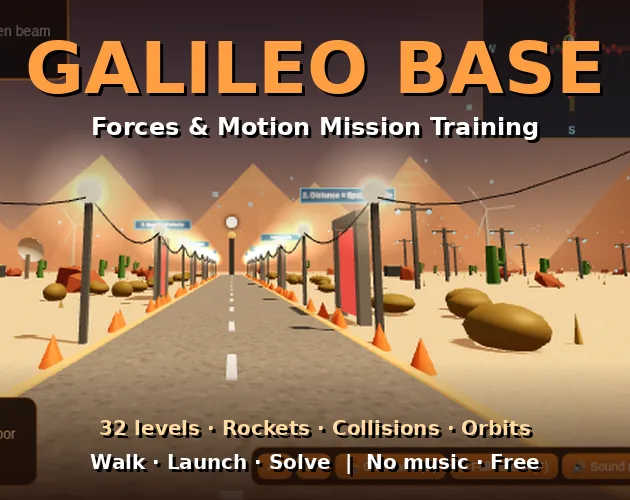
Galileo Base is a free 3D browser game that teaches forces and motion through hands-on experiments on a desert launch base. Thirty-two levels across four missions cover speed, Newton's laws, momentum and orbits, each starting with a short animated lesson and ending with a live graph.
What is Galileo Base?
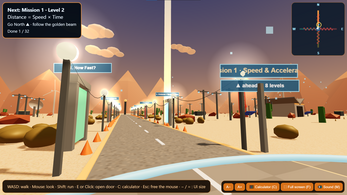
Galileo Base is a first-person 3D training game set on a desert launch base. Players are addressed as cadets and move between the open base and a laboratory where the experiments happen. The mood is deliberately calm: no music plays, ambient sound fills the space, and teaching arrives a few words at a time instead of in a wall of text.
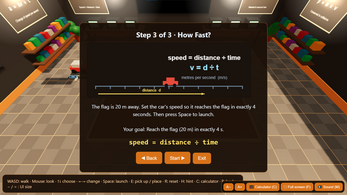
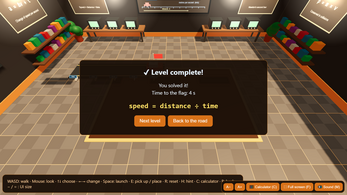
The structure is four missions of eight levels each, thirty-two in total. A mission opens only when the previous one is finished, so the material builds in a fixed order from basic motion up to orbital ideas. Every level starts with a short animated lesson and then hands control to the lab, where settings can be changed and the experiment watched as it runs. Live graphs record what the experiment does.
It runs as an HTML5 build inside a browser and costs nothing to play, so the first lesson on the base is available immediately to anyone with a keyboard and mouse.
How to play
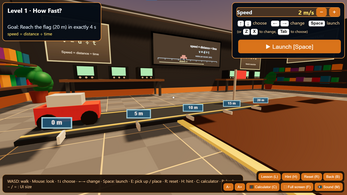
Every level follows the same loop. A short animated lesson introduces the idea a few words at a time, then the player walks into the lab. Inside, the experiment has adjustable settings: the up and down keys choose which setting to work on, and left and right change its value. Space launches the run, and the result plays out in the lab while a live graph traces it.
Hints are tiered. Asking once gives a light nudge, and each further request sharpens the help until the full solution is revealed, so a level can be solved without blind guessing but not without thinking. R resets the setup for another attempt from the same starting point.
The experiments themselves are physical: rockets launched at any angle, balls dropped, cars crash-tested, seesaws balanced. Progress is gated by mission, so the second set of eight levels stays closed until the first is complete.
Controls
Movement uses the standard first-person arrangement. W, A, S and D walk, and the mouse looks around. A single click on the game captures the pointer so looking works smoothly, and Esc releases it again when the pointer is needed elsewhere.
Lab settings are chosen with the up and down arrows, while left and right, or alternatively Z and X, change the highlighted value. Space launches the experiment and R resets it. E, or a click, picks up and places objects inside the lab.
The remaining keys are all reference tools. H brings up a hint, L replays the lesson, C opens the calculator and physics formula helper, and F toggles full screen. Interface size is adjusted with the A+ and A− buttons, and the = key also enlarges the text.
| Input | Action |
|---|---|
| W, A, S, D | Walk around the base and the lab |
| Mouse | Look around; click once to capture the pointer, Esc releases it |
| Up / Down | Choose which experiment setting to adjust |
| Left / Right or Z / X | Change the value of the selected setting |
| Space | Launch the experiment |
| R | Reset the experiment |
| E or Click | Pick up and place objects |
| H | Request a hint |
| L | Replay the lesson |
| C | Open the calculator and physics formula helper |
| F | Toggle full screen |
| A+ / A− buttons (or = key) | Adjust interface text size |
Tips for your first run
The opening minutes are mostly about getting the loop into muscle memory: lesson, lab, settings, launch. A few habits make the early missions smoother and keep the harder ones from turning into guesswork.
- Start on a desktop browser such as Chrome or Edge, then press F for full screen so the lab and its graphs have room.
- Click the game once to capture the mouse before walking, and remember that Esc hands the pointer back.
- Move between settings with the up and down arrows and change values with left and right, or Z and X, rather than hunting for other keys.
- Ask for a hint at the first sign of confusion; the opening nudge is small and stronger help only arrives when requested.
- Press L to replay the animated lesson whenever a level's goal stops making sense.
- Raise the interface size with A+ or the = key if the lesson text is hard to read on a laptop screen.
- Reset with R between attempts so each experiment starts from the same baseline.
Content and replayability
The material is split into four themed missions. The opening set is about describing motion: how speed relates to distance and time, what velocity and acceleration mean, how to read motion graphs, and how far a vehicle travels while braking.
The second mission turns to forces: separating weight from mass, free fall, resultant force, Newton's laws, friction, terminal velocity, and the total stopping distance of a moving object.
Momentum and projectiles dominate the third: collisions and recoil, crash tests in the lab, the angle a rocket is launched at, thrust, and the paths projectiles follow after launch.
The final mission moves to rotation and gravity: turning moments, Hooke's law, circular orbits, orbital period, and the Solar System at large. Thirty-two levels carry that arc, each with an animated lesson, a live graph and a lab setup to adjust, while the built-in calculator and formula helper stay available for working through the numbers behind a result.
Presentation and performance
Galileo Base is built as a first-person 3D world rather than a diagram. The base sits in a desert, the lab is a separate room to walk into, and experiments play out in that space with live graphs alongside, so a rocket arc or a braking run is something watched rather than read about.
The audio choice is noticeable: no music at all, just calm ambient sound, which keeps attention on the lesson text and on the experiment itself. Lessons are animated and delivered in short bursts rather than as dense screens of explanation.
The interface scales with A+ and A− buttons, and the = key enlarges text as well, which matters on smaller laptop screens. Full screen gives the lab and its graphs more room. A desktop browser such as Chrome or Edge is the environment the game is built for.
Who should play it
This is aimed squarely at students meeting forces and motion for the first time, particularly those working through the Edexcel International GCSE Physics topics the game is based on. The cadet framing and the one-lesson-at-a-time delivery suit players who want the idea explained before the experiment, not after it.
It also fits anyone who prefers learning by adjusting a variable and watching the consequence: launching a rocket at a new angle, dropping a ball, or loading a seesaw until it balances. The calm presentation and the absence of music make it easy to use in a shared or quiet room.
A keyboard and mouse carry the whole interface, so a desktop browser is the natural home. Anyone revising the forces and motion syllabus alongside taught lessons will get the most out of the thirty-two levels.
Screenshots
How we tested it
The build was loaded from games.debutplay.com in a headless Chromium session on ; the canvas started and no request was blocked. The guide was last checked on .
From the developer
Welcome to Galileo Base, cadet! Galileo Base is a calm 3D training game that teaches forces and motion step by step. Walk around a desert launch base, enter the lab, and learn by doing: launch rockets at any angle, drop balls, crash-test cars and balance seesaws. How it works Four missions, eight levels each. A mission unlocks when you finish the one before it. Every level starts with a short animated lesson, a few words at a time. Then you walk into the lab, change the settings, and watch the experiment run. Hints get stronger each time you ask, up to the full solution. What you will learn Mission 1: speed, distance and time, velocity, acceleration, graphs, braking distance Mission 2: weight and mass, free fall, resultant force, Newton's laws, friction, terminal velocity, stopping distance Mission 3: momentum, collisions, recoil, crash tests, rocket launch angle, rocket thrust, projectiles Mission 4: turning moments, Hooke's law,…
Frequently asked questions
Is Galileo Base free to play?
Yes. It runs in a browser at no cost, so nothing stands between a new cadet and the first animated lesson on the desert launch base.
How many levels are there?
Thirty-two, arranged as four missions of eight levels each. Every level opens with its own animated lesson and then hands over to a lab experiment with a live graph.
Do missions have to be played in order?
Yes. A mission stays locked until the previous one is finished, which keeps the topics in a set sequence from basic motion through forces and momentum to orbits.
What happens when a level feels too hard?
The hint system escalates. A first request gives a small nudge, and repeated requests bring stronger guidance until the complete solution is available, with R on hand to reset the experiment.
Is there music?
No. The sound design is limited to calm ambient audio, which suits the slow, lesson-by-lesson pace of the training base and keeps focus on the experiments.
Can it be played on a phone or tablet?
The controls are keyboard and mouse, and full screen on a desktop browser such as Chrome or Edge is the suggested setup for the clearest view of the lab.
What games are similar to Galileo Base: Forces & Motion in 3D?
The closest matches on DebutPlay are Spark Lab: Circuit City, Comando Exato, A Well-Run Exercise / Eine gut gelungene Alarmprobe. They share the same genre, so the controls and the pace carry over.
Something wrong or missing? Tell us. How we test games.