Educational · New game
Spark Lab: Circuit City
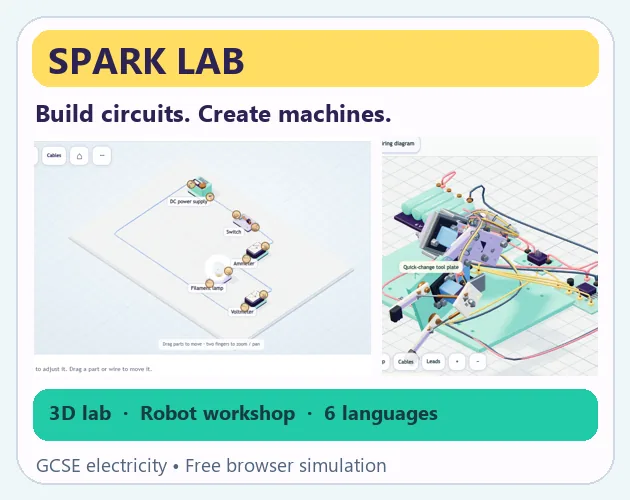
A free browser workshop where circuits, cable routing and a step-by-step robot arm build turn voltage, resistance and wiring into something you can poke at directly.
#11 this weekAI-assisted: Code, Graphics, Text
The game runs in this tab. No install, no account.
The short answer
Spark Lab: Circuit City is a free 3D workshop for building low-voltage circuits and simple machines in a browser, with mouse and touch input. Start with a guided first circuit, work through 24 repair challenges, then assemble a robot arm across 39 guided steps. It runs locally with no account, ads or purchases.
What is Spark Lab: Circuit City?
Spark Lab: Circuit City is a browser-based electricity and machine workshop built on one shared component system spread across two workspaces. One handles low-voltage circuits, the other handles mechanical builds. The parts library runs to 104 modelled pieces, divided into 64 electrical types, four physical cable accessories and 36 mechanical types.
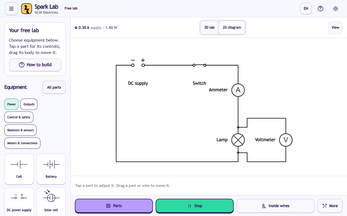
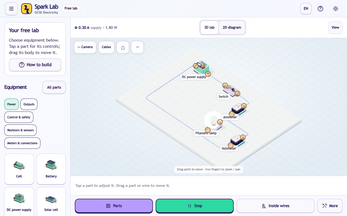
The electrical side covers cells, batteries and bench supplies alongside switches, lamps, meters, resistors, sensors, diodes, transistors, relays, capacitors, inductors, and protection and distribution gear. Work happens in 3D first: orbit, pan and zoom around the apparatus, then switch to a 2D circuit diagram that can be edited directly. The GCSE material uses UK symbol conventions, while advanced electronics lean on labelled symbols or functional blocks.
Seventeen ready-built circuits are included, among them series and parallel measurements, a potential divider, capacitor charging, relay control and RGB LEDs. A separate wire microscope breaks the inside of a conductor into four short stages, separating positive metal ions from free electrons, tracking net electron drift, showing scattering and linking energy transfer to heating. Particle scales and speeds are deliberately exaggerated for clarity.
How to play
Start with the built-in first-circuit walkthrough, then move into the free lab. There, open the Parts panel, tap the bench to place equipment, and tap two terminals to join them. Dragging a component body repositions it. Crossings only connect at a shared terminal or junction, so a busy layout will not silently short itself. Press Run to power the circuit, and select a wire or open Cables to inspect and organise it.
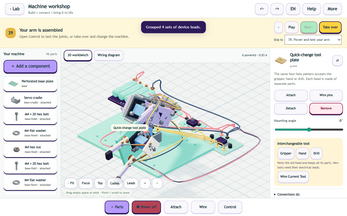
The machine workshop trades placement for assembly: pick a part, then use Attach, Wire or Control, with the arm guide explaining each step. The robot arm is the structured route, taking 39 steps to assemble a base, shoulder, elbow and gripper from 96 separate parts and 16 leads. Compatible connectors snap, threaded hex fasteners fit, and power and servo controls get wired. Steps can be reversed, skipped or taken over partway through.
Around those two poles sit 24 repair challenges and the GCSE physics strand. Investigation notebooks hold model readings and graphs, with CSV export for write-ups. Everything runs from a single component vocabulary, so a cable habit learned in one workshop carries into the other.
Controls
In the 3D view, dragging empty space orbits the camera, while scrolling or pinching zooms in and out. Camera controls refit the scene or swing it to a top-down view. Placing and wiring are tap-driven on both mouse and touch, so the same gestures work on a tablet as on a desktop.
The 2D diagram is keyboard-driven once a part is selected: arrow keys move it, R rotates it, Delete removes it. Space toggles circuit power, Ctrl or Cmd with Z undoes the last change, and Escape closes a panel or pauses. In the machine workshop the flow is select a part, then choose Attach, Wire or Control.
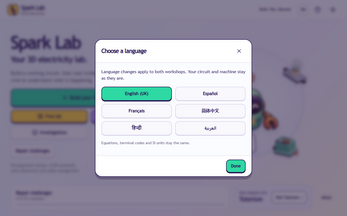
Language switching lives in a button inside either workshop or in Settings, and changing language preserves your circuit and machine. Arabic switches the layout to right-to-left. Equipment search works with translated names, and the language packs are bundled for offline use.
| Input | Action |
|---|---|
| Mouse drag on empty space | Orbit the 3D view |
| Scroll wheel | Zoom the 3D view |
| Pinch | Zoom on touch screens |
| Tap or click | Place a part or join two terminals |
| Drag on a component body | Reposition the component |
| Arrow keys | Move the selected part in the 2D diagram |
| R | Rotate the selected part in the 2D diagram |
| Delete | Remove the selected part |
| Space | Toggle circuit power |
| Ctrl or Cmd + Z | Undo the last change |
| Escape | Close a panel or pause |
Tips for your first run
The first hour goes best if you resist building something ambitious. Run the guided circuit, open one or two of the ready-built examples, and only then start placing parts of your own. Reading someone else's wiring first makes the terminal rule obvious: a crossing is not a connection unless a terminal or junction is shared.
Cable work deserves early attention, because a tidy loom is far easier to debug than a nest of leads. The wire microscope rewards a visit too, since it explains what the resistance value is actually doing before you start changing material, temperature, length or cross-section and comparing readings.
For the robot arm, lean on the guide rather than fighting it: reverse a step when a connector refuses to seat, skip ahead when a subassembly is already clear, and take over manually once the sequence feels predictable.
- Run the guided first circuit before the free lab
- Open a preset before building from scratch
- Treat every crossing as unconnected until a junction exists
- Name and recolour leads before a circuit gets busy
- Check the wire microscope before editing wire properties
- Use skip and reverse freely in the 39-step arm guide
Content and replayability
The headline count is 24 repair challenges, each a fault to track down rather than a blank canvas. Those sit alongside 17 ready-built circuits and the GCSE strand, which is enough material to fill several sessions before free building even starts. The wire microscope adds four stages of theory that can be paused or stepped through frame by frame.
The robot arm supplies the longest single project at 39 steps, but it is not a dead end. The same kit can be reused in free construction, with gears and linkages attached, and the gripper swapped for a hand or a drill tool. That turns a fixed tutorial into a parts bin for further builds.
Cable management is effectively its own sandbox: routes can be tidied, conductors traced individually, related leads bundled into looms, guide points dragged, and clips, trays, ties and strain relief added. Each lead keeps its own electrical connection, and drawing a route only alters resistance when a measured wire length is explicitly applied. Circuit and machine files can be imported and exported, and local saves cover work in progress.
Presentation and performance
Visually the workshop splits between an orbitable 3D bench and a flat editable diagram, with the microscope sequences staged as short schematic animations. Motion, text size and vibration are adjustable, there is a battery saver, and music and sound effects have independent volume controls with a mute option. The supplied background track is Bubbly Groove.
The build is version 5.1.0, created for Steven Ross and Tutorium, with AI-assisted graphics, code, learning text and translations. Six interface languages are bundled: English (UK), Spanish, French, Simplified Chinese, Hindi and Arabic. Translations are machine-assisted with technical terminology corrections and have not had a full native-speaker review.
Because the downloadable HTML runs offline in a current WebGL browser and nothing is fetched from a runtime CDN, a weak connection is not a blocker. Layouts were checked using phone emulation, so performance on a physical handset and learner comprehension are open questions rather than verified results.
Who should play it
The clearest audience is a learner working through GCSE physics who wants to see readings respond to a change instead of copying them from a textbook. The 24 repair challenges and the four-stage wire microscope are aimed squarely at that, and the CSV export suits anyone keeping a lab write-up.
It also lands with tinkerers who enjoy the unglamorous half of electronics: routing cables, tracing a single conductor, bundling looms and labelling leads. And it suits builders who want a guided mechanical project with an escape hatch into free construction, since the arm kit can be rebuilt with gears, linkages and a swapped tool head.
Two cautions belong here. The electronics are teaching approximations with simplified semiconductor and storage models, and the machines use kinematic motion, so weight, torque, contact, cutting and grip force are not simulated. Virtual readings do not replace supervised practical work. Anyone wanting a game with scores or pressure will not find it.
Screenshots
How we tested it
The build was loaded from games.debutplay.com in a headless Chromium session on ; the canvas started and no request was blocked. The guide was last checked on .
From the developer
Build circuits. Look inside a wire. Create a working robot arm. Spark Lab is a free 3D electricity and machine workshop for phones, tablets and desktop browsers. Start with a guided circuit, solve 24 repair challenges, investigate GCSE physics, or build your own low-voltage circuits and mechanisms. Two workshops, one component system 104 original Blender component models: 64 electrical types, four physical cable accessories and 36 mechanical types. Cells, batteries, bench supplies, switches, lamps, meters, resistors, sensors, diodes, transistors, relays, capacitors, inductors, protection and distribution equipment. Orbit, pan and zoom around the 3D apparatus, then switch to an editable 2D circuit diagram. The GCSE core uses UK symbol conventions; advanced electronics use labelled symbols or functional blocks. Try 17 ready-built circuits, including series/parallel measurements, a potential divider, capacitor charging, relay control and…
Frequently asked questions
Is Spark Lab: Circuit City free to play?
Yes. It is free, and there is no account to create, no ads, no in-game purchases and no analytics running in the background.
What devices can run it?
It runs as HTML5 in a current WebGL browser on phones, tablets and desktop, with mouse and touch both supported.
How much content is included?
There are 24 repair challenges, 17 ready-built circuits, a four-stage wire microscope and a 39-step robot arm build assembled from 96 parts and 16 leads.
Can it be played offline?
Yes. The downloadable HTML works offline in a current WebGL browser, with language packs bundled locally and progress kept in local saves. Circuits and machines can also be imported and exported.
Are the physics readings exact?
No. The electronics are teaching approximations, including simplified semiconductor and storage models, and the microscope exaggerates particle scales and speeds. Machines use kinematic motion, so forces such as torque and grip are not simulated.
Which languages are available?
Six: English (UK), Spanish, French, Simplified Chinese, Hindi and Arabic, with right-to-left layout support for Arabic. Switching languages keeps your circuit and machine intact.
What games are similar to Spark Lab: Circuit City?
The closest matches on DebutPlay are Galileo Base: Forces & Motion in 3D, Comando Exato, A Well-Run Exercise / Eine gut gelungene Alarmprobe. They share the same genre, so the controls and the pace carry over.
Something wrong or missing? Tell us. How we test games.