Puzzle · New game
SubnetShuffle
A free browser puzzle demo about rotating cables, lighting an office network, and learning why an office cat should never meet Cat6.
#38 this weekAI-assisted: Code, Graphics, Text
The game runs in this tab. No install, no account.
The short answer
SubnetShuffle is a free HTML5 puzzle demo set at Corrugated Ambitions Ltd, where new network engineers rotate cable tiles, connect desks and cameras, and learn lightly simplified networking across eight Day One levels. Three difficulties, star ratings, a salary and hint economy, plus a cat named Sal, give the first chapter a playful office-comedy hook. The free Day One demo is playable now.
What is SubnetShuffle?
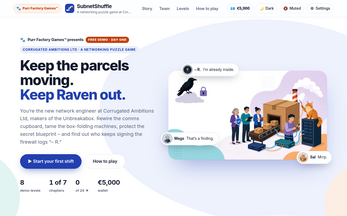
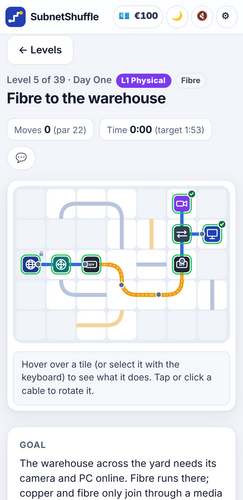
SubnetShuffle is a free browser puzzle demo from Purr Factory Games, set inside the fictional Corrugated Ambitions Ltd, a company that makes the Unbreakabox. You join as the new network engineer after the last engineer departed on Friday with the paperwork. What remains is a comms cupboard of tangled cabling and an office cat that likes to chew Cat6. The immediate job is to rotate cable tiles, light up the network, and bring each desk station, laptop and camera online before colleagues notice. The demo covers all of Chapter 1, called Day One, which focuses on OSI Layer 1, Physical. It contains eight levels, including a disconnected reception, a boardroom Wi-Fi job, a 140-metre cable problem, fibre to the warehouse, a cat-related incident, Power over Ethernet, and Coffee o'clock. A second thread asks who keeps signing the firewall logs as R. The project is in development, and this free demo is the Day One slice.
How to play
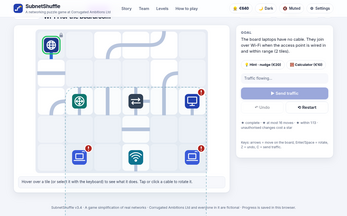
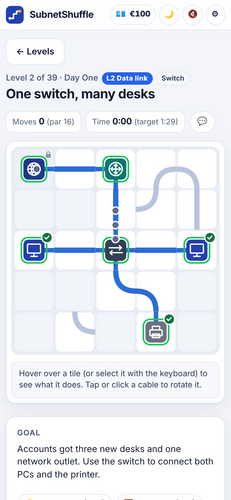
The core loop is tile rotation. Click a cable tile to turn it 90 degrees; padlocked tiles cannot be moved. The goal is to link every device and then use Send traffic. The test plan sets out the traffic paths that have to pass, with attack checks added later. Each level ends with a What you learned screen, so the puzzle is tied to a specific networking idea rather than abstract pipe matching. The eight Day One levels use Cat6 copper and its 100-metre limit, fibre, switches, Wi-Fi range and channels, and PoE. Three difficulties change the challenge: Apprentice, Engineer and Architect. Every level carries three stars: completion earns one, efficiency in move count earns another, and speed earns the third; unauthorised cowboy changes cost a star. A wallet and salary support hints, and on Normal the subnet calculator costs €10 per use. The demo is single-player and runs in a browser.
Controls
The controls use click and keyboard input. Clicking a tile rotates it 90 degrees; padlocked tiles stay put, so the route has to work around them. The keyboard scheme covers movement and the main actions: the arrow keys handle movement, Enter or Space turns the current tile, Tab jumps to the panels, Z reverses the last step, and C submits the traffic. The Send traffic command is the test step, not an automatic result of laying every cable. A sensible rhythm is to rotate a tile, check the test plan, adjust the route, then send traffic. The panel shortcuts matter because the test plan and wallet sit outside the board. Undo is useful after a mistaken rotation, while the padlock rule means some tiles are fixed obstacles rather than optional links. The whole scheme is built for a browser session with a mouse or keyboard.
| Input | Action |
|---|---|
| Mouse | Click a tile to rotate it 90 degrees; padlocked tiles stay put. |
| Arrow keys | Move. |
| Enter or Space | Rotate the selected tile. |
| Tab | Reach the panels. |
| Z | Undo. |
| C | Send traffic. |
Tips for your first run
Start by reading the test plan before rotating anything. The board is not just a picture of a network; it is a set of required flows, and later levels add attacks that must fail. The three-star structure rewards finishing, few moves, and speed, so a clean route planned before the first click is better than a fast scramble. Padlocked tiles are fixed, which makes them landmarks: build around them instead of hunting for a way to turn them. If a route collapses, use undo rather than rebuilding from scratch. Hints draw on the salary wallet, and on Normal the subnet calculator charges €10 each time, so spend carefully. Cowboy changes are unauthorised edits that cost a star, so avoid them when a star is the goal.
- Read the test plan before the first rotation; it defines the flows that must work.
- Treat padlocked tiles as fixed obstacles and plan the route around them.
- Use undo after a bad rotation instead of restarting the level.
- Aim for a low move count first, then repeat for speed; the stars are separate goals.
- Save hints and the €10 subnet calculator for moments when the route is genuinely blocked.
- Avoid cowboy changes if a three-star result matters.
Content and replayability
The demo contains all eight levels of Chapter 1, Day One, which is built around OSI Layer 1, Physical. The level set moves through reception, boardroom Wi-Fi, a 140-metre cable, fibre to the warehouse, a cat incident, Power over Ethernet, and Coffee o'clock. Each finishes with a What you learned summary. The teaching stays close to real networking while simplifying it: copper Cat6 with a 100-metre ceiling, fibre links, switches, Wi-Fi range and channel choices, and PoE all appear. Replay value comes from three difficulties and three stars per level. Apprentice, Engineer and Architect change the pressure, while the stars separate completion from efficiency and speed. The planned full release expands to 39 levels across seven chapters, each tied to an OSI layer, with topics such as routers, firewalls, VLANs, subnetting, rulebases, certificates and an Audit Day finale. A later full release is planned for Steam and the studio's website. This demo covers Day One only. Story scenes can be switched off, which makes a second run cleaner for players who want the puzzles without the office banter.
Presentation and performance
SubnetShuffle runs entirely in the browser as an HTML5 game. There are no advertisements, tracking scripts or cookies, the game does not make network requests, and progress stays on the local device. That local-only save is part of the privacy design. Presentation leans on an office comedy cast: Mags in Security, Derek in Change Management who accepts neither cash nor biscuits, Victoria the CEO who wants everything yesterday, Jay on Helpdesk who tidies things, and Bridget Severin, an Incident Manager who assigns a severity to everything, including the coffee machine. Raven remains the mystery behind the firewall logs. Sal is a ginger Maine Coon the size of a small sofa, the unofficial Head of Cable Testing, mostly by chewing, and the convinced owner of every box in the building. Players can choose a light, dark or system-following theme; sound effects are generated; and story scenes have an off switch. The concrete technical promise is a no-network browser game with local progress.
Who should play it
SubnetShuffle suits puzzle players who like a clear board state and a testable result. The rotate-and-connect loop is easy to read, but the test plan, padlocked tiles, move limit and speed star give it more structure than a simple pipe puzzle. It also fits players who want an office comedy with a networking theme: the cast includes a security lead, a change manager, a CEO, a helpdesk worker, an incident manager and a cat with strong opinions about boxes. Learners get lightly simplified versions of Cat6 limits, fibre, switches, Wi-Fi channels and PoE, with a What you learned screen at the end of each level. Three difficulties let Apprentice players start gently and Architect players push for tighter routes. The demo is single-player and browser-based. Anyone wanting the full 39-level, seven-chapter arc should note that this release covers Day One only.
Screenshots
How we tested it
The build was loaded from games.debutplay.com in a headless Chromium session on ; the canvas started and no request was blocked. The guide was last checked on .
From the developer
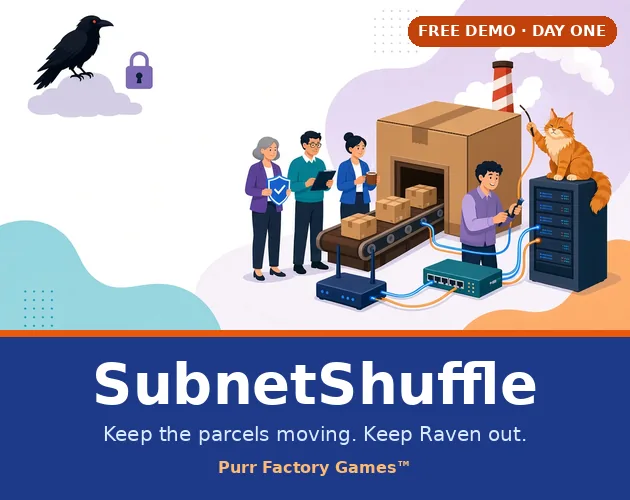
Free Day One demo · by Purr Factory Games™ Keep the parcels moving. Keep Raven out. Welcome to Corrugated Ambitions Ltd (motto: "We think inside the box"), makers of the Unbreakabox. You're the new network engineer. Your predecessor left on Friday and took the documentation with them. All you've got is a comms cupboard full of spaghetti and an office cat with a taste for Cat6. Rotate the cables, light up the network and get every desk, laptop and camera online before anyone notices. Then find out who keeps signing the firewall logs "– R." What's in the demo All of Chapter 1, "Day One" (OSI Layer 1, Physical): 8 levels. These include Reception is offline, Wi-Fi for the boardroom, The 140-metre cable, Fibre to the warehouse, The cat did it, Power over Ethernet and Coffee o'clock.Real networking, lightly simplified. Cat6 copper and its 100-metre limit, fibre, switches, Wi-Fi range and channels, PoE. Every level ends with "What you…
Frequently asked questions
Is SubnetShuffle free to play?
The Day One demo is free. It contains all eight levels of Chapter 1.
What platform does SubnetShuffle run on?
It is an HTML5 browser game. Play happens in the browser.
How many levels are in the demo?
Eight levels make up Chapter 1, Day One. The full game is planned for 39 levels across seven chapters.
What are the difficulty options?
Apprentice, Engineer and Architect. Each level also has three stars for completion, few moves and speed.
How do stars work?
One star is for finishing, one for few moves, one for speed. Unauthorised cowboy changes cost a star.
Does SubnetShuffle save progress?
Progress saves only on the player's own device. The game makes no network requests and uses no ads, trackers or cookies.
What games are similar to SubnetShuffle?
The closest matches on DebutPlay are Boo Order, //TODO: Save the Dev, Holy Shift: Drunken Exorcist Simulator. They share the same genre, so the controls and the pace carry over.
Something wrong or missing? Tell us. How we test games.