Puzzle · New game
Jigmap
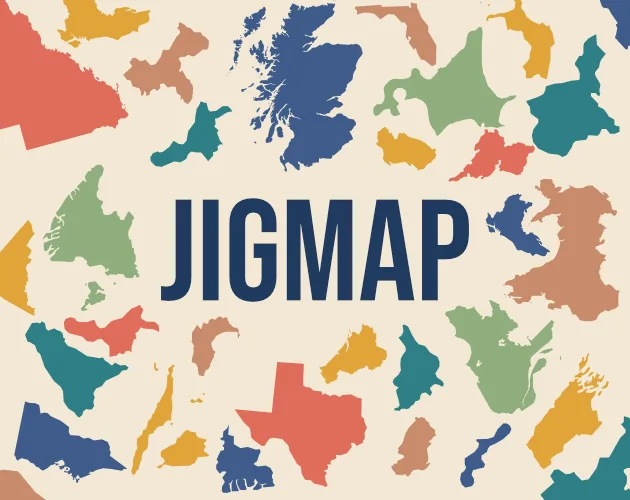
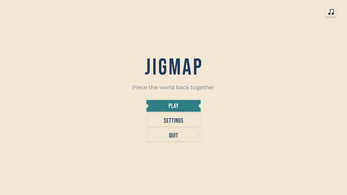
Aumarka's Jigmap turns real country maps into region-piece puzzles, letting players work slowly or chase speed and accuracy goals.
#30 this week
The game runs in this tab. No install, no account.
The short answer
Jigmap is a free relaxing puzzle game from Aumarka. Each puzzle rebuilds a real-life country from pieces shaped as its regions. Players can take their time or challenge themselves to finish quickly with few mistakes. Left click places pieces on pins, right click returns them, and the mouse wheel or plus and minus keys zoom. It runs in HTML5 and on Windows.
What is Jigmap?
Jigmap is a relaxing puzzle game from Aumarka, released on 31 October 2026. Each puzzle uses the map of a real country and turns its regions into the pieces that must be fitted together. The goal is to rebuild the country one region at a time, so the finished board shows how that nation is divided geographically. The game is free and appears in an HTML5 build and a Windows version, with Windows Desktop named as the intended platform. Its pace is flexible: a player can take as long as needed on a map, or treat the same puzzle as a speed challenge and try to finish with the fewest mistakes. That combination gives the game a calm, learn-as-you-go feel while still offering a sharper test for players who want one. The design leans toward a smaller, polished experience, with attention placed on polish, juice, and presentation.
How to play
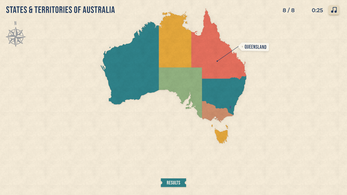
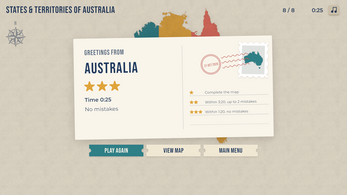
The core loop is simple to read on screen. A country map is broken into region-shaped pieces, and the player rebuilds it by picking up a piece with the left mouse button and placing it on a pin. A held piece can be sent back with the right mouse button, and the Esc key can also return it or open a pause state. Once the map is complete, the same country can be approached in a more demanding way: finish as quickly as possible while keeping mistakes low. The challenge comes from matching region shapes and remembering where each piece belongs. The game also supports zooming and panning, which matters when a country has many small regions or when a piece needs precise placement. Players who want a quiet session can ignore the speed pressure and simply assemble the map at their own pace. The relaxed approach and the speed goal use the same country maps, so learning a layout once can pay off on a later attempt.
Controls
Jigmap uses the mouse as its main input, with a few keyboard shortcuts for zoom and pause. Left click does the central action: it picks up a piece, and it places that piece onto a pin. Right click puts the held piece back. The mouse wheel changes zoom, and the plus and minus keys do the same job. When the view is zoomed in, dragging with a mouse button pans across the map. Esc is the safety key: it returns the piece being held or pauses the game. These inputs are worth learning before a first puzzle because the board can become crowded, and a quick return or zoom adjustment prevents small mistakes from turning into a frustrating search. The control set stays compact and relies on direct manipulation of the map, so a player can correct a placement without leaving the map view.
| Input | Action |
|---|---|
| Left click | Pick up a puzzle piece and place it on a pin |
| Right click | Return the held piece |
| Mouse wheel or + / - | Zoom in and out |
| Mouse drag | Pan the view when zoomed in |
| Esc | Return the held piece or pause |
Tips for your first run
First-time players should treat the first country as a chance to learn the board rather than a race. The game allows a relaxed pace, so there is no need to chase the speed challenge until the controls feel natural. Zoom is the most useful habit: the mouse wheel or plus and minus keys let a player inspect crowded areas, while dragging pans the view when zoomed in. If a piece is in the wrong place, right click or Esc returns it without forcing a bad fit. Use the pin placement deliberately, and pause with Esc when the map becomes busy.
- Start in a relaxed run and complete one country before trying a speed goal.
- Zoom in with the mouse wheel or plus and minus keys when region shapes are hard to separate.
- Pan by dragging with a mouse button while zoomed in, then place the piece on its pin with left click.
- Return a held piece with right click or Esc instead of leaving it in a doubtful spot.
- Save the fewest-mistakes challenge for a second attempt, once the country's layout is familiar.
Content and replayability
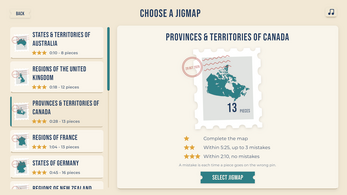
Jigmap's content is built from an assortment of puzzles based on the maps of real countries. The pieces are the regions that make up each country, so every map is both a puzzle and a small geography lesson. The game does not present a single fixed way to play: a player can spend as long as desired on a country or set a faster target and work on accuracy at the same time. That gives each completed map a second use, because a familiar country can be replayed for a quicker time or a cleaner run with fewer mistakes. The game also invites suggestions for additional maps, which fits a project built around country and city regions. Because the puzzle pieces are tied to real geography, the appeal is different from a generic jigsaw: the shape of the country and the arrangement of its regions carry the challenge. A country with many regions will naturally take more sorting than a compact one, but the flexible pace lets the player decide how much pressure to apply. The experience is organized around individual country puzzles.
Presentation and performance
Mark Auman is credited with design, art, and development, and the music comes from HoliznaCC0 and Alex McCulloch. Sound effects are credited to Kenney Assets. The presentation work uses shaders, PrimeTween, and Unity 6.6 UI Toolkit features, with the aim of a polished, juicy, and well-presented smaller game. That focus fits a puzzle title where clear pieces, readable maps, and smooth feedback matter more than a large content stack. The intended platform is Windows Desktop. An HTML5 version is available, but browser players who encounter save issues or other glitches are directed toward the standalone Windows version when possible. The overall package is intentionally compact, with the art and audio credits kept simple and the interface work aimed at feedback rather than spectacle. The release date is 31 October 2026.
Who should play it
Jigmap suits players who want a calm puzzle session with a geographical theme. The pieces are real country regions, so anyone who enjoys maps, borders, and the layout of nations has a clear reason to try it. The flexible pace matters: a player can assemble a country slowly or use the same map for a speed run with few mistakes. It is also a good fit for players who prefer direct mouse controls, since the main actions are left click, right click, zoom, pan, and Esc. The listed platforms are HTML5 and Windows, with Windows Desktop as the intended version; players who hit browser save problems should use the standalone Windows build when possible. The game is free, which makes it easy to sample as a short relaxation break or as a quick accuracy challenge. Players who like learning the lay of the land while solving a puzzle are the clearest audience, and the optional speed goal gives that same group a reason to return.
Screenshots
How we tested it
The build was loaded from games.debutplay.com in a headless Chromium session on ; the canvas started and no request was blocked. The guide was last checked on .
From the developer
Note: The intended platform for Jigmap is Windows Desktop. If you run into save issues or any other glitches while playing the browser-based version of Jigmap, please download the standalone Windows version of the game if possible. WELCOME TO THE JIGMAP GAME PAGE Jigmap is a relaxing puzzle game where you piece the world back together one country at a time. Play through an assortment of puzzles based on the maps of real-life countries, where the puzzle pieces are the regions that make up the country. Spend as much time as you want putting together puzzles or challenge yourself to complete them as quick as possible with the fewest mistakes. Sit back, relax, and learn the lay of the land of the countries that make up our world. Controls Left click: pick up a piece, place it on a pinRight click: put the held piece backMouse wheel or + / -: zoomDrag with a mouse button: pan when zoomed inEsc: put the piece back or pause Credits Design,…
Frequently asked questions
Is Jigmap free?
Yes. Jigmap is free to play.
What are the puzzle pieces?
The pieces represent the regions that make up a real-life country, and the completed puzzle rebuilds that country's map.
How do players place a piece?
Left click picks up a piece and places it on a pin. Right click returns the held piece, and Esc can also return it or pause the game.
Can Jigmap be played at a relaxed pace?
Yes. Players can spend as long as they want on a puzzle, or challenge themselves to finish quickly with the fewest mistakes.
Which platforms are supported?
Jigmap is available in an HTML5 build and a Windows version. Windows Desktop is the intended platform, and browser players with save issues or glitches are directed to the standalone Windows version when possible.
When was Jigmap released?
Jigmap was released on 31 October 2026.
What games are similar to Jigmap?
The closest matches on DebutPlay are Boo Order, SubnetShuffle, //TODO: Save the Dev. They share the same genre, so the controls and the pace carry over.
Something wrong or missing? Tell us. How we test games.