Puzzle · New game
LogiBelt: Sudoku Factory
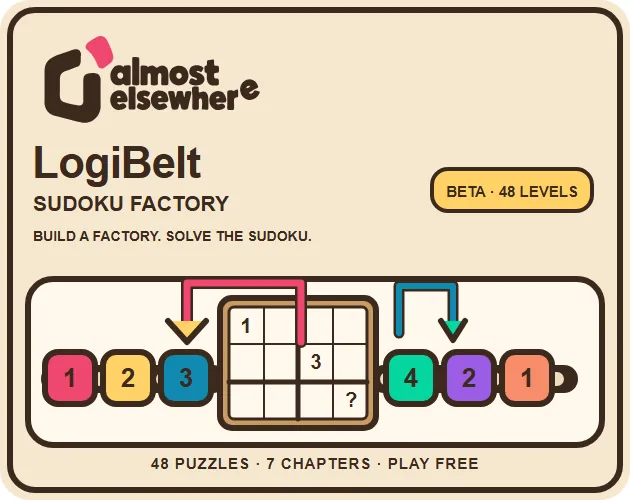
LogiBelt: Sudoku Factory asks players to solve Sudoku logic, then build a little factory of belts, arms, splitters, and tunnels that delivers each correct token to its destination.
#49 this weekAI-assisted: Code, Graphics, Sound, Text
The game runs in this tab. No install, no account.
The short answer
LogiBelt: Sudoku Factory is a browser puzzle game that combines number deduction with factory automation. Solve each grid, then route tokens using belts, filtering arms, splitters, tunnels, telescopic arms, and programmable gantries. It offers 48 curated puzzles across seven chapters, 144 stars, undo, adjustable simulation speed, step-by-step testing, mouse and touch controls, and free access with optional donations.
What is LogiBelt: Sudoku Factory?
LogiBelt: Sudoku Factory is a 2D puzzle game from Almost Elsewhere that brings two normally separate pleasures into one board: Sudoku deduction and factory automation. Each puzzle begins with empty cells that need the correct number, but the answer does not end at the grid. The player must also design a small production line that carries the right token to its destination.
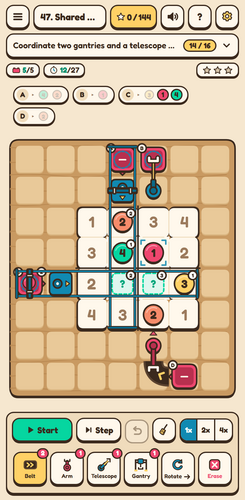
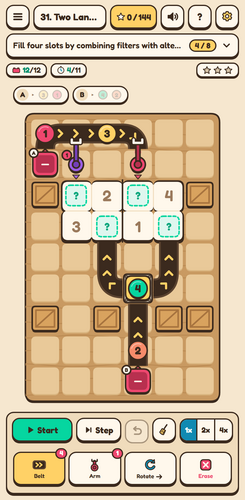
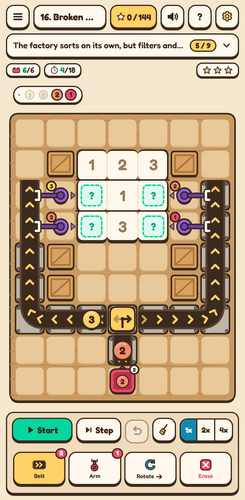
That second layer is where the factory theme becomes concrete. Conveyor belts move pieces, filtering robot arms sort them, alternating splitters divide flows, and underground tunnels create routes below the main board. The toolset also includes advanced telescopic arms and programmable gantries.
The structure is clear from the start: 48 curated puzzles are arranged across 7 chapters, with 144 stars to earn. The game is in development and runs as an HTML5 title. It is single-player and built around logic, so the appeal is less about reflexes and more about reading a board, spotting a route, and testing whether the factory behaves as intended. The core promise is a tiny factory with a lot of logic.
How to play
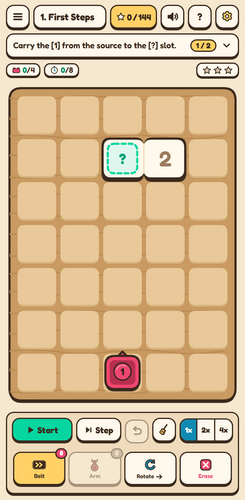
The loop starts with Sudoku. Each empty cell needs a number, and the puzzle asks the player to deduce which one belongs there. From that answer comes the factory task: deliver the right token to the matching destination. Building the route is a matter of choosing a tool and placing pieces on the board.
Conveyor belts carry tokens, filtering robot arms sort them, alternating splitters send items along different paths, and underground tunnels open routes beneath the surface. More advanced pieces include telescopic arms and programmable gantries, which expand the routing options beyond simple belt lines.
Once the layout is in place, pressing Start runs the simulation so the factory can be tested. The result is not just a Sudoku answer but a working delivery system. If a route fails, the undo button or Ctrl+Z and Command+Z reverse the last action. Adjustable speed and step-by-step simulation let the player watch the factory at a chosen pace rather than only seeing the final outcome. That combination matters: the number puzzle sets the target, while the automation layout determines whether the target is reached.
Controls
Controls are built around direct manipulation. Choose a tool, then tap or drag on the board to place a piece. A placed piece can be tapped to rotate it or dragged to move it, so adjustments do not require deleting and rebuilding everything. Press Start to test the factory.
The undo button reverses an action, and Ctrl+Z or Command+Z provides the same shortcut on a keyboard. Mouse and touch controls are both supported. The simulation can be adjusted in speed and run step by step, which helps when a route needs closer inspection. Language can be changed in Settings through the gear button.
These controls keep the focus on the board rather than on memorizing a command list: placement, rotation, movement, testing, and reversal are the main verbs. The undo shortcut is especially useful because factory layouts invite small corrections. A misplaced splitter or a belt pointed the wrong way can be fixed without starting over. The control scheme does not demand fast input; it rewards deliberate placement and repeated testing. That fits a puzzle built on deduction and routing rather than action.
| Input | Action |
|---|---|
| Mouse | Choose a tool and click or drag on the board to place pieces. |
| Touch | Tap or drag on the board to place pieces. |
| Placed piece | Tap to rotate it or drag to move it. |
| Start | Test the factory simulation. |
| Undo button | Reverse an action. |
| Ctrl+Z or Command+Z | Reverse an action with the keyboard. |
| Settings gear button | Open settings to change language. |
Tips for your first run
The first run is easier when the Sudoku board is treated as the specification for the factory. The numbers identify which tokens are needed, while the automation layout decides whether those tokens arrive. A deliberate approach matters more than a complicated one.
- Solve the empty cells first so every delivery has a clear target.
- Build a basic belt route before adding splitters, tunnels, telescopic arms, or programmable gantries.
- Press Start early, then use adjustable speed or step-by-step simulation to inspect a route.
- Tap a placed piece to rotate it, drag to move it, and use undo or Ctrl+Z and Command+Z for corrections.
- Keep progress in local browser storage in mind; clearing browser data can erase the save.
Content and replayability
The content is built around a fixed set of puzzles. There are 48 curated puzzles, divided into 7 chapters, and 144 stars to earn. The star total gives the game a visible completion target beyond the initial solve, so replay value comes from returning to chapters and chasing the stars that remain.
The factory toolset grows in scope: conveyor belts, filtering robot arms, alternating splitters, and underground tunnels form the base, while advanced telescopic arms and programmable gantries add more complex routing possibilities. Because the game is single-player and logic-focused, progress is personal rather than competitive.
The interface supports several languages, among them English, Spanish, French, German, Italian, Korean, Japanese, and two Chinese scripts. Language can be changed in Settings with the gear button. The translations are AI-assisted and may contain errors. Progress is saved locally in the browser on the device, with no cloud sync. No game account is required. For a puzzle game in development, that structure gives players a clear set of goals and a reason to revisit chapters.
Presentation and performance
LogiBelt: Sudoku Factory uses procedural vector graphics and synthesized audio. That means the visual pieces are generated rather than painted as fixed art, and the soundscape is built from synthesized elements. The game uses the Fredoka and Noto Sans CJK fonts, with license notices included in the game package.
The interface is a 2D board with factory pieces, which suits the routing task: belts, arms, splitters, tunnels, telescopic arms, and gantries need to remain readable as they connect. The HTML5 format keeps the game in the browser. Mouse and touch controls are supported, and the simulation can be adjusted in speed or advanced step by step. Those options help inspection: a slow or stepped view makes it easier to see where a token travels and where a route breaks.
The game is in development, so the presentation should be judged as an evolving build rather than a final retail package. The interface supports multiple languages, and translations are AI-assisted, which can affect polish. There is no cloud sync; progress is stored in local browser storage. The overall presentation promise is modest and clear: readable vector pieces, synthesized sound, and a simulation view built for inspection.
Who should play it
This is for players who enjoy Sudoku as a logic problem but want something physical to do with the answer. The game asks for deduction first and route-building second, so it suits puzzle players who like to see a solution move through a system rather than remain a set of numbers. Factory-automation fans should also find a clear entry point: belts, filtering arms, splitters, tunnels, telescopic arms, and programmable gantries all serve the job of delivering tokens.
The 48 puzzles, 7 chapters, and 144 stars give completionists a defined structure without suggesting a competitive mode. The game is single-player and 2D, with mouse and touch controls, undo, adjustable speed, and step-by-step simulation. The control scheme favors direct manipulation, so players who like placing and adjusting pieces will be better served.
The local save system and lack of a required game account make it easy to start, though anyone who switches devices should know there is no cloud sync. Free-to-play access with optional donations lowers the barrier. Anyone curious about the exact feel of the factory tools should try the browser build directly.
Screenshots
How we tested it
The build was loaded from games.debutplay.com in a headless Chromium session on ; the canvas started and no request was blocked. The guide was last checked on .
From the developer
A tiny factory. A lot of logic. LogiBelt: Sudoku Factory combines factory automation and Sudoku. Deduce which number belongs in each empty cell, then build a factory that delivers the right token. By Almost Elsewhere. 48 curated puzzles across 7 chapters, with 144 stars to earn.Conveyor belts, filtering robot arms, alternating splitters and underground tunnels.Advanced telescopic arms and programmable gantries.Mouse and touch controls, undo, adjustable speed and step-by-step simulation. How to play Choose a tool and tap or drag on the board. Tap a placed piece to rotate it, or drag it to move it. Press Start to test your factory. Use the on-screen undo button or Ctrl+Z / Command+Z. Beta & languages Spanish, English, French, German, Italian, Korean, Japanese, Simplified Chinese and Traditional Chinese. Change language in Settings (gear button). Translations are AI-assisted and may contain errors; feedback is welcome in the comments.…
Frequently asked questions
Is LogiBelt: Sudoku Factory free?
It is free to play, with optional donations. No game account is required.
What is the core loop?
The game combines Sudoku deduction with factory automation. Players determine the number for each empty cell, then build a route that delivers the correct token to its destination.
How many puzzles are included?
There are 48 curated puzzles across 7 chapters, with 144 stars to earn.
What controls are available?
Choose a tool and tap or drag on the board to place pieces. Tap a placed piece to rotate it, drag it to move it, and press Start to test the factory. Undo, Ctrl+Z, and Command+Z reverse actions. Mouse and touch controls are supported.
Does progress save?
Progress is saved locally in the browser on the device. There is no cloud sync, and clearing browser data can erase the save. If storage is blocked, the game can still be played, but progress may not persist.
Which languages are available?
The interface supports several languages, including English, Spanish, French, German, Italian, Korean, Japanese, and two Chinese scripts. Change language in Settings with the gear button. Translations are AI-assisted and may contain errors.
What games are similar to LogiBelt: Sudoku Factory?
The closest matches on DebutPlay are BATHORY: BLOODLINE — The Ten Rites, Kortzale Solitaires, Before You Wake. They share the same genre, so the controls and the pace carry over.
Something wrong or missing? Tell us. How we test games.