Fighting · New game
Metal Fighting Robots
Metal Fighting Robots hands the fighting to your machine: you tune action priorities before each bout, then watch a real-time duel of stats, stamina, and evasion play out.
#9 this weekAI-assisted: Graphics
The game runs in this tab. No install, no account.
The short answer
It is a real-time robot fighting game built around indirect control. Rather than steering every punch, you assign each action a priority from 0 to 9, inspect both fighters' stats, and let the machine act. Opponents grow stronger round after round, so the strategy you set before the arena matters more than reflexes.
What is Metal Fighting Robots?
Metal Fighting Robots is a real-time fighting and strategy game from developer MatolcsGyula, also credited as Szabó Dávid. It was assembled in a single month for HEJ in October 2026 and released on 1 November 2026 for HTML5 browsers and Windows. It costs nothing to play, and the build runs on Godot 4.7.2.
The premise inverts the usual arena fighter. Two robots meet and trade attacks, blocks, and tricks in real time, but the player never steers a punch. Instead, the player writes the fighter's instincts before the bell: each available action carries a priority number, and the robot resolves its own decisions from there. The design leans hard on indirect interaction, and the whole thing is dressed in a heavy metal mood.
A run is a chain of bouts against progressively tougher machines. Before each fight the player can study both stat sheets and re-tune the plan, then send the chosen robot back into the arena. The genre blend is deliberate: the numbers game of a strategy title wrapped around the spectacle of a robot duel.
How to play
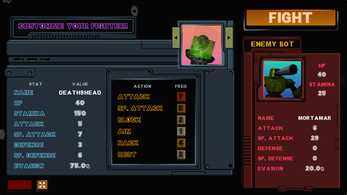
Every action a robot can take accepts a priority between 0 and 9. Higher values pull the machine toward that action when it makes its own choice, while low values leave it as a rare fallback. The result is a ratio rather than a script: set one number high and another low, and the robot's behavior skews accordingly for the whole fight.
The action set covers offense, defense, and attrition. Attack deals damage from the ATTACK stat, cut down by the target's DEFENSE. The special attack does the same job through SP. ATTACK and SP. DEFENSE. Block raises your own DEFENSE, Aim reduces the enemy's EVASION, Hack drains the enemy's STAMINA, and Rest returns some STAMINA to your machine.
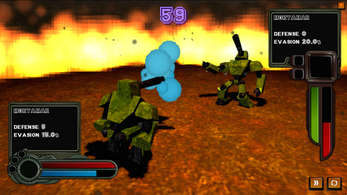
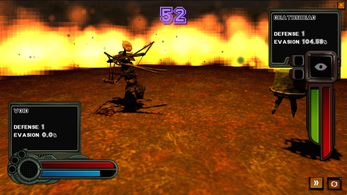
Three numbers decide how a bout ends. HP is health, and reaching zero means destruction. STAMINA fuels every action, and hitting zero leaves that robot briefly incapacitated, which is a dangerous window. EVASION is the percentage chance of slipping an incoming attack. Every robot carries different stats, so the same priority spread does not suit every matchup, and both fighters' sheets can be inspected before entering the arena.
Controls
All interaction runs through the mouse. Clicking an action's priority field raises that number, which is the main way a battle plan gets built; there is no key for striking and no button for dodging, because the robot handles those calls on its own. The left and right arrow keys switch between robots while moving from one battle to the next, which is the moment a different stat profile can be brought in against the upcoming opponent.
Two buttons sit alongside the fight itself. The fast forward button speeds up a battle in progress, useful when a priority spread needs to be judged quickly rather than watched at full length. The camera button toggles the dynamic camera on and off, so the arena can be viewed from a livelier angle or held steady.
Because nothing in the arena is directly steered, the only real dexterity the game asks for is clicking numbers up before a fight starts. Everything else is preparation.
| Input | Action |
|---|---|
| Mouse | All interactions |
| Click an action's priority value | Raise that action's priority |
| Left and right arrow keys | Switch robots between battles |
| Fast Forward button | Speed up a battle |
| Camera button | Toggle the dynamic camera on or off |
Tips for your first run
Treat the opening matches as reading exercises. A quick example of how the numbers behave: with Attack left at 1 and Block set to 3, the robot becomes three times as likely to block as to attack. Priorities are relative, so raising one action quietly demotes the others. Before editing anything, open both stat sheets and decide which enemy number is the real threat.
- Check the opponent's EVASION before investing in Aim, since lowering it is the whole point of that action.
- Watch STAMINA on both sides. Hack pushes the enemy toward an incapacitated window, while Rest keeps your own machine from stalling.
- Give Block real weight against opponents with heavy attack stats, because it lifts your DEFENSE for the exchanges that follow.
- Lean on the fast forward button to see a bad spread play out quickly, then adjust and go again.
- Use the left and right arrows between battles to swap in a robot whose stats match the next opponent rather than forcing one machine through everything.
- Keep at least one offensive action high enough that your robot actually pressures HP instead of stalling out on utility moves.
Content and replayability
The structure is a ladder. Each round brings stronger opponents, so a plan that won comfortably early will need revision later. Because the roster is built around differing stat lines, the interesting decisions are about which machine to field and how to bias its behavior, not about learning a fixed sequence of moves.
That is where the replay value sits. Priorities can be rebuilt for every fight, and the pre-battle inspection makes that rebuilding worthwhile rather than blind. A player who experiments with combinations, and who swaps robots with the arrow keys between battles, has more room to find an answer to a tough opponent than one who locks in a single spread and hopes.
It also stays easy to return to. There is nothing to install for the browser build, and the Windows version runs the same fight structure. A session is a series of duels, so picking the game back up means reading a stat sheet, adjusting a few numbers, and entering the arena again.
Presentation and performance
The visual direction aims for a late-nineties console look, chasing an N64 aesthetic while using PSX-style character and texture assets, including a retro PSX character and a PSX texture bundle. The interface comes from an atompunk UI kit by GabrielaTot, and a beta Super Mario 64 font is used for text. Music and sound effects are credited to Ovani Sound and GameDev Market, which fits the heavy metal framing around the arena.
Camera work is a deliberate feature rather than an afterthought. The dynamic camera can be toggled on for a more active view of the fight or switched off for a steadier, more readable angle, and the fast forward control lets a long exchange be compressed when the outcome is already clear.
Under the hood the project is built in Godot 4.7.2. The playable build runs in an HTML5 frame in the browser, with a Windows version alongside it.
Who should play it
This suits players who like tuning systems more than twitch reactions. If the appeal of a fighting game is the matchup math and the moment a plan clicks, the indirect control here is a feature rather than a limitation. Anyone who enjoys reading a stat sheet, spotting that an opponent's EVASION is the problem, and answering it with Aim will feel at home.
It is also a good fit for a short session. Bouts resolve themselves in real time, the fast forward button trims the waiting, and priorities can be rebuilt between fights, so a run can be picked at for ten minutes or pushed further into the ladder.
Players who want direct control of every strike, or who prefer a defensive, reaction-based fighting game, should know exactly what they are getting: the robot decides, and the player's influence happens before the bell. It is free to try in a browser or on Windows, which makes that experiment cheap.
Screenshots
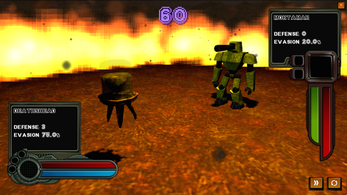
How we tested it
The build was loaded from games.debutplay.com in a headless Chromium session on ; the canvas started and no request was blocked. The guide was last checked on .
From the developer
About the game This game was made for HEJ (October 2026), in a month.Made by MatolcsGyula (Szabó Dávid) Enter the arena! In Metal Fighting Robots, you'll face increasingly powerful fighter robots in a series of battles. But there's a catch: you don't directly control your robot. Instead, you must program its fighting preferences and let it decide how to fight! Each action can be assigned a priority value from 0 to 9. The higher the value, the more likely your robot is to perform that action during battle. For example, setting Attack to 1 and Block to 3 makes your robot three times more likely to Block than Attack. Choose your priorities wisely and build a fighting strategy that makes the most of your robot's strengths! Your available actions are: Attack – Deals damage based on your robot's ATTACK stat, reduced by the enemy's DEFENSE.SP. Attack – Deals damage based on your robot's SP. ATTACK stat, reduced by the enemy's SP.…
Frequently asked questions
Is Metal Fighting Robots free?
Yes. The game is free to play, with no purchase required.
Do you control the robot directly in battle?
No. The player sets priorities for each action, and the robot decides for itself which action to perform during the fight.
Which platforms can it be played on?
It runs as an HTML5 game in a browser, and there is also a Windows version. It was released on 1 November 2026.
How do the action priorities work?
Each action takes a value from 0 to 9. Higher numbers make that action more likely to be chosen; with Attack at 1 and Block at 3, the robot is three times as likely to block as to attack.
What happens when STAMINA reaches zero?
The robot becomes incapacitated for a short duration. Rest restores some STAMINA, and the Hack action drains the opponent's.
What actions can be prioritized?
Attack, special attack, Block, Aim, Hack, and Rest. Each one is tied to a different stat or effect, such as raising DEFENSE, cutting EVASION, or draining STAMINA.
What games are similar to Metal Fighting Robots?
The closest matches on DebutPlay are FINAL HONOR: FEUDAL GRUDGE — GBC Demo, Furious Street, Spin Top Showdown. They share the same genre, so the controls and the pace carry over.
Something wrong or missing? Tell us. How we test games.