Adventure · New game
Prompt Asylum
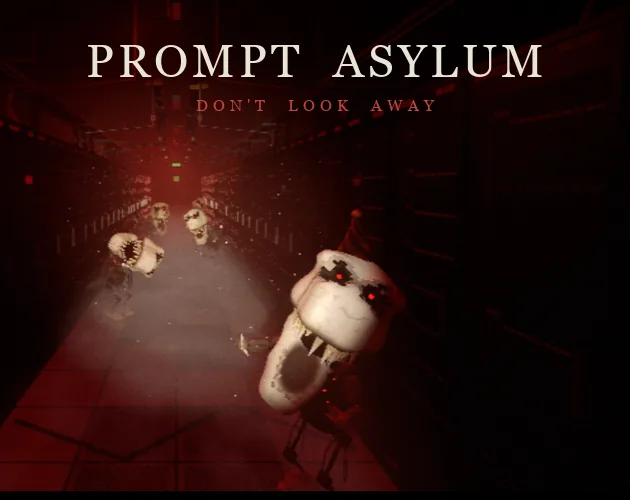
A free, short first-person horror demo about freezing mascot dinosaurs with a flashlight while hunting three items and a timed exit.
#2 this weekAI-assisted: Code, Graphics, Sound, Text
The game runs in this tab. No install, no account.
The short answer
Prompt Asylum is a free, short first-person horror demo set in an empty GPU data centre for Halloween. Broken mascot dinosaurs freeze while lit by the flashlight, so movement means managing light and nerve. Find three items from clues, reach the EXIT, and post a timed run from the title screen. Play now in a desktop browser or download the Windows or macOS version for the fuller look.
What is Prompt Asylum?
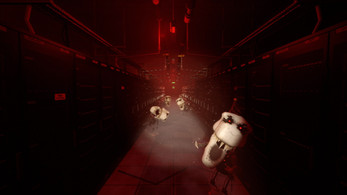
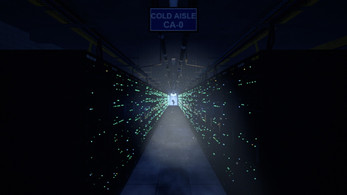
Prompt Asylum is a short first-person horror demo built around a simple, tense rule: the broken mascot dinosaurs in an empty GPU data centre freeze while caught in the flashlight and move when the beam leaves them. The opening puts the player on foot at night with only that light, a set of server racks to navigate, and one immediate goal: find the exit. The intended mood is PS2-era horror, with a compact running time of roughly five to ten minutes and a Halloween theme.
It is free, released on 30 October 2026, and playable in an HTML5 browser frame or through Windows and macOS downloads. The objective sits in the top-left corner, giving the first task a visible anchor. Three items block progress, and their locations change each run, which turns the short demo into a quick read-and-search loop rather than a fixed tour. The scares come from light management and the risk of looking away rather than a long campaign. Players who want a compact horror run with a clear finish line can start immediately.
How to play
Start by reading the objective in the top-left corner, then treat the room as a search problem rather than a straight dash. Three items are required, and they are not in fixed spots: each run moves them, so the monitor, whiteboard and maintenance tablet are the places to check for clues before committing to a route. The dinosaur rule shapes every movement. A mascot caught in the flashlight beam cannot move; turn away, let the beam die, or lose power, and it closes in. Progress is therefore paced by light, not speed alone.
Getting caught sends the player back to the beginning of the current section, but collected items stay in hand, so a mistake costs position rather than the whole search. The finish is the final EXIT door. The clock starts once movement is possible after waking and stops when the player bursts through that door. A run only counts if it begins from the title screen, so start attempts there.
Controls
Prompt Asylum uses a compact desktop control set. Click the game window first, then move the mouse to look around. WASD handles movement, and Shift sprints while stamina lasts. The flashlight toggles with F or the right mouse button. Esc opens the pause menu. A fullscreen button is available, and the game recommends it for the best experience. The browser build is best in a desktop browser such as Chrome, Edge, Firefox or Safari on a computer with a keyboard and mouse, which fits the control demands: looking, moving, sprinting and managing light all happen at once.
Mouse look is central because the flashlight direction is also the dinosaur-freezing tool, so a steady hand matters as much as quick feet. Sprinting is useful for crossing open space, but stamina makes it a limited tool rather than a permanent speed boost. Use the pause menu when a break is necessary.
| Input | Action |
|---|---|
| Mouse | Click the game, then move the mouse to look around. |
| WASD | Move. |
| Shift | Sprint while stamina lasts. |
| F or right mouse button | Toggle the flashlight. |
| Esc | Open the pause menu. |
| Fullscreen button | Use fullscreen for the best experience. |
Tips for your first run
Treat the first run as a scouting pass. The objective in the top-left corner gives the immediate task, but the room's clues decide where the three items are on this particular attempt. Check the monitor, whiteboard and maintenance tablet before wandering the racks. Keep the flashlight beam on any mascot dinosaur that blocks the route; the moment the light leaves it, the threat changes. Because capture sends the player back to the start of the section with items kept, a mistake is recoverable, but the walk back costs time on the clock. Start timed attempts from the title screen so the run registers. Use headphones and a dark room for the intended atmosphere, and choose fullscreen for a clearer view. The demo is short, so a first run can be exploratory and a second can chase a cleaner time.
- Read all three clue spots before committing to a route.
- Keep a lit dinosaur in the beam while backing away; do not turn the light off near it.
- Sprint only when the path is clear, because stamina limits repeated bursts.
- Use Esc to pause rather than leaving the game window.
- After a capture, keep the items already collected and restart the section promptly.
Content and replayability
Prompt Asylum is built as a short demo, roughly five to ten minutes for a run, so its content is concentrated rather than sprawling. The replay hook is the combination of moving item locations and a visible clock. Three items must be found each time, and the monitor, whiteboard and maintenance tablet provide the clues, so the search changes between attempts. The timer begins when movement starts after waking and ends at the final EXIT door. Only attempts launched from the title screen count, which makes the title screen part of the competition loop.
At the finish, the player enters a name, and the end card displays the time, deaths, SEED and CODE. Those details give each attempt a record beyond a simple completion message. Getting caught returns the player to the start of the section with items kept, so a run can absorb mistakes while still pressuring the clock. The result is a compact horror piece that rewards a second attempt: one run to learn the clue spots and dinosaur behaviour, another to cut the route and improve the posted time.
Presentation and performance
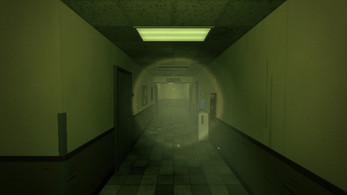
Prompt Asylum aims for a PS2-era look, and the browser build makes a visible trade between convenience and polish. The HTML5 version prepares its graphics on first launch, a step that can take one to two minutes, and it can hitch on some machines. For smoother play and the fuller visual treatment, including volumetric fog and flashlight shadows, the Windows and macOS downloads are the intended route.
On Windows, unzip the package and run PromptAsylum.exe; if a Windows protected your PC warning appears, use More info and then Run anyway. On Mac, unzip the download, then right-click Prompt Asylum.app and choose Open the first time, or use System Settings, Privacy & Security and Open Anyway. The Mac build is not notarized by Apple, so macOS asks once. The browser version is best in a desktop browser such as Chrome, Edge, Firefox or Safari on a computer with a keyboard and mouse. The game is short and atmospheric, so headphones and a dark room suit the material, but the performance choice is straightforward: browser for quick access, download for the smoother, fuller look.
Who should play it
Prompt Asylum suits players who want a compact horror demo with a clear rule and a quick finish. The appeal is the flashlight standoff with the mascot dinosaurs: looking at a lit threat holds it still, while looking away or losing light lets it move, so tension comes from attention and positioning. Players who enjoy PS2-era presentation, server-room dread and a Halloween one-off will find the setting specific and the session short.
The three-item search and the clues on the monitor, whiteboard and maintenance tablet give the run a puzzle-like shape, and the timer, deaths, SEED and CODE give repeat attempts a scoreboard. It is a poor fit for anyone expecting a long campaign; the demo is roughly five to ten minutes and built around one compact loop. Desktop players with a keyboard and mouse are the natural audience, with a browser option and Windows or macOS downloads. Because it is free, the commitment is low, but the best experience still depends on following the light rule and playing in a dark room with headphones.
Screenshots

How we tested it
The build was loaded from games.debutplay.com in a headless Chromium session on ; the canvas started and no request was blocked. The guide was last checked on .
From the developer
You wake at night in an empty GPU data centre with only a flashlight. Broken mascot dinosaurs roam the racks: while you look at one and it is lit, it cannot move. Look away, let your light die, or lose the power, and it comes for you. Find the exit. A short PS2-era first-person horror demo (about 5-10 minutes) made for GMI Cloud's Halloween. Play in the dark, with headphones. HOW TO PLAY Follow the objective in the top-left corner. Three items stand in your way and they are somewhere else every run: read the clues on your monitor, the whiteboard and the maintenance tablet. A dinosaur in your flashlight is frozen; turn your back on it and it moves. Caught = back to the start of the section, items kept. CONTROLS Click the game to look around with the mouse. WASD move, Shift sprint (stamina), F or right mouse button flashlight, Esc pause menu. Use the fullscreen button for the best experience. TIMING The clock runs from the moment you…
Frequently asked questions
Is Prompt Asylum free?
Yes. Prompt Asylum is free.
How long is a run?
A run is roughly five to ten minutes, measured from the moment movement begins after waking to the final EXIT door.
Which platforms are supported?
Prompt Asylum is available in an HTML5 browser frame, on Windows and on macOS. The browser build is intended for desktop browsers such as Chrome, Edge, Firefox or Safari with a keyboard and mouse.
Do the three items stay in the same place?
No. The three required items are somewhere else every run; clues are on the monitor, whiteboard and maintenance tablet.
What happens when a dinosaur catches the player?
The player returns to the start of the current section with items kept.
How does the timer work?
The clock begins once movement is possible after waking and stops when the player bursts through the final EXIT door. Only a run started from the title screen counts, and the end card shows time, deaths, SEED and CODE.
What games are similar to Prompt Asylum?
The closest matches on DebutPlay are Maple Leaf, Pracinhas, //TODO: Save the Dev. They share the same genre, so the controls and the pace carry over.
Something wrong or missing? Tell us. How we test games.