Simulation · New game
The Diner
A cozy 1962 diner simulation about taking orders, cooking at three stations, serving thirteen regulars, and building a familiar Main Street community.
#36 this weekAI-assisted: Code, Graphics, Sound, Text
The game runs in this tab. No install, no account.
The short answer
The Diner is a cozy management simulation set in Millfield in spring 1962. Players run a small Main Street diner, take orders from thirteen regulars, cook at three stations, and chat between meals. A free browser demo offers the current playable slice without a real-time trial limit, while Windows and Linux builds cost $4.99.
What is The Diner?
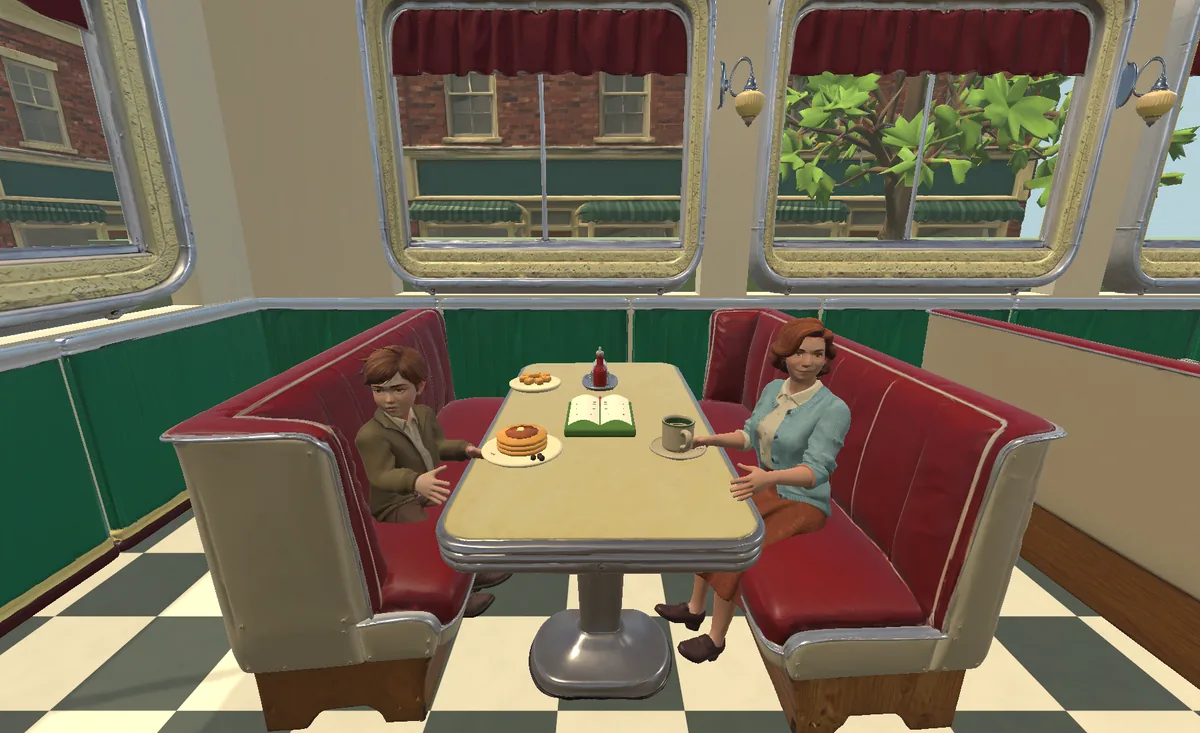
The Diner is a simulation game from Departurebay set in Millfield in spring 1962. The setup is simple: run a small Main Street diner, start the coffee, and get to know the customers. It is a cozy cooking and management game with story-rich community elements.
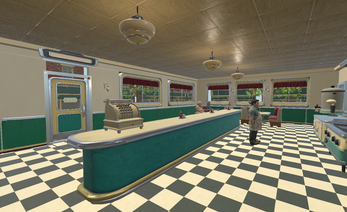
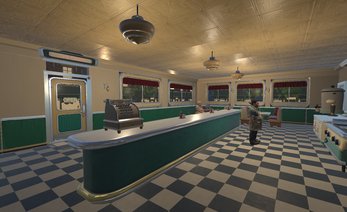
Players work inside a fully furnished diner, handle orders, cook at three stations, and carry plates to the counter or booths. Thirteen regulars give the place its rhythm; remembering their usual orders and sharing short conversations matters as much as getting food out. Molly can be hired to help with orders and deliveries. The project is in development at version 0.2.0. A free browser demo is playable in HTML5, while desktop development builds for Windows and Linux cost $4.99. The published date is 31 October 2026.
How to play
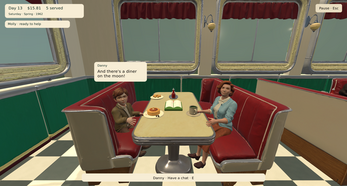
Service begins by walking the diner and watching the room. Click a seated guest to approach and take the order. The kitchen has three stations: one for coffee, one for the griddle, and one for the pie case. Click the station to prepare the item, collect the ready dish, then click the guest to serve it. Clicking the guest again opens a short conversation.
Finished meals go to the counter or to booths. Molly can handle some orders and deliveries while the player cooks and spends time with guests. The pace is deliberately forgiving: food stays warm, guests remain patient, and there is no bankruptcy state or daily-login requirement. The browser demo contains the current playable slice without a real-time trial limit; the paid desktop downloads contain the same present content in an offline build. Town exploration is not part of this version.
Controls
Keyboard and mouse are required. Mouse input drives the service loop: click a seated guest to take an order, click a cooking station to prepare food, collect the finished dish, then click the guest to serve and click again for conversation.
The keyboard handles movement and interface access. WASD or the arrow keys walk the diner. E interacts. Right-dragging the mouse looks around. Number keys 1, 2, and 3 select the kitchen stations. C and V switch camera views. Esc pauses. J opens the optional notebook. These bindings cover the current playable slice. No gamepad or alternative input scheme is specified, so the practical setup is a standard desktop keyboard and mouse. The browser demo uses the same control scheme as the desktop development builds.
| Input | Action |
|---|---|
| Mouse click on guest | Approach a seated guest, take an order, serve a dish, or start a conversation |
| Mouse click on station | Prepare coffee, griddle food, or pie at a kitchen station |
| Mouse click on ready dish | Collect a finished dish |
| WASD / Arrow keys | Walk through the diner |
| E | Interact |
| Right-drag | Look around |
| 1 / 2 / 3 | Select kitchen stations |
| C / V | Switch camera views |
| Esc | Pause |
| J | Open the optional notebook |
Tips for your first run
Start with the service loop rather than the decoration menu. Click each seated guest, learn the order, then move to the correct station. The optional notebook on J is useful for keeping track of the room. Molly can be hired to help with orders and deliveries, which frees time for cooking and conversation. Because food stays warm and guests remain patient, there is no need to rush the room; the game has no bankruptcy state. Allow browser storage before a first session in the HTML5 demo, since browser progress is separate from desktop saves. The demo has no real-time trial limit, so a first visit can be used to learn the diner at a comfortable pace.
- Use the optional notebook on J if keeping track of the room helps.
- Learn the three stations: coffee, griddle, and pie case, then map keys 1, 2, and 3 to the kitchen.
- Click a guest once to serve and once more to open a short conversation.
- Hire Molly when cooking and chat time matter more than handling every delivery alone.
- Check C and V camera views before service begins; right-drag looks around the diner.
Content and replayability
The current slice is built around thirteen regulars and the small rituals of a local diner. Players remember usual orders, share short conversations, and offer another cup of coffee. Molly can be hired to help with orders and deliveries. Helen, Danny's mother, arrives from day 12; Nora's story group can be invited; Danny's drawing can be given a permanent place on the wall.
The room changes from daylight to evening and night, with four seasons, changing trees, rain, and snow outside. Halloween or Christmas decorations and festive dishes can be chosen whenever the player likes. There is no bankruptcy state and no daily-login obligation, so the game does not punish a missed day. The free browser demo contains the current playable slice without a real-time trial limit; paid Windows and Linux downloads offer the same present content in an offline desktop build. A wider town and further community stories are planned, but town exploration is not included now.
Presentation and performance
The diner is fully furnished, and the room moves from daylight into evening and night. Four seasons change the trees outside, with rain and snow adding weather to the view. Holiday decor for Halloween or Christmas and festive dishes can be selected whenever the player likes. The game is built in Unity with generated 3D assets and procedural audio.
Character animation is procedural and still needs refinement in this early build, which is the main presentation caveat. The browser demo runs in HTML5, and desktop builds target Windows and Linux. Browser storage needs permission to keep progress between visits, and browser and desktop saves are separate. Existing development saves are preserved separately. Camera views can be switched with C and V, while right-dragging looks around the diner.
Who should play it
The Diner suits players who want a cozy cooking and management loop with story-rich community beats. The appeal is in service, memory, and small rituals: take an order, cook at a station, carry the plate, and return for a short conversation. Players who like remembering regulars' usual orders, hiring Molly for support, and choosing seasonal decorations will find a clear fit.
The forgiving rules matter too: food stays warm, guests remain patient, and there is no bankruptcy or daily-login pressure. The free browser demo is the low-risk entry point, while the $4.99 Windows and Linux builds are for offline desktop play. This is not a town-exploration game in the current version, and the procedural character animation is still being refined. Players who need a finished, fully polished simulation should weigh that early-build status. Those who want a calm, story-rich diner slice can start with the browser demo and see whether the service rhythm clicks.
Screenshots
How we tested it
The build was loaded from games.debutplay.com in a headless Chromium session on ; the canvas started and no request was blocked. The guide was last checked on .
From the developer
Good food. Familiar faces. Welcome to Millfield, spring 1962. Take over a little diner on Main Street, put the coffee on, and get to know the people who come through your door. Version 0.2.0: free browser demo, with Windows and Linux development builds available for $4.99. Keyboard and mouse required. A place people come back to Walk through a fully furnished diner, take orders, cook at three stations and carry meals to the counter or booths.Meet thirteen regulars, remember their usual orders, share short conversations and offer another cup.Hire Molly to help with orders and deliveries while you cook and spend time with your guests.See daylight fade into evening and night, with four seasons, changing trees, rain and snow outside.Choose Halloween or Christmas decorations and festive dishes whenever you like.Meet Danny’s mother Helen from day 12, invite Nora’s story group, and give Danny’s drawing a permanent home on the wall. Food…
Frequently asked questions
Is The Diner free to try?
Yes. A free browser demo is playable in HTML5 without a real-time trial limit. Windows and Linux development builds cost $4.99 and contain the same present content in an offline desktop build.
What platforms does it support?
HTML5 in the browser, plus Windows and Linux development builds. Keyboard and mouse are required.
Does the browser demo save progress?
Browser and desktop saves are separate. Browser storage must be allowed to keep progress between visits, and existing development saves are preserved separately.
Is there a fail state or daily login requirement?
There is no bankruptcy state and no daily-login obligation. Food stays warm and guests remain patient, so service can be paced comfortably.
Can players explore the town?
Town exploration is not included in the current version. A wider town and further community stories are planned.
What is in the current slice?
The current slice includes the furnished diner, three cooking stations, thirteen regulars, Molly as hired help, four seasons, weather, and Halloween or Christmas decorations and dishes. Helen arrives from day 12, Nora's story group can be invited, and Danny's drawing can be placed on the wall.
What games are similar to The Diner?
The closest matches on DebutPlay are Penguin Nursery, A Well-Run Exercise / Eine gut gelungene Alarmprobe, Gig Promotor (free early playtest of first 2 seasons). They share the same genre, so the controls and the pace carry over.
Something wrong or missing? Tell us. How we test games.