Simulation · New game
Wardlight Frontier
A free 3D voxel sim about out-terraforming four rival scouts on Halcyon, where each biome opens only to one color of flame and every pellet carries a purity grade.
#1 this weekAI-assisted: Code, Graphics, Sound, Text
The game runs in this tab. No install, no account.
The short answer
Wardlight Frontier is a free browser sim about making Halcyon livable before four rival scouts manage it. Dig the ground into graded pellets, chain machines and belts into a growing factory, and carry the right flame color into each hostile biome. Combat, deaths and timers are absent unless survival pressure is switched on.
What is Wardlight Frontier?
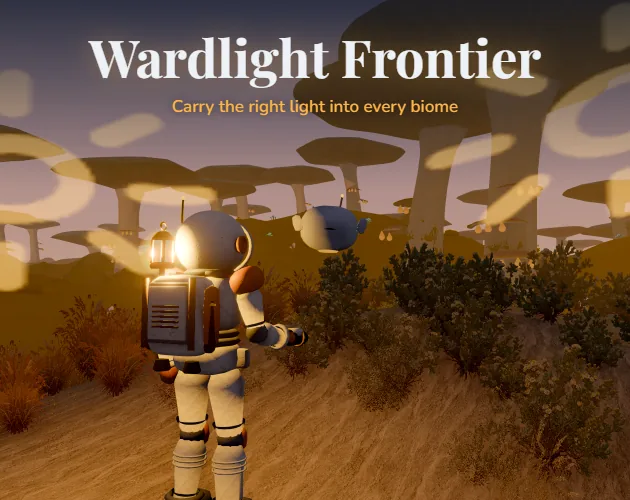
You arrive on Halcyon as a scout of the Meridian Fleet, one of five working to turn a hostile world into somewhere a fleet could settle. The planet resists: spores, cold, fumes and static fill its regions, and each region tolerates exactly one color of flame.
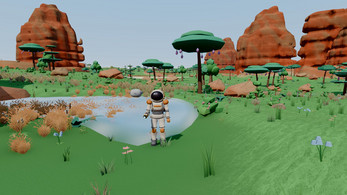
Everything is measured by the Founding Index. Raising your site's index while four rival scouts climb their own moves the land around your pod through visible stages, from thinning haze and creeping lichen to grass, flowers, rain, ponds, alien trees and small flyers. Repairing the uplink puts you on the survey board, and the rivals send dispatches as they gain ground.
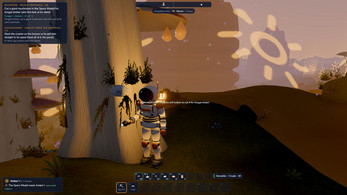
Wick, a companion drone with opinions, scans for seams, marks the route and keeps your next milestone in the corner of the view with what it still needs and where that material lives. It runs in the browser as a 3D voxel simulation, free to play, cozy by default.
How to play
Digging turns the ground into pellets of earth, rock and crystal, and each pellet leaves the hole with a purity grade somewhere between crude and pristine. Those grades are what your production line sorts on, so the first job is not a pretty base but a steady supply of graded material.
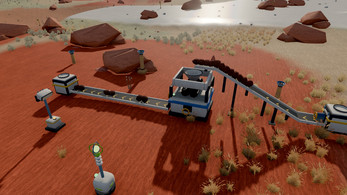
The factory builds outward from processing machines that stack so one machine's output drops straight into the next, then belts, lifts, splitters and sorters that pull pellets out by grade, then pipes and pumps feeding acid and titanium chemistry, then moth drones ferrying loads between ports. Generators, wind, sun and geothermal vents keep it all running, and lighting the basin matters once night arrives.
A ward cell decides whether a biome lets you work. Rock salt burns amber because it is sodium, copper burns verdant for the Rime Hollows, strontium crimson for the Cinder Steppe and indium indigo for the Storm Mesas, while a flame mixer blends colors into violet, teal and gold for the storms' hearts and the caverns below. The wrong light, or a flame too weak for a biome's core, lets the veil creep in until the suit recalls you home. Nothing is lost and nobody dies; you simply carried the wrong flame.
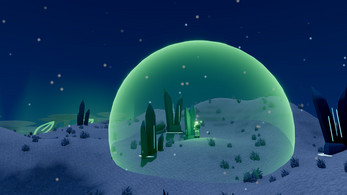
Outposts extend the run: a ward pylon's dome shelters auto-drills on seams, mushrooms yield timber and shelf fungus yields resin, the Crawler rover hauls cargo, and recall beacons link the network together. Deeper down, the Choir Deep holds crystal forests and Lamplighter halls, and the white torch, every color at once, opens the way to the Heart of Halcyon.
Controls
Movement is W A S D or the arrow keys, with Shift to run, Space to jump and a held Space to hover on the jetpack. The mouse looks around once you click the game to capture the pointer, the wheel zooms the camera, the left button digs or places and the right button fills or cancels a placement. Holding the left button on a giant mushroom's stem cuts it.
E handles interaction: picking up, loading a machine, opening panels, tapping shelf fungus and driving the rover. Q throws a single pellet or a flare, O tosses the whole stack, and the comma and period keys step through the stack in hand. F lights or douses the ward, and the Twin Burner swaps cells on a tap. T runs Wick's scan, H asks what the step needs and where to find it, Enter talks to Wick, and a held G recalls you home.
Building uses B for the menu, R to rotate, a held X to dismantle, P for the ports overlay and a held Ctrl to replace whatever a belt run crosses. Numeric keys fill the hotbar, Tab opens the backpack, and C, J, M and V reach the Codex, journal, map and survey board. K hides the key guide, Esc pauses for options, fullscreen, save and save export or import. Every binding can be rebound, and hints then name your key. A gamepad covers the basics, though menus still want the mouse.
The game page does not list its controls. Check the in-game tutorial or pause menu for the current scheme.
Tips for your first run
The opening hour goes faster if you treat purity as the real resource and let the base look rough until sorted pellets are flowing. Wick's milestone line is the closest thing to a checklist, so check it before wandering. A few habits worth forming early:
- Press H whenever the next step is unclear; Wick names the requirement and the place to find it.
- Read the key guide beside the view before the first ward cell, and remember K hides it when it clutters the screen.
- Keep a spare ward cell and a mixed supply of blended colors before pushing into storms' hearts or the caverns.
- Failed ward attempts cost nothing, so test an unfamiliar biome's color instead of guessing from a distance.
- In Options, low quality draws at 80 percent resolution without shadows or post-processing if frames start dropping.
- On Safari, use Export save file before closing the tab, since storage inside the frame can be cleared.
Content and replayability
The build carries the whole story from a hard landing through the Founding and the fleet coming home, then leaves a sandbox for continued building. Every ring is present, from the Landing Basin through the Spore Weald, Rime Hollows, Cinder Steppe and Storm Mesas to the Choir Deep and the Heart, along with all eight commissions from Report In to the Founding.
Terraforming runs through its full set of stages, from Barren to Founding-ready, and every flame from amber to white is in play. Milestones come with Wick's hints, optional advancements walk through each zone's torch and through factory growth, and the Codex holds both reference material and recipes.
Cozy is the default setting and survival is a choice that adds warmth to maintain, ward cells that burn down and suit air if you want it. Live Wick sits off by default and needs your own key if you want a language model speaking some of his moments, and the trophy badge sends nothing until you opt in with a nickname.
Presentation and performance
Each region sounds like itself: a generative score built from the flame notes gives every biome its own mood, and synthesized sound design runs throughout. The world is voxel-built, and large factories are tuned to stay smooth.
The game needs browser hardware acceleration, and the title screen says so with instructions if your browser is drawing without the graphics card. Low quality in Options drops to 80 percent resolution and removes shadows and post-processing for modest machines.
Accessibility is unusually thorough for the genre. Every ward color carries its own glyph and every purity grade a numeral plus notches, and the game was checked through simulations of protanopia, deuteranopia and tritanopia. Text size, reduce motion, field of view, camera sensitivity and invert all live in Options, and running, recalling and dismantling can each be a single press instead of a hold. Saves happen in the browser every few minutes, when you leave the tab and when you return to the title, with Esc offering an immediate save, a file export and an import.
Who should play it
This suits players who want automation without pressure: the sorting, chemistry and drone logistics reward planning, and the absence of combat, deaths and timers means a base can be rebuilt badly and fixed later. Anyone who dislikes factory games for their stress will find the cozy default forgiving.
Players who need stakes can switch to survival for warmth, burning ward cells and optional suit air, so the same world carries both moods. The flame-color puzzle gives exploration a reason beyond distance, since progress depends on reading a biome and carrying the right torch.
It is also a strong pick for colorblind players and for anyone who plays with a gamepad for movement and building while keeping a mouse for menus, and for browsers only. Expect to consult Wick often rather than guess.
Screenshots
How we tested it
The build was loaded from games.debutplay.com in a headless Chromium session on ; the canvas started and no request was blocked. The guide was last checked on .
From the developer
You are a scout of the Meridian Fleet, racing four rival scouts to make a hostile planet fit to call home. Halcyon's biomes won't let strangers in: spores, cold, fumes and static fill the air. But each one answers to a single color of flame. Dig, purify, build, and carry the right light. Dig the planet into pellets of earth, rock and crystal. Every pellet has a purity grade, from crude to pristine. Build a factory that grows with you: crushers, furnaces, kilns and washers, stacked so their outputs fall into one another; then conveyor belts, lifts, splitters and sorters that pick pellets out by grade; then pipes and pumps, acid and titanium chemistry, and moth drones that carry loads between ports. Power it with generators, wind, sun and geothermal vents, and light the basin against the night. Repair your uplink and join the survey board. Raise your site's Founding Index against four rival scouts, who send dispatches as they climb.…
Frequently asked questions
Is Wardlight Frontier free to play?
Yes. It runs in the browser as an HTML5 game at no cost, and there is nothing to install beyond loading the frame.
What happens if the wrong ward color lets the veil in?
Your suit recalls you home. You keep everything you were carrying, nothing is lost and you never die; the fix is simply the right flame color or a stronger burn.
Is there combat or a time limit?
No combat, no deaths and no timers in the default cozy setup. Survival is optional and adds warmth to manage, ward cells that burn down and suit air if you enable it.
Can it be played with a gamepad?
The basics work: sticks move and look, A jumps, B dismantles, X interacts, Y scans, triggers fill and dig, bumpers pick the stack, View opens the backpack, Menu pauses and the D-pad builds. Menus still want a mouse.
How does saving work?
The game saves in the browser every few minutes, when you switch away from the tab and when you return to the title. Esc gives a save now option plus save file export and import. On Safari, export before closing.
How do the flame colors work?
Rock salt burns amber as sodium, copper verdant for the Rime Hollows, strontium crimson for the Cinder Steppe and indium indigo for the Storm Mesas. A flame mixer blends violet, teal and gold for storms' hearts and caverns, and a white torch carries every color for the Heart of Halcyon.
What games are similar to Wardlight Frontier?
The closest matches on DebutPlay are Voxelium: Block Crafting 3D, Salim's Stall, Bloodline: Vampire Dynasty. They share the same genre, so the controls and the pace carry over.
Something wrong or missing? Tell us. How we test games.