Adventure · New game
Pippin
Five hand-built isometric dioramas, a brass key that moves time, and an apple tree that outlived everyone who planted it.
#19 this weekAI-assisted: Code, Graphics, Sound, Text
The game runs in this tab. No install, no account.
The short answer
Pippin is a short point-and-click adventure built from five isometric dioramas, each a living model from Ida Marsh's life. A time slider scrubs each place forward and back, so puzzles hinge on timing: crossing a pond once it freezes, reaching a shop before half past six. It plays in the browser, runs about 30 to 60 minutes, and saves as you go.
What is Pippin?
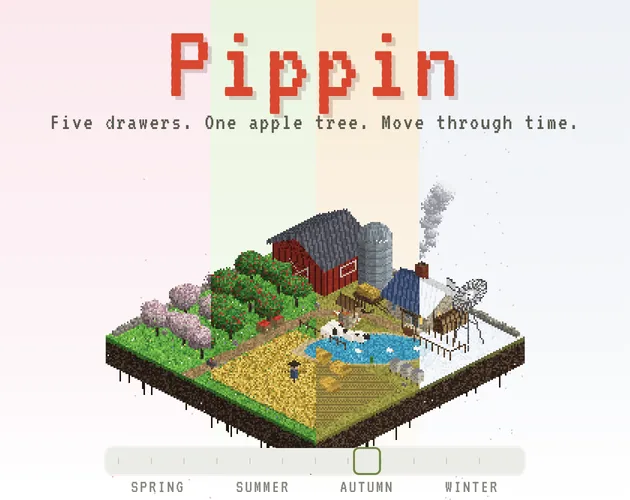
Gran leaves Nell a cabinet with five drawers and a brass winding key, and turning that key is how time moves here. Every drawer holds a small, living model of a place from Ida Marsh's life, and each chapter is one hand-built isometric diorama rather than a scrolling world. The time control sits at the base of the screen, and dragging it rewinds or advances everything in the scene at once.
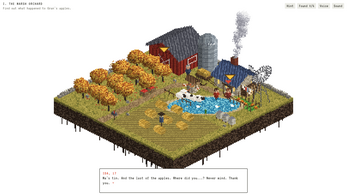
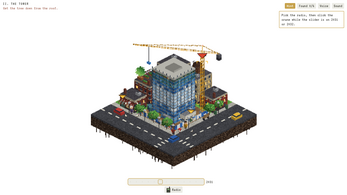
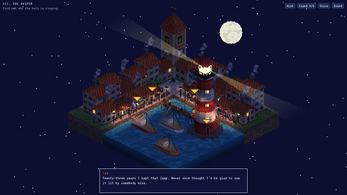
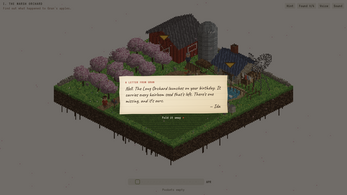
Those five places differ in scale as much as in setting: an orchard followed across a single year, a tower tracked through a decade of construction, a harbour watched over the course of one night, an island seen on either side of an eruption, and a long orchard counting down to a launch.
What links them is an apple tree that outlived everyone who planted it. The tone is cozy and narrative, the structure is short and chapter-driven, and the whole thing was made by th1nhng0 for thatgamejam #02.
How to play
Clicking does almost everything: walking, talking and using all come from the same input. The puzzles turn on being in the right place at the right time, which is where the time control earns its keep. The pond can only be walked on once it has frozen. A shop closes at half past six, so arriving late is a dead end until the hour is scrubbed back. A tree has to be saved before the block comes down.
Items live in Nell's pockets. Click one to pick it up, click whatever it should be used on, and right-click to set it down again. The six keepsakes hidden in each chapter, plus the five notes from Ida, reward poking at things that are not strictly on the critical path.
A Hint button points at exactly where to go next, and it stays entirely optional — nothing forces it on a player who would rather sit with a frozen pond for a while. The story finishes on one of two endings.
Controls
Mouse and touch cover the basics: click or tap to walk, talk and use, drag the time control to move a diorama through its history, click a pocket item to take it, and right-click to put it down. Running is a second click while already walking, and zooming is handled by the wheel or a pinch. Touch screens are supported for that same click-and-drag work.
The keyboard mirrors most of it. Left and Right choose an action and Enter confirms it; Tab jumps to the time control so the arrow keys can scrub it; the number keys 1 to 9 handle pocket items; Esc drops what is being held; H calls up the hint. F11 toggles full screen in the desktop build.
Because the slider is the one moving part that matters, the keyboard route is worth knowing if a mouse drag keeps overshooting the exact moment needed.
| Input | Action |
|---|---|
| Click or tap | Walk, talk and use |
| Left and Right arrows, then Enter | Choose and confirm those same actions from the keyboard |
| Drag the time slider | Move a diorama forward or backward through time |
| Tab, then the arrow keys | Adjust the time slider without a mouse |
| Click a pocket item, or press 1 to 9 | Pick an item up |
| Right-click or Esc | Put a held item down |
| Pick an item, then click a target | Use an item |
| Click again while walking | Run |
| Hint button or H | Get a pointer to where to go next |
| Mouse wheel or pinch | Zoom |
| F11 | Toggle full screen in the desktop version |
Tips for your first run
Pippin is generous with help but stingy with signposting, so a few habits make the first hour smoother. Time is the main variable in every chapter, and most dead ends are actually just the wrong hour.
- Lean on the Hint button whenever a diorama stalls; it points at exactly where to go next and costs nothing.
- Scrub the time control before concluding a route is blocked — the pond only becomes walkable after it freezes.
- Treat schedules as puzzle pieces: a shop closing at half past six means the errand has to happen earlier, not elsewhere.
- Click again while walking to run, which makes sweeping a diorama for keepsakes far quicker.
- Check each chapter for six hidden keepsakes and keep an eye out for Ida's five notes across the game.
- Use Tab and the arrow keys when a slider drag overshoots; small nudges matter more than big sweeps.
- Start in the browser to skip installation, and switch to the desktop build when F11 full screen is wanted.
- No manual save is needed: progress is written automatically, so there is nothing to remember before closing.
Content and replayability
Five chapters make up the whole of Pippin, each one a self-contained isometric diorama with its own span of time, from a year in the orchard to a night at the harbour. A full run takes about 30 to 60 minutes, which puts it firmly in one-sitting territory.
What fills that time beyond the main path is optional. Six keepsakes are hidden in every chapter, and five notes written by Ida are scattered through the game for anyone who wants the family history filled in. The story closes on one of two endings.
Because progress saves automatically, there is no bookmark to manage and no chance of losing a chapter to a forgotten save. Returning for the second ending means replaying the dioramas with the time control already understood, which is a very different experience from the first pass.
Presentation and performance
Pippin is drawn in pixel art and framed isometrically, so each diorama reads like a tiny model on a table. None of that art ships as image files: every pixel of the dioramas is produced by code, which is what lets a place be redrawn at any point in its history when the time control moves.
The presentation is fully voiced, with a cast reading the dialogue, alongside music and sound effects. Interface type comes from VT323 and Caveat, both Google Fonts under the SIL Open Font License.
It runs either in a browser or as a desktop download for Windows, macOS and Linux, with F11 toggling full screen in the desktop version. Mac users should right-click Pippin.app and choose Open the first time, and if macOS reports the app as damaged, a Terminal command clears that.
The making of the game is disclosed openly: code and art were produced with an AI coding assistant, directed and reviewed by the author; the story and dialogue were drafted the same way and then edited by hand; voices, music and effects were generated with ElevenLabs.
Who should play it
Pippin suits anyone who wants a cozy, narrative adventure finished in an evening. Point-and-click players will recognise the rhythm of clicking through a scene, but the puzzles here are about scheduling rather than combining odd objects, which makes the timing gimmick feel fresh rather than retro.
It is also a good fit for players who like being handed a hint instead of a walkthrough, and for browser players who want to start without an install. Jam followers and anyone curious about code-generated pixel art will find something worth watching in the dioramas themselves.
Look elsewhere if a long campaign or a large open world is the goal: the scope is five dioramas, roughly an hour, and two endings. That brevity is the point — the cabinet has five drawers, and the story is told inside them.
Screenshots
How we tested it
The build was loaded from games.debutplay.com in a headless Chromium session on ; the canvas started and no request was blocked. The guide was last checked on .
From the developer
Gran left Nell a cabinet with five drawers and a brass winding key. Each drawer holds a small, living model of a place from Ida Marsh's life. Turn the key, and time moves. Pippin is a short point-and-click adventure about an apple tree that outlived everyone who planted it. Every chapter is one hand-built isometric diorama. A slider at the bottom of the screen scrubs the whole place through time: I. The Marsh Orchard runs through a single year.II. The Tower covers a decade of a building going up.III. The Keeper is one night at a harbour.IV. The Mountain is an island before and after an eruption.V. The Long Orchard is the countdown to a launch. The puzzles are about being in the right place at the right time: You can only walk on the pond once it freezes.A shop closes at half past six.A tree must be saved before the block comes down. Features Five chapters and two endings.A fully voiced cast.Six hidden keepsakes per chapter, and five…
Frequently asked questions
How long does Pippin take to finish?
Roughly 30 to 60 minutes for a run through the five chapters. Hunting every hidden keepsake and Ida's notes stretches that, and a second pass for the other ending adds a little more.
Does Pippin cost anything?
No. It is free, with browser play and desktop downloads available.
Where can Pippin be played?
In a browser through the HTML5 build, or as a download for Windows, macOS and Linux. The desktop version adds an F11 full-screen toggle.
Does the game save progress?
Yes. Progress saves automatically as the story moves, so there is no manual save step to remember between chapters.
Is there help if a puzzle stalls?
A Hint button points at exactly where to go next. It is optional, so players who prefer to work out the timing themselves can ignore it.
Are there extras beyond the main story?
Two endings, six hidden keepsakes in every chapter, and five notes from Ida to find across the game. A fully voiced cast carries the dialogue throughout.
What games are similar to Pippin?
The closest matches on DebutPlay are Hush, Then Bloom, Angler’s Wake, After the Tone. They share the same genre, so the controls and the pace carry over.
Something wrong or missing? Tell us. How we test games.