Simulation · New game
Sushi Wave
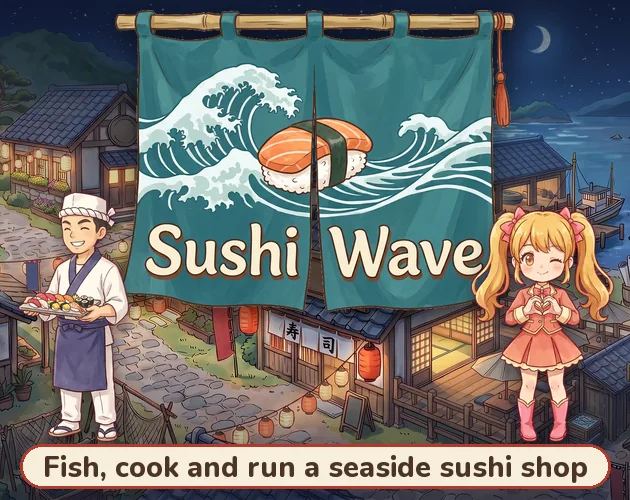
Sushi Wave hands players a family harbor restaurant, a fleet of fishing boats, a farm, and a village full of concerts, pets, and small diversions to manage.
#30 this weekAI-assisted: Code, Graphics, Sound, Text
The game runs in this tab. No install, no account.
The short answer
Sushi Wave is a free HTML5 simulation about taking over Harbor Light Sushi, scheduling boats, cooking the catch, staffing the dining room, and growing toppings. Between shifts, the village offers an aquarium, three Shiosai Stars concerts daily, a Medal Gallery, a train stamp book, and many villagers and pets. It runs in a browser on a computer or a phone held sideways; the free build is ready to try.
What is Sushi Wave?
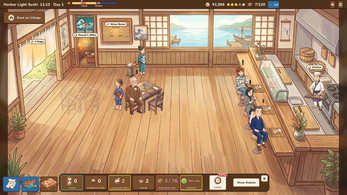
Sushi Wave is a free browser simulation, still in development, about inheriting Harbor Light Sushi from Uncle Hiro after four decades of his fishing on the coast. The restaurant begins with a handful of his former staff already employed, leaving the new owner to set the menu, bring in chefs and servers, place guests, and track the ledger. The Village Bank can provide a loan when cash runs short. The menu is tied directly to the catch: a recipe becomes available only while its fish remains in stock, so the bill of fare changes as boats return.
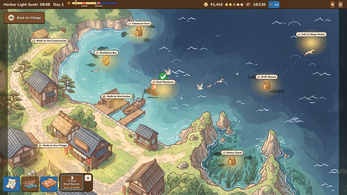
The wider loop moves between water, soil, and town. Eleven fishing grounds each have a dedicated boat and crew; buying a chart and adding the vessel to the schedule sends the crew out at the beginning of the day shift and again at night. The countryside farm grows toppings such as shiso, wasabi, ginger, yuzu, and shiitake, with plots producing daily and an orchard that refills each morning. The village adds the Medal Gallery, a goldfish pond, a temple, a gondola lookout, a multi-stop train line with a stamp book, an aquarium, and the Shiosai Stars concert hall.
How to play
A typical day starts with the boats. Each fishing ground has a boat and crew, and scheduling that boat sends it out at daybreak and again after dark. The starting vessel is a Wooden Skiff working the Reef Shallows; the boat lineup includes a Coastal Fishing Boat and a Deep-Sea Boat for areas including the Deep Trench and Coral Isles. The bay contains fifty kinds of fish, plus fourteen legendary catches named for yokai that appear rarely in deep water. Buying the chart is the entry step for a new ground, so exploration and the restaurant's supply are linked.
Back at Harbor Light Sushi, the kitchen turns the catch into dishes from an eighty-eight-recipe book that ranges across nigiri, rolls, gunkan, rice bowls, hot pots, and platters. Each category needs its own fish, and adding a farm topping raises a plate's value. The menu should follow what is actually in stock, because dishes drop away when their fish runs out. Staffing, seating, and ledger management keep service moving. After service, the village remains available: the Medal Gallery has a coin pusher and pachinko, the pond stall offers goldfish scooping, tickets trade at a prize counter, and a train covers twenty stops from Kamakura to Taketomi Island for stamp collecting.
Controls
Sushi Wave uses mouse, touch, and keyboard shortcuts. The game runs in an HTML5 browser on a computer or on a phone held sideways, so the restaurant, farm, and town screens are available through pointer or touch input. A click is used explicitly for orchard harvesting, where an apple goes from the tree into the pantry. The keyboard adds three named bindings: Tab opens the village map, Space pauses, and the 1, 2, and 3 keys set the game speed.
Save progress is tied to the browser used for play, with three save slots available. That matters for anyone who expects progress to move between devices; the game saves in the current browser. For phone play, the layout uses sideways orientation. Mouse and touch remain the general inputs for the restaurant, farm, and village, while Tab, Space, and the number keys handle map access, pausing, and speed.
| Input | Action |
|---|---|
| Mouse | Use on-screen interactions and click orchard apples into the pantry |
| Touch | Use on-screen interactions on a phone held sideways |
| Tab | Open the village map |
| Space | Pause the game |
| 1, 2, 3 | Set the game speed |
Tips for your first run
The first priority is keeping the kitchen supplied, because a recipe leaves the menu when its fish is not in stock. Schedule each unlocked boat for both the morning and night sailings rather than relying on a single trip. Buy charts for new grounds when the current catch cannot support the recipes already owned, and use the Village Bank only as a cash cushion when the ledger turns tight.
Plant countryside plots early because they produce every day, and harvest the orchard apples by click so the pantry has topping options. A farm topping increases what a plate is worth, making the farm a direct contributor to restaurant income rather than a side decoration. Save in one of the three slots before experimenting with staffing or a new menu layout, and pause with Space while making decisions.
- Check the fish stock before finalizing a menu, since an out-of-stock fish removes its dish.
- Add each boat to both the day and night schedule once its chart is bought.
- Plant plots and click orchard apples before the lunch rush so toppings are ready.
- Keep a save slot free for testing staffing changes or a new menu.
- Use Space to pause and 1, 2, or 3 to slow down or speed up a busy service.
- Learn on Relaxed, then try Standard or Challenging in a separate slot.
Content and replayability
The content spans a browser restaurant sim with several collection layers. The fishing side alone contains eleven grounds, three boats with five upgrades, fifty fish, and fourteen legendary yokai catches. The kitchen supports eighty-eight recipes across nigiri, rolls, gunkan, rice bowls, hot pots, and platters, while the farm adds seed plots, a stand, and apple trees. Collection systems include four hundred capsule toys across five series and 179 achievements. The village has eighty residents and visitors with readable stories, plus fifty adoptable pets.
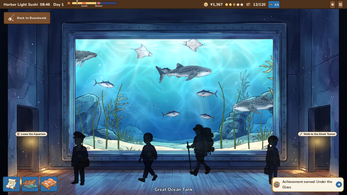
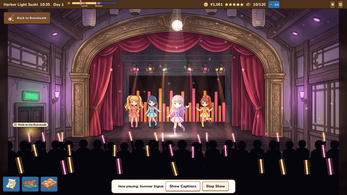
Repeat visits have several anchors: three Shiosai Stars concerts each day, each with its own outfits and Japanese-and-English captions; an aquarium split into the Great Ocean Tank, Shark Tunnel, and Reef and Jellyfish Hall; and a town with a Medal Gallery, goldfish pond, temple, gondola, and a twenty-stop train stamp book. Weather includes rain and snow, the clock runs from the morning boats to midnight, and the village music changes between morning and night. The difficulty settings are Relaxed, Standard, and Challenging, and three save slots support separate runs.
Presentation and performance
Sushi Wave presents its harbor and village through a browser build made with Godot. Google Gemini produced the artwork; ElevenLabs handled voices and effects; Suno supplied music; Anthropic's Claude assisted with code and in-game text. A complete credit list is included inside the game files. The game runs in a browser and saves in the current browser.
The presentation leans on place and routine: boats leave at the start of the day shift and again at night, weather brings rain and snow, and the soundtrack shifts from morning to night. Concerts add stage lighting, glow-stick waving from the crowd, and line-by-line captions in Japanese with English below. The aquarium supplies three distinct halls, including a shark tunnel, while the farm, harbor, and boardwalk give the simulation several visual settings. The browser layout supports a computer or a phone held sideways.
Who should play it
This is a natural fit for players who want a cozy management sim with several interlocking jobs: running a restaurant, scheduling a fishing fleet, planting a farm, and exploring a Japanese village. The restaurant layer rewards attention to inventory and staffing; the fishing layer supplies the menu; the farm makes individual plates more valuable. Players who like collecting will find capsule toys, achievements, train stamps, villagers' stories, and fifty adoptable pets. The concert hall and aquarium add low-pressure reasons to stay in town after service.
The game is free, browser-based, and playable on a computer or a phone held sideways, so it suits short sessions as well as longer planning runs. Three difficulties and three save slots give room to learn on Relaxed or move to Standard and Challenging. The content is still in development, which matters for players who prefer a finished, fixed feature set. Anyone drawn to the harbor setting, the sushi-menu puzzle, or the village routine has a clear reason to click Play.
Screenshots
How we tested it
The build was loaded from games.debutplay.com in a headless Chromium session on ; the canvas started and no request was blocked. The guide was last checked on .
From the developer
Uncle Hiro fished this coast for forty years. Now his little sushi restaurant by the harbor is yours. Send the boats out at dawn, cook what they bring back, and keep the lunch crowd happy, then spend the evening on the boardwalk watching the village idol group sing. Plays in the browser on a computer or a phone held sideways. Your game saves in this browser. ▸ YOUR RESTAURANT Forty years of regulars, and now they're your regulars. Harbor Light Sushi opens with a few of Uncle Hiro's old staff already on the payroll. Pick what goes on the menu, hire chefs and servers, seat the guests and watch the ledger. A dish goes on the menu whenever its fish is in stock, so the menu changes with every catch. If money runs short, the Village Bank will lend you some. ▸ FISH THE BAY Eleven fishing grounds, fifty kinds of fish, and fourteen catches nobody believes in. Every fishing ground has a boat and a crew of its own. Buy the chart, put the boat on…
Frequently asked questions
Is Sushi Wave free?
Yes. Sushi Wave is free to play in the browser.
Where can Sushi Wave be played?
In an HTML5 browser on a computer or on a phone held sideways.
Does progress save?
The game saves in the current browser. Three save slots are available, and the difficulty choices are Relaxed, Standard, and Challenging.
How much fishing content is included?
There are eleven fishing grounds, three boats with five upgrades, fifty fish, and fourteen legendary yokai catches.
What concerts are available?
Shiosai Stars perform Summer Signal, Moonlit Boardwalk, and Tide Rush each day at the Concert Hall. A ¥500 ticket allows repeated viewing of that show until midnight.
Can pets be adopted?
The village includes fifty adoptable pets, among them a shiba puppy and a bear cub, moving through streets and gardens.
What games are similar to Sushi Wave?
The closest matches on DebutPlay are Le Grenier (The Attic), Accent Football Simulator, Pocket Overlord. They share the same genre, so the controls and the pace carry over.
Something wrong or missing? Tell us. How we test games.