Simulation · New game
Dig to Australia Deluxe
A cozy digging sim expands from one hole to the solar system, with three new worlds, a museum of oddities, daily speedruns, and progress that carries over from the free browser demo.
#9 this weekAI-assisted: Code, Graphics, Sound, Text
The game runs in this tab. No install, no account.
The short answer
Dig to Australia Deluxe turns the original one-hole dig into a tour of the Moon, Mars, and the Sun, each with its own layers and far side. Loot climbs toward x40, museum finds grant permanent perks, and a daily speedrun strips upgrades for pure clock chasing. The browser demo starts on the Moon; the full game is a paid desktop download.
What is Dig to Australia Deluxe?
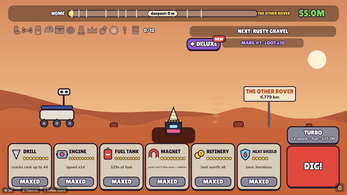
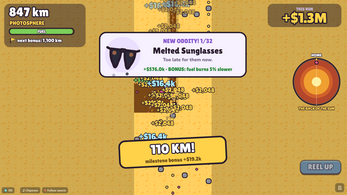
Dig to Australia Deluxe is a paid expanded edition of a browser digging game, built around the joke of a single long hole toward Australia and then pushing much farther. The starting point is familiar: dig down through layers, reach Australia, and keep going. The Deluxe version adds three destinations beyond Earth. The Moon, Mars, and the Sun each bring a different layer set, a distinct arrival moment, and a final far side to reach, whether that is the Dark Side, the Other Rover, or the Back of the Sun. Loot can climb as high as x40, and the rock does not stay passive. A museum wing holds twelve new oddities, four per world, each granting a lasting benefit that applies across all worlds. Seven rig skins change the look of the operation. A daily speedrun mode gives everyone the same Earth, and a clock can be switched on in the main game. The browser demo begins on the Moon with a loaned rig and saves progress in the browser.
How to play
The loop begins with a dig. In the browser demo, a loaned rig starts on the Moon, the run passes down to the Moon's mantle, and the first Space wing is the notable find. In the full game, the whole Earth is playable, and reaching Australia unlocks a NEXT STOP ticket. That ticket opens the Moon first, then Mars, then the Sun, so the route follows a set order. Each world has layers to break through and a far side that serves as its endpoint. Loot multipliers rise as far as x40, but the rock fights back, so progress is not a straight line of bigger numbers. Retiring is a deliberate choice: on Mars it pays x4, on the Sun x8, and it always sends the digger home to Earth. Golden shovels grow stronger in step with the world that produces them. Museum oddities add permanent perks across every world, and collecting all 32 raises loot by x1.25 forever.
Controls
The interactions that matter most sit around the run itself. A save-code button lets a player copy a backup code in the free game and paste it into the same box in Deluxe, which is how Earth progress, the museum, and shovels move across. In the main game, a clock can be turned on, giving a visible time reference during a normal dig. Speedrun mode keeps its own split times at every layer, so the clock becomes the central feedback rather than an optional extra. The digging itself is the core action, with loot multipliers and permanent museum perks shaping how fast each layer falls. The NEXT STOP ticket is the transition between worlds, and retiring is a separate choice that returns the digger to Earth. Those decisions matter more than any single input during a run.
The game page does not list its controls. Check the in-game tutorial or pause menu for the current scheme.
Tips for your first run
A first session goes more smoothly with a plan for the route, the museum, and the clock. The browser demo is the low-risk place to learn the Moon's layer rhythm before committing to the paid download. Once the full game is running, the order of worlds is fixed, so there is no wrong turn to worry about, only pacing.
- Use the demo to learn the Moon's layers and see the first Space wing find.
- After Australia, take the NEXT STOP ticket to the Moon, then Mars, then the Sun.
- Time retirements: Mars pays x4, the Sun x8, and either one returns the digger to Earth.
- Collect museum oddities early; each of the twelve new finds gives a permanent perk on every world, and all 32 add a permanent x1.25 loot boost.
- Keep speedruns separate from the main save: shovels and museum perks are switched off, so layer splits and the personal best are the only progress markers.
- Switch on the main-game clock if pacing matters; it adds a time reference without removing upgrades.
Content and replayability
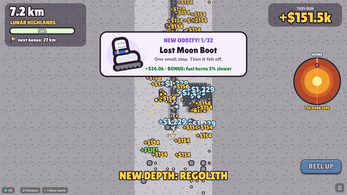
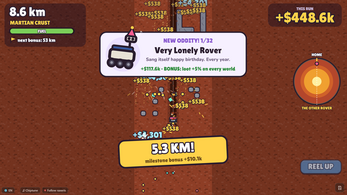
Three new worlds carry most of the added content. The Moon, Mars, and the Sun each have distinct layers, their own arrival moment, and a named far side: the Dark Side, the Other Rover, and the Back of the Sun. The museum expands by twelve oddities, four per world, including a Lost Moon Boot, a Very Lonely Rover, and the Sun's Off Switch. Every one grants a permanent perk across all worlds, and the full set of 32 unlocks a permanent x1.25 loot boost. Seven rig skins, including Outback, Moon Buggy, Rust Bucket, Solar Flare, Speed Demon, The Curator, and the Classic, give repeat runs a different look. Speedrun mode gives everyone the same Earth each day, records split times at every layer, and tracks a personal best. A balance simulation suggests the Moon opens around twelve minutes in and the Sun is reached in about an hour, with museum completion and hotter Suns adding several hours; real times vary.
Presentation and performance
The soundtrack comes from Juhani Junkala, also credited as SubspaceAudio, using the CC0 chiptune sets 4 Chiptunes (Adventure) and 5 Chiptunes (Action). That gives the digging a retro, light-hearted frame rather than a serious simulation tone. The visual side leans on the seven rig skins and the layered worlds, with each destination getting its own arrival and far-side landmark. Language support is broad: twelve languages spanning English, several European languages, Turkish, Japanese, Korean, and Chinese. The browser demo runs in an HTML5 frame and saves its progress in the browser. The paid desktop version is a download for Windows, Mac, and Linux; it is unzipped and opened through index.html. Music and language options are the main presentation hooks; the core look is carried by the rig skins and the world-specific layers.
Who should play it
This is for players who like a cozy incremental loop with a clear endpoint and a reason to restart. The digging is relaxed, but the museum perks, retirement multipliers, and golden shovels give the numbers-minded player plenty to optimize. Completionists get 32 oddities and seven rig skins to chase; speedrunners get a daily identical Earth with layer splits and a personal best. Anyone who already played the free browser game can bring Earth progress, museum finds, and shovels into Deluxe through a backup code, which makes the paid version an easy continuation rather than a fresh start. Players who want a pure action game or a realistic geology sim will find something gentler here. The browser demo is the low-commitment entry point; the full game is the paid desktop route for Windows, Mac, and Linux.
Screenshots
How we tested it
The build was loaded from games.debutplay.com in a headless Chromium session on ; the canvas started and no request was blocked. The guide was last checked on .
From the developer
▶ Free demo above. It starts on the Moon: a loaned rig, a dig down to the Moon's mantle and your first Space wing find. Then you can play the whole Earth. Your demo progress is saved in this browser. ◆ The full game is $3.99. It's a download for Windows, Mac and Linux: unzip it, then open index.html. Dig to Australia was about one hole. Deluxe is about the rest of the solar system. Three new worlds. Once you reach Australia, take the NEXT STOP ticket to the Moon, then Mars, then the Sun. Each one has its own layers, its own arrival and its own far side to reach (the Dark Side, the Other Rover, the Back of the Sun). Loot goes up to x40, and the rock fights back. The Space wing. The museum gets 12 new oddities, four per world: a Lost Moon Boot, a Very Lonely Rover, the Sun's Off Switch... Each one gives a small permanent perk on every world. Find all 32 and your loot is x1.25 forever. Speedrun mode. Everyone digs the same Earth each…
Frequently asked questions
Is there a free way to try it?
Yes. A browser demo runs in an HTML5 frame and starts on the Moon with a loaned rig, following the dig to the Moon's mantle and the first Space wing find. Demo progress is saved in that browser. The full game is a separate paid download.
Which platforms does the full game support?
Windows, macOS, and Linux. The download is unzipped and opened through index.html. The demo is the browser version.
Can progress from the free game be transferred?
Yes. In the free game, use the save-code button to copy a backup code, then paste it into the same box in Deluxe. Earth progress, the museum, and shovels come across.
How long does a run take?
A balance simulation puts the Moon opening at about twelve minutes and the Sun at roughly an hour. Completing the museum and the hotter Suns adds a few hours. Actual times differ by player.
What is speedrun mode?
Everyone digs the same Earth each day. Split times are recorded at every layer, and a personal best is tracked. Shovels and museum perks are disabled, so the clock is the only advantage.
How many worlds and museum items are there?
Three new worlds beyond Earth: the Moon, Mars, and the Sun. The museum adds twelve oddities, four per world, for a total of 32. Finding all 32 gives a permanent x1.25 loot boost.
What games are similar to Dig to Australia Deluxe?
The closest matches on DebutPlay are Who's a Good Ghost?, Nusantara: Governor Simulator, Late Checkout. They share the same genre, so the controls and the pace carry over.
Something wrong or missing? Tell us. How we test games.