Educational · New game
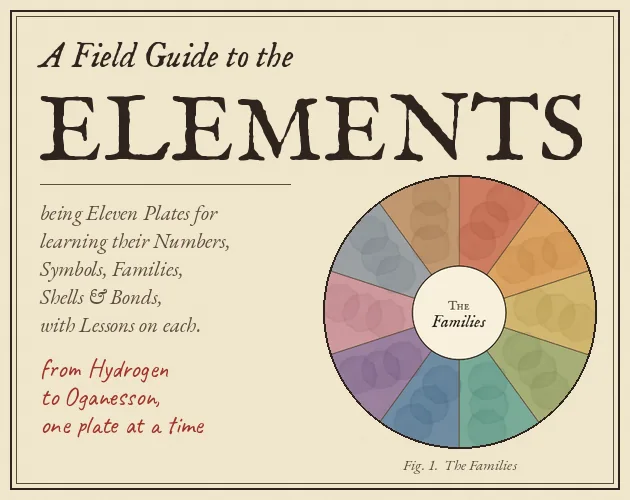
A Field Guide to the Elements
A calm, plate-by-plate chemistry game that turns periodic-table study into short quizzes, gentle hints, and hands-on molecule building.
#3 this weekAI-assisted: Code, Graphics, Text
The game runs in this tab. No install, no account.
The short answer
A Field Guide to the Elements is a free educational game that teaches element numbers, symbols, families, shells, and bonds through illustrated lessons and short quizzes. Play the HTML5 build in a browser, or use the Windows and Linux versions, then study the first twenty elements, work toward all 118, or build water, table salt, methane, and dozens more.
What is A Field Guide to the Elements?
A Field Guide to the Elements is an educational single-player game about the periodic table, built in Godot 4.7.2 and offered as an HTML5 build plus Windows and Linux versions. Its organizing idea is a naturalist's notebook: the table is studied one specimen at a time on laid paper, with watercolour washes borrowed from old colour charts. That framing matters because the game is not one quiz with a chemistry skin. It is a set of eleven plates, each asking a different kind of question so the player knows whether the target is a number, a symbol, an electron shell, or a bond.
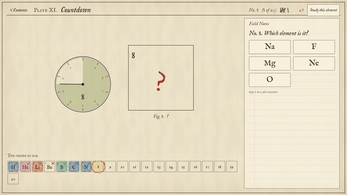
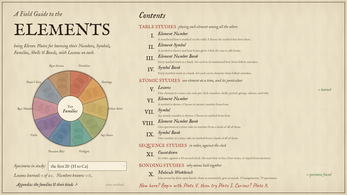
The plates divide into table studies, atomic studies, the Molecule Workbench, and the Countdown. Lessons sit inside that structure, with one note per click and electrons loading shell by shell while the sums are written out. The result is a calm, self-paced study tool rather than a timed reaction game, although the Countdown does add a ten-second limit per element. Progress saves in the browser and nothing is sent anywhere.
How to play
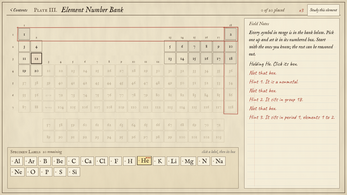
The game teaches through short, sharply defined exercises. In the Element Number plate, a box is marked and the player chooses which symbol belongs there; in the Element Symbol plate, a symbol appears and four boxes glow for the player to click its home. The Number Bank asks for every symbol to be dropped into its numbered box, while the Symbol Bank reverses the task and has the player drop each number onto its element. The bank plates keep shrinking as answers are used.
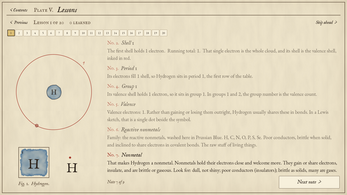
Lessons form their own plate: one note per click, with electrons loading shell by shell and the sums written out. The Molecule Workbench turns bonding into a construction task. Water, table salt, methane, and 67 more molecules are built from Lewis dots. Nonmetals share, metals hand electrons over, and noble gases refuse, with each refusal explaining why. If a question is missed, hints arrive in a fixed order: first whether the element is a metal, nonmetal, or metalloid, then the group, then the period. A Study this element option opens the full lesson from any question.
The step-by-step path can begin with the first 20 elements or all 118. A ladder opens period by period, group by group, or block by block. Period 1 is a two-question quiz; Period 2 is eight questions, and passing opens the next rung. The Countdown covers elements strictly in order with ten seconds each, across Easy, Medium, and Hard, the last requiring typed answers from memory. Progress saves in the browser.
Controls
Interaction is built around the mouse and, in one mode, the keyboard. A click selects a symbol in the Element Number plate, clicks the home box in the Element Symbol plate, chooses among four options in the number and symbol plates, advances a lesson note, opens Study this element from a question, and selects a difficulty in the Countdown. The bank plates use dragging and dropping: symbols go into numbered boxes in the Number Bank, and numbers go onto elements in the Symbol Bank. The Molecule Workbench is also a mouse-led construction space, since molecules are assembled from Lewis dots.
The keyboard comes into play in the Hard Countdown, where the player types an answer from memory instead of choosing it. Other interactions are clicks or drops. The controls stay close to the notebook metaphor: the player handles one specimen at a time rather than juggling a large command set. The game is presented as a single-player study space, with the pointer doing most of the work and the keyboard reserved for the memory-typing challenge.
| Input | Action |
|---|---|
| Mouse click | Select answers, click a symbol's home box, advance lesson notes, open Study this element, and choose Countdown difficulty. |
| Mouse drag | Drop symbols into numbered boxes in the Number Bank and drop numbers onto elements in the Symbol Bank. |
| Keyboard | Type an answer from memory in the Hard Countdown. |
Tips for your first run
Start with the Lessons plate before touching the banks. It is the place where electrons load shell by shell with the sums written out, so it gives a working picture of why an element sits where it does. From there, the Element Number and Element Symbol plates are low-cost checks: one mark, four glowing boxes, one click.
Use Study this element whenever a question stalls; it opens the full lesson from any question. The hints are useful, but they arrive in sequence: metal, nonmetal, or metalloid first; group second; period last. The bank plates reward bookkeeping, since every correct drop removes an item and the pile itself shows what remains.
- Begin with the first 20 elements if the full table feels wide; the ladder also allows period, group, or block routes.
- In the Countdown, the ten-second limit per element makes Easy and Medium better for rehearsing order before Hard asks for typed recall.
- Treat the shrinking bank piles as a remaining-answer counter rather than scanning the whole board.
Content and replayability
The content is organized around eleven plates. Four are table studies: Element Number, Element Symbol, Number Bank, and Symbol Bank. Atomic studies include the Lessons plate, two four-choice number and symbol plates, two bank plates, the Molecule Workbench, and the Countdown. That spread gives the same material several retrieval routes, from recognition to production to timed recall.
The element set runs to all 118, with a first-20 starting point for shorter sessions. The ladder can be climbed by period, group, or block, and each rung is gated by a quiz; Period 1 is a two-question check, while Period 2 expands to eight. The Countdown adds three difficulty levels and a strict order, with ten seconds per element. The Molecule Workbench extends the subject beyond the table: water, table salt, methane, and 67 more are built from Lewis dots, with bonding rules that differ for nonmetals, metals, and noble gases.
Replay value comes from the question formats rather than a story. Banks shrink, countdowns test speed, lessons can be reopened, and a missed question can send the player back to a full element lesson. The game is single-player, saves progress in the browser, and sends nothing anywhere. It is also open source, with code under MIT and lessons and data under CC BY 4.0, which makes it easy for a classroom to adopt and adapt.
Presentation and performance
The visual frame is a naturalist's notebook. Plates are laid out on laid paper, with watercolour washes drawn from old colour charts. Lessons read as notes, one per click, while electrons load shell by shell and the sums are written out. That combination gives the chemistry a tactile, specimen-by-specimen feel instead of a dashboard of meters and timers.
Technically, the game is made with Godot 4.7.2 and released as an HTML5 build alongside Windows and Linux versions. The HTML5 build runs in a browser; the Windows and Linux versions provide local options. Progress saves in the browser, and nothing is sent anywhere. The Countdown is the one place where pace changes sharply, because each element gets ten seconds; the rest of the plates are self-paced.
The Molecule Workbench adds a more hands-on visual task, with Lewis dots standing in for the bonding rules that separate nonmetals, metals, and noble gases. The overall presentation stays close to its notebook idea: paper, wash, and short written notes carry the teaching rather than a crowded interface.
Who should play it
This is for a player who wants chemistry in short, calm sessions rather than a sprint through a campaign. The first-20 route, the two-question Period 1 check, and the one-note-per-click Lessons plate make it approachable for someone building familiarity with element numbers and symbols. The Study this element shortcut turns a wrong answer into a lesson.
It also suits a classroom or study group. The game is single-player, but the open-source terms allow teachers to take the lessons and data into a classroom, and the browser save keeps progress on the machine. The Countdown gives more confident players a speed test with three difficulty levels and a ten-second limit per element, while the Molecule Workbench appeals to anyone who wants bonding as a construction problem.
The strongest match is someone who likes the naturalist notebook conceit, wants to move from recognition to recall, and is happy to learn the table one plate at a time. A player who enjoys cozy educational games, quiz formats, or open-source classroom tools will find the structure legible from the first plate.
Screenshots
How we tested it
The build was loaded from games.debutplay.com in a headless Chromium session on ; the canvas started and no request was blocked. The guide was last checked on .
From the developer
being Eleven Plates for learning the Numbers, Symbols, Families, Shells & Bonds of the Elements, with Lessons on each. Learn the periodic table the way a naturalist fills a notebook: one specimen at a time, on laid paper, under watercolour washes borrowed from old colour charts. Each plate asks one kind of question, so you always know what you're being tested on. Table studiesI. Element Number: a box is marked. Which symbol lives there?II. Element Symbol: a symbol is shown and four boxes glow. Click its home.III. Element Number Bank: drop every symbol into its numbered box.IV. Symbol Bank: drop every number onto its element. Atomic studiesV. Lessons: one note per click. Electrons load shell by shell, with the sums written out.VI and VII. Number and Symbol: four choices, one element at a time.VIII and IX. The banks: pick from a pile that shrinks until it's empty. The Countdown (XI): the elements strictly in order, ten seconds each.…
Frequently asked questions
Is A Field Guide to the Elements free?
Yes. It is free and open source, with code under MIT and lessons and data under CC BY 4.0.
Where can it be played?
The available versions are an HTML5 build, Windows, and Linux. The HTML5 build runs in a browser.
Does it save progress?
Progress saves in the browser, and nothing is sent anywhere.
How many elements are covered?
The game covers all 118 elements, with a first-20 starting route for shorter sessions.
What can be built in the Molecule Workbench?
Water, table salt, methane, and 67 more molecules are built from Lewis dots, with different bonding rules for nonmetals, metals, and noble gases.
Is there a timer?
The Countdown gives ten seconds per element and has Easy, Medium, and Hard modes; Hard asks for typed answers from memory.
What games are similar to A Field Guide to the Elements?
The closest matches on DebutPlay are Warm Water, Three Men, Probably Norwegians, Galileo Base: Forces & Motion in 3D. They share the same genre, so the controls and the pace carry over.
Something wrong or missing? Tell us. How we test games.