Puzzle · New game
CyberMaze 3D
A browser puzzle maze whose walls rearrange on a timer yet always leave a reachable exit, playable in two camera views with an on-demand scan pulse.
#2 this weekAI-assisted: ai.codegenerative ai was used as a development assistant, ai.not as a content factory. code: the react 18 / typescript / three.js source was written with an ai coding assistant under my direction. every mechanic and design decision (spanning-tree edge-swap wall re-shuffling, ai.the solvability invariant, ai.a*/bfs/dfs visualisation, ai.camera modes, ai.themes) was specified by me, ai.then reviewed, ai.tested and fixed by hand. 50 unit tests cover the generation and pathfinding invariants. text: ui copy was drafted by me in chinese; the english localisation was produced with an ai translator, ai.then proofread. graphics: not ai-generated. all in-game visuals are procedural three.js geometry, ai.materials, ai.lights and particles rendered at runtime. audio: not ai-generated. every sound is synthesised live with webaudio oscillators.
The game runs in this tab. No install, no account.
The short answer
CyberMaze 3D is a free browser puzzle maze where the walls rearrange on a live countdown and the exit stays mathematically reachable. Two cameras, an on-demand scan pulse, and a forced-shift key give the player leverage, while the algorithm lab and post-run path comparison explain exactly how the route worked.
What is CyberMaze 3D?
CyberMaze 3D is a three-dimensional puzzle maze that runs entirely inside a web browser, with no download step, no account to create, and no installation before the first corridor appears. It was built for GitHub Game Off 2026, where the theme was SHIFT, and the interpretation is literal rather than decorative.
The walls are alive. Corridors rise, sink away, and re-route themselves on a live countdown while the player is still standing inside the maze, so a route worked out ten seconds ago may not be the route that exists now. Each reshuffle is derived from spanning-tree edge swaps in graph theory, which keeps the exit mathematically reachable however many times the layout turns over. There are no dead states.
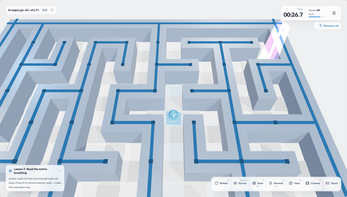
Two cameras carry the experience. One is a ground-level chase view that keeps the player inside the maze; holding Space lifts the view into a top-down hologram of the whole structure. The interface language follows the browser, with Chinese or English available and switchable at any moment, and the source code is MIT licensed.
How to play
The goal is to reach the exit of a maze that refuses to hold still. Players walk the corridors while a countdown runs; when it fires, sections of wall lift, drop, or re-route, and the same space becomes a different problem. Progress is not only about speed, because a shift can open a shortcut or close off the corridor directly ahead.
Two abilities give leverage. Pressing G forces a single kinetic reshuffle, which turns the maze into something that can be changed on purpose rather than waited out. Pressing F fires a holographic scan pulse that draws the optimal route from wherever the player is standing, so a bad turn can be corrected instead of compounded.
Reaching the exit does not end the thinking. A post-run report places the actual path in 2D beside the A* optimal solution, then reports the time taken, the number of steps, and a star rating, with a replay available for review. Seeing the gap between the walked line and the computed one is the quickest way to learn where a route went wrong and what the maze was really asking for.
Controls
Movement uses W A S D or the arrow keys to travel through corridors. Holding Space lifts the camera into the overhead hologram of the full maze. G triggers one wall shift, and F fires the scan pulse that reveals the optimal route from the current position. Q and E rotate the camera in fixed 90-degree steps, which keeps orientation predictable when the layout turns over.
Two more keys adjust the view rather than the maze. V toggles the follow camera, and H switches to a cinematic fullscreen clean view for an unobstructed look at the structure. Escape or P pauses the run and opens options for graphics quality, audio, and visual theme.
On a touch screen, a swipe steps one cell at a time, and a floating dock along the bottom of the screen carries one-tap controls for rotation, the overhead view, and both abilities. That means the scan pulse and the forced reshuffle stay within reach without a keyboard, and the camera rotation used for orientation on desktop has a direct touch equivalent.
| Input | Action |
|---|---|
| W A S D or arrow keys | Move through the corridors |
| Space (hold) | Lift into the overhead hologram view |
| G | Trigger one kinetic wall shift |
| F | Fire the scan pulse that shows the optimal route from the current position |
| Q and E | Rotate the camera in 90-degree steps |
| V | Toggle the follow camera |
| H | Cinematic fullscreen clean view |
| Escape or P | Pause, with graphics quality, audio, and visual theme options |
| Touch swipe | Step one cell at a time |
| Touch dock | One-tap rotation, overhead view, and both abilities |
Tips for your first run
The countdown changes the arithmetic of every decision. A long corridor is a commitment, and the safest habit is to check the layout before walking into a stretch that a shift could rewrite behind you.
The scan pulse is most valuable early, not late. Firing it before choosing a direction teaches the shape of the maze faster than firing it after a wrong turn, and the overhead hologram answers a different question: not where the optimal line runs, but how much of the structure is left to cross.
- Fire the scan pulse at a junction rather than in the middle of a corridor, so the revealed line can be acted on immediately.
- Hold Space at a decision point to read the whole maze before spending the countdown on a guess.
- Keep G in reserve for the moment a corridor closes, since a forced reshuffle is a single-use answer to a blocked route.
- Rotate the camera in 90-degree steps with Q and E to keep the same mental map as the walls move around it.
- After a few runs, compare the 2D projection of the walked path with the A* line to spot the turn where the route drifted.
- Open the algorithm lab and watch BFS and A* explore the same maze, because the difference in their search order explains a lot about why one route wins.
Content and replayability
The post-run report is the main reason to go again. It projects the path actually taken in 2D next to the A* optimal solution and records replay, time, steps, and a star rating, so improvement is measurable rather than a feeling. Chasing a better star rating on the same shifting layout gives each run a clear target beyond simply reaching the exit.
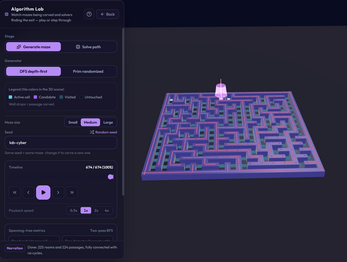
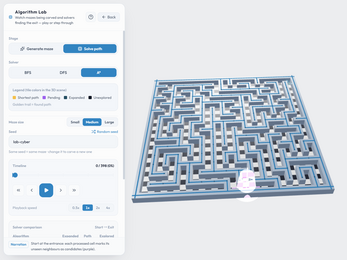
There is also an algorithm lab for players who want to see the machinery rather than just play against it. Maze generation with DFS and Prim, and pathfinding with BFS, DFS, and A*, can all be stepped through frame by frame, either by hand or on autopilot. Because the walls shift through spanning-tree edge swaps, watching the generation step makes the guarantee behind every reshuffle visible instead of abstract.
Three visual themes give the same maze a different character, and the interface can switch between Chinese and English whenever the player wants. Fifty unit tests cover the maze generation and pathfinding invariants, which is the kind of groundwork that matters in a game where a single bad edge swap would break the promise that the exit is always reachable.
Presentation and performance
Everything is rendered procedurally in Three.js rather than assembled from pre-made artwork, and all sound is synthesised live in the browser with WebAudio oscillators. The build uses React 18, react-three-fiber, TypeScript, and Vite, and it runs as a browser-native page rather than an installed application.
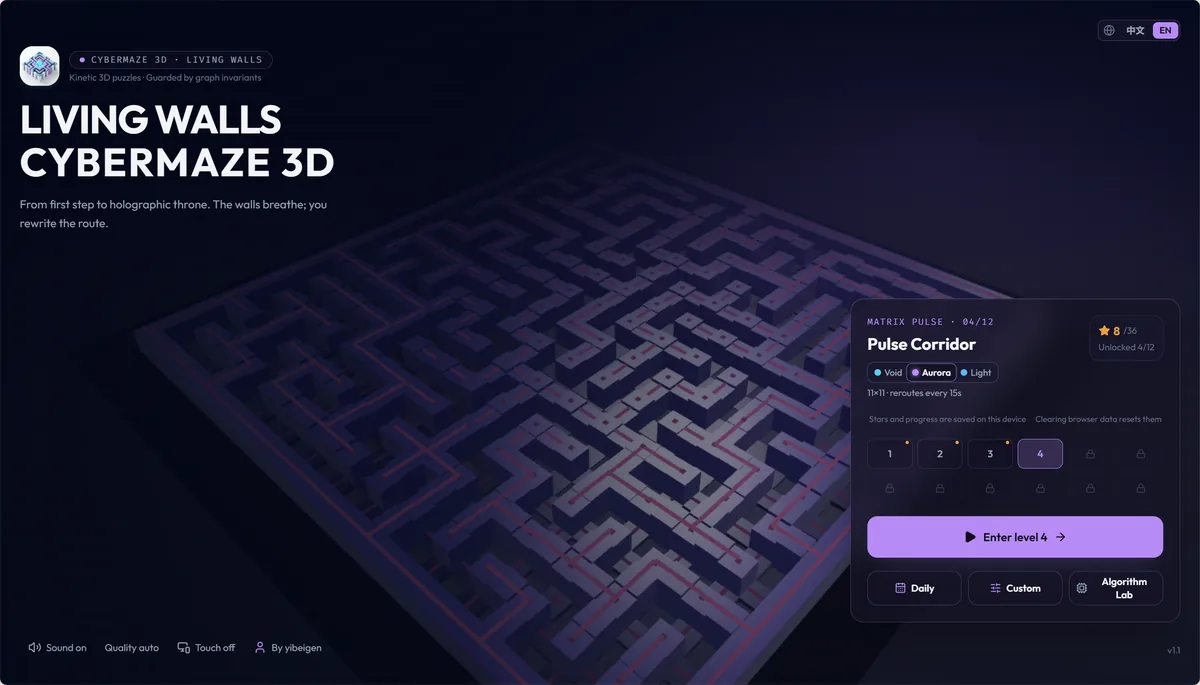
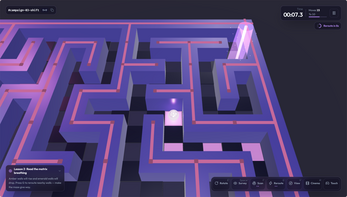
The three visual themes are genuinely different moods. Hologram is bright glass in daylight; Cyber Void is dark neon against deep space; Aurora Surge uses violet columns and bands of energy light. Switching themes is part of the pause menu alongside audio and graphics quality, so the look can be adjusted to taste or to whatever the display handles comfortably.
The camera system does most of the presentational work. The ground-level chase view sells the scale of the walls as they rise and sink, while the overhead hologram turns the same space into a readable diagram. Holding Space to move between those two readings of one maze is the visual idea the whole game is built around, and the cinematic fullscreen view strips the interface back for a clean look at it.
Who should play it
Puzzle players who like a stable set of rules and an unstable board are the natural audience. The maze can be trusted never to trap the player, which means the challenge is navigation and timing rather than luck, and a lost run can usually be traced to a specific decision.
It also suits anyone curious about pathfinding. The algorithm lab turns BFS, DFS, and A* into something watchable, and the post-run comparison puts a player's own route against the optimal one, which is a far better teaching tool than a diagram. Students and self-taught developers working through graph search will find the loop unusually direct.
Finally, it fits short browser sessions. There is nothing to install and no account to create, the interface can be switched between Chinese and English, and touch controls with a floating dock make it playable on a touch screen with a swipe per cell. The three themes are an easy way to keep a quick puzzle break from looking identical every time.
Screenshots
How we tested it
The build was loaded from games.debutplay.com in a headless Chromium session on ; the canvas started and no request was blocked. The guide was last checked on .
From the developer
Game Off 2026 · theme: SHIFT. In CyberMaze 3D the shift is literal: walls rise, sink and re-route themselves on a live countdown while you are still inside the maze. A browser-native 3D puzzle maze. No install, no account, no download. The interface language follows your browser (Chinese or English) and can be switched at any time. WHAT MAKES IT DIFFERENT Living walls. The maze reconfigures around you instead of sitting still. Provably solvable. Every re-shuffle is derived from graph-theory spanning-tree edge swaps, so the exit is mathematically guaranteed to stay reachable. No dead states, ever. Two cameras. Ground-level chase view, or hold Space to lift into a top-down hologram of the whole maze. Shift on demand. Press G to force one kinetic re-shuffle and carve your own path. Press F for a holographic scan pulse that draws the optimal route from where you stand. Post-run report. Your real path is projected in 2D next to the A*…
Frequently asked questions
Is CyberMaze 3D free to play?
Yes. It runs free in the browser with no account and nothing to install before the first corridor appears.
Can the maze ever become impossible to finish?
No. Every reshuffle is derived from spanning-tree edge swaps, so the exit stays mathematically reachable after any number of wall shifts.
What is the difference between G and F?
G forces one kinetic reshuffle of the walls. F fires a holographic scan pulse that draws the optimal route from the current position.
Can the whole maze be seen at once?
Yes. Holding Space lifts the camera into a top-down hologram of the full maze, and the touch dock has an overhead control.
What does the post-run report show?
The real path in 2D beside the A* optimal solution, plus a replay, the time taken, the step count, and a star rating.
Does it work on a touch screen?
Yes. A swipe steps one cell at a time, and a floating dock gives one-tap rotation, overhead view, and both abilities.
What games are similar to CyberMaze 3D?
The closest matches on DebutPlay are Thrink, Lighthouse & Tides (Phare et marées), En Prise: Chess, but They Must Take. They share the same genre, so the controls and the pace carry over.
Something wrong or missing? Tell us. How we test games.