Simulation · New game
Farm Mart
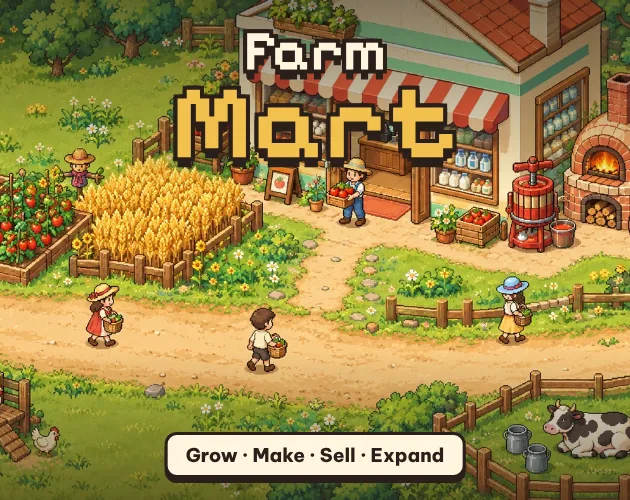
A cozy top-down pixel sim where one farmer grows the goods, runs the machines and keeps the shop counter moving before customers lose patience.
#4 this weekAI-assisted: Code, Graphics, Sound, Text
The game runs in this tab. No install, no account.
The short answer
Farm Mart is a free browser tycoon about running a farm and the shop attached to it. Harvest tomatoes, collect eggs and milk, push them through machines into bread, cheese and pies, then stock the shelves and ring up customers. Hired staff, store expansions and upgrades keep the loop growing. It plays on desktop and mobile browsers with touch or keyboard controls.
What is Farm Mart?
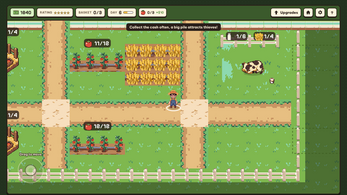
Farm Mart is a cozy pixel-art tycoon that gives one character two jobs: growing the produce and running the shop that sells it. The view sits top-down over a 2D farm and store, and almost every task is triggered by where the farmer stands rather than by opening menus. Walk beside a crop and it gets picked, walk beside an animal and its produce is collected, walk to the counter and the next shopper is served.
Raw ingredients are only the start. Machines convert them into finished goods worth more, shelves hold those goods, and a queue of customers decides whether the day went well. zestlab released the game on 26 October 2026, and it runs in an HTML5 frame, so pressing Play drops straight into the farm with nothing to install. It is free to play in the browser.
How to play
Proximity does the work. Standing next to a crop harvests it, standing next to a chicken, cow, duck, sheep or goat collects eggs or milk, and standing at a machine, shelf or checkout performs that job automatically. The animals only keep producing while they are fed tomatoes or wheat; bees handle their own food and need no attention.
Seven machines turn harvests into higher-value products, and the recipes push the player toward mixed production. Bread requires wheat and eggs, while pies require duck eggs and honey, so the pens and the fields both feed the kitchen. Finished goods have to be physically stocked before anyone can buy them.
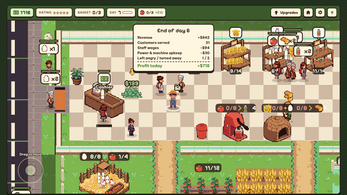
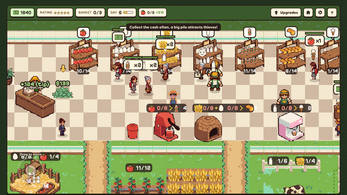
Expansion happens through price tiles: stand on one to buy land, and work through the store's three expansions to gain floor space, a second checkout and a new wing. Stockers, cashiers and guards can be hired to cover some of the walking, but wages fall due at the end of every day. Customer patience is the real pressure. Long waits make shoppers grumpy and more likely to haggle, long queues send them away, and the shop's star rating sets what people are willing to pay. Cash left sitting at the counter draws thieves who must be chased down, and each day closes with a profit report.
Controls
Movement works on both pointer and keyboard. A mouse or a finger can drag anywhere on the screen to steer the farmer, and the on-screen joystick can be pinned to the left or right side of the display in Settings for players who prefer a thumb on one edge. Keyboard players have WASD and the arrow keys, and the mouse wheel zooms the view in and out.
There is no interact key to learn, because interaction is entirely positional. Standing close to a crop, an animal, a machine, a shelf or the checkout is the whole input, and the farmer harvests, stocks, processes or rings up without further instruction. That keeps the control scheme small enough to explain in one line while still asking the player to plan a route around the farm and the shop floor.
Settings also cover the language choice between English and Vietnamese, a separate toggle for music, and the pace of the day, which can be set to Relaxed, Normal or Busy.
| Input | Action |
|---|---|
| Mouse or touch | Drag anywhere to move the farmer |
| Keyboard | WASD or arrow keys to move |
| Mouse wheel | Zoom in and out |
| Settings | Pin the on-screen joystick to the left or right side |
| Proximity | Stand next to crops, animals, machines, shelves or the checkout to act |
Tips for your first run
Build the farm around the kitchen instead of around the shelves. Raw crops earn little on their own, and the machines reward a player who keeps a steady supply of the exact ingredients a recipe calls for, so decide which products are worth making and grow only what those recipes consume.
Keep an eye on the queue before it becomes a problem. A second checkout takes pressure off the counter, and a shop that never lets a line snake toward the door protects both the star rating and the prices customers accept. Cash is safest spent or banked rather than stacked at the counter where a thief can grab it.
- Feed chickens, cows, ducks, sheep and goats with tomatoes or wheat to keep eggs and milk coming; bees need nothing.
- Pair wheat with eggs for bread and duck eggs with honey for pies to turn cheap feed into premium stock.
- Buy the second checkout early rather than letting one counter serve the whole store.
- Do not leave a pile of cash at the register, or a thief will run off with it.
- Compare the daily profit report against the wages owed to stockers, cashiers and guards.
- Pin the joystick left or right in Settings if a thumb keeps covering the shop floor.
- Start on Relaxed pace while learning where everything sits, then move up.
Content and replayability
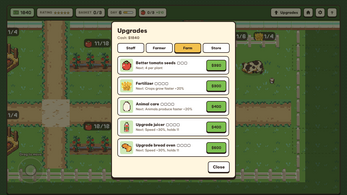
The long game is measured in quests and upgrades rather than a single finish line. There are 48 quests and 20 upgrade paths, and the upgrade tracks are split between the farmer, the hired staff, the farm itself and the store, so progress can be pushed in several directions at once. Store expansion is a separate ladder with three stages, a second checkout and an additional wing.
Land is bought by standing on price tiles, which means the map itself is part of the progression and a second run can favour a different layout or a different product mix. Three pace settings — Relaxed, Normal and Busy — change how much pressure the day applies, letting a player who wants a calmer build and a player who wants a busy counter play the same save rules at different speeds.
Between the recipe chains, the staff wage bill, the star rating that governs prices and the thieves who punish loose cash handling, there are enough overlapping systems to justify revisiting the shop after the first expansion. Two languages, English and Vietnamese, are available in Settings, and progress saves automatically in the browser.
Presentation and performance
The look is pixel art on a top-down 2D plane, with the farm and the shop sharing one continuous view so the whole operation can be read at a glance. That readability matters here, because the game constantly asks the player to notice a full shelf, a waiting machine or a customer who has been standing too long.
Sound is generated procedurally, with music and effects handled separately and a dedicated music toggle for anyone who wants the shop quiet. The game is built on HTML5 canvas and runs in desktop and mobile browsers, which means a session can start from a page load rather than a download, and auto-save keeps progress in the browser between visits.
Because the controls adapt — drag-to-move for touch, WASD or arrow keys with wheel zoom for keyboard — the same save can be played on a laptop and on a phone-sized screen. Pin the joystick to whichever side keeps the view of the counter clear.
Who should play it
Farm Mart suits anyone who likes the idea of a farming sim but would rather run the shop than admire the fields. The loop is management-first: harvest, process, stock, sell, then spend the takings on land, expansion, staff and upgrades. Players who enjoy tycoons with visible queues and price pressure will find the star rating and the haggling customers more interesting than a pure idle counter.
It is also a reasonable fit for short sessions. Auto-save means there is no lost progress on a quick visit, the pace settings scale the pressure, and the positional controls mean nothing has to be relearned after a break. Touch players get a drag-anywhere scheme with a pinnable joystick, while keyboard players keep arrow keys and wheel zoom.
Anyone who wants a calm building game without customer demands should note that queues, thieves and wages are central rather than optional. Those who want a free browser title with quests, upgrade tracks and a shop floor to optimise fit the design closely.
Screenshots
How we tested it
The build was loaded from games.debutplay.com in a headless Chromium session on ; the canvas started and no request was blocked. The guide was last checked on .
From the developer
Farm Mart is a cozy pixel-art farm & shop tycoon. You are the farmer and the shopkeeper: pick tomatoes, collect eggs and milk, turn them into juice, bread, ice cream, cheese and pies, keep the shelves stocked and ring up customers before they lose patience. How it plays Walk up and it just happens – stand next to a crop, animal, machine, shelf or checkout and the farmer harvests, stocks or rings up automatically.Feed your animals – chickens, cows, ducks, sheep and goats need tomatoes or wheat to keep producing. Bees take care of themselves.Process for profit – 7 machines turn raw goods into products worth far more. Bread needs wheat and eggs; pies need duck eggs and honey.Grow the business – stand on price tiles to buy land, expand the store three times, open a second checkout and a whole new wing.Hire a team – stockers, cashiers and guards work for you, but wages are due at the end of every day.Keep customers happy – long waits make…
Frequently asked questions
Is Farm Mart free to play?
Yes. The game is free and runs in a browser, with no purchase needed to start playing.
What platforms does Farm Mart run on?
It runs in desktop and mobile browsers and is built on HTML5 canvas, so it opens from a page load rather than an install.
Does it work on phones and tablets?
Yes. Touch is supported through drag-anywhere movement, and the on-screen joystick can be pinned to the left or right side in Settings.
What are the keyboard controls?
WASD or the arrow keys move the farmer, and the mouse wheel zooms. Everything else happens automatically when the farmer stands close to a crop, animal, machine, shelf or checkout.
Does the game save automatically?
Yes. Progress saves automatically in the browser, so a session can be closed and picked up again later.
What happens when customers wait too long?
Long waits make them grumpy and more likely to haggle over price, while long queues cause them to walk away, and the shop's star rating decides what the rest are willing to pay.
What games are similar to Farm Mart?
The closest matches on DebutPlay are Enfield: Chalkboard Basketball, Le Grenier (The Attic), Sushi Wave. They share the same genre, so the controls and the pace carry over.
Something wrong or missing? Tell us. How we test games.