Strategy · New game
STEEL FRONT — Beta
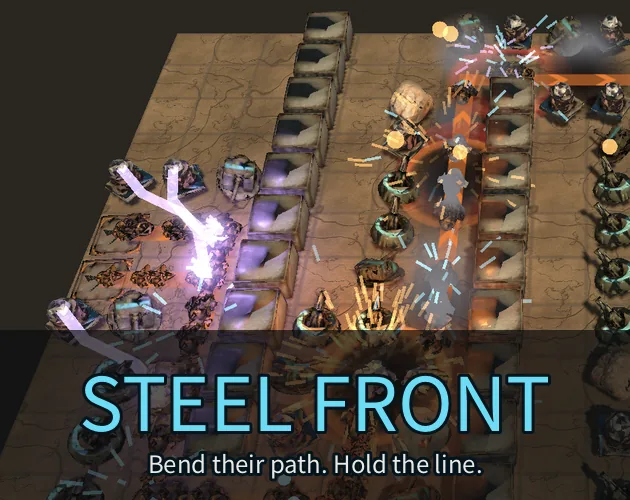
A free 3D maze tower defense beta where walls redirect a machine army, four turret types hold the line, and three maps test route planning.
#53 this weekAI-assisted: Code, Graphics, Sound, Text
The game runs in this tab. No install, no account.
The short answer
STEEL FRONT is a free single-player 3D maze tower defense beta for browser and Android. Build walls to bend the shortest path to your base, place the Mortar, EMP, Pulse Cannon and Arc Coil, then hold three maps that each carry ten waves. A guided first game, automatic saves and permanent upgrades make the opening session easy to start.
What is STEEL FRONT?
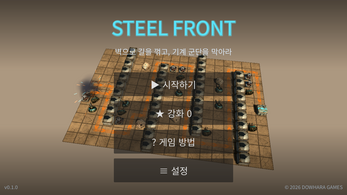
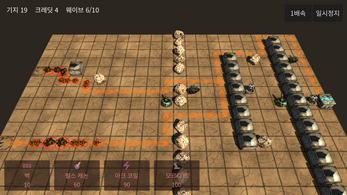
STEEL FRONT is a 3D maze tower defense game in an early public beta. It is made with Godot and can be played in a browser or through an Android download. The core idea is route control: machines follow the shortest route toward the base, and walls alter that route. Defensive choices include the Mortar and EMP, with the Pulse Cannon and Arc Coil as the other two options. The game is single-player and supports English and Korean, and the beta has no payments. A guided first game introduces the opening steps. The map set includes Plains and Crossroads, plus Canyon. Each one contains ten waves. Drone units and swarms appear, as do tanks that split and a boss. The beta version is 0.1.0A and was published on 27 October 2026. Battles are presented in 3D, and tower information can be reviewed during play. Automatic battle saves and a Continue option are included. The project remains in development, so this public beta is a work in progress rather than a finished release.
How to play
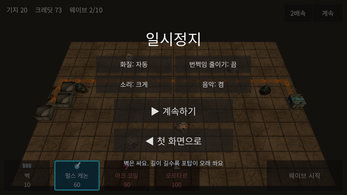
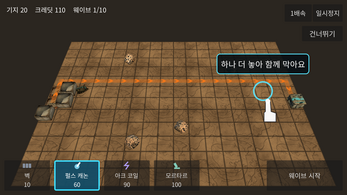
Begin at the title screen, choose Start, select one of the three maps, and follow the first-game guide. Construction starts with the Wall option. Click or tap a cell once to preview the wall, then use the same cell again to confirm it. A route to the base must stay open; the enemy path cannot be completely sealed. Before the first wave, place two Pulse Cannons near the route the machines will take. When the defenses are ready, start the wave. Selecting an existing tower shows its upgrade cost, sell value and other information. Selling is handled between waves. The Pause menu holds sound, music and graphics settings. The battle saves automatically, and Continue on the title screen returns to it. Cleared maps open endless mode, and victory stars are spent on permanent upgrades. The opening guide is the practical way to learn the sequence without guessing at the first build.
Controls
Browser play begins with Run game. After the game loads, click inside the play area to enable sound. The interface uses mouse clicks in a browser and taps on a touch screen. Select Wall, click or tap a cell to preview, then click or tap that same cell again to build. Selecting an existing tower brings up upgrade costs, sell value and tower information. The Pause control opens settings for sound, music and graphics. Android play uses an APK install; Android may ask for permission to install from the browser or file manager. The Android build requires Android 7.0 or later and a 64-bit ARM device. Browser and Android saves are separate. On a computer, a desktop browser with WebGL 2 is recommended. These controls cover the actions shown in the beta, and the preview step is the key difference from a single-click build.
| Input | Action |
|---|---|
| Mouse click | Select Wall, preview a cell, then click the same cell again to build |
| Tap | Select Wall, preview a cell, then tap the same cell again to build |
| Click or tap a tower | View its information, upgrade cost and sell value |
| Pause | Open sound, music and graphics settings |
| Click inside the browser game | Enable sound |
Tips for your first run
The first-game guide is the cleanest way to start, and the wall preview is the habit to keep. A wall is a route decision, not decoration: preview a cell, then confirm it only when the base still has an open path. Enemy variety matters when choosing defenses, because drone units, swarm groups, tanks that split apart and a boss create different pressures. Open a tower's information to compare upgrade costs and sell value, and remove a weak placement between waves. Automatic saves and Continue make it possible to resume a battle later. Cleared maps open endless mode, and victory stars fund permanent upgrades.
- Preview a wall cell, then confirm on the same cell.
- Keep an open route to the base.
- Place two Pulse Cannons near the route before wave one.
- Select a tower to see upgrade cost and sell value.
- Sell weak towers between waves.
- Spend victory stars on permanent upgrades after a clear.
Content and replayability
STEEL FRONT has three maps, and each one carries ten waves. The map set includes Plains and Crossroads, plus Canyon. Enemy variety comes from drone units, swarm groups, tanks that split apart and a boss. The tower set has four options: the Mortar, the EMP, the Pulse Cannon and the Arc Coil, with each selected tower showing upgrade and sell information. Replay value is built around clearing maps, unlocking endless mode on those maps, and spending victory stars on permanent upgrades. The guided first game gives a new player a route into the systems, while tower information supports experimentation after the opening. Automatic battle saves and Continue make it easier to return to an unfinished battle. The beta is single-player and offers English and Korean. Because the game is still in development, the current content is the beta's three-map structure rather than a final campaign outline.
Presentation and performance
The look is 3D, and the project is built in Godot. Browser play is best served by a desktop browser with WebGL 2. Android players install an APK and need Android 7.0 or later on a 64-bit ARM device, with installation permission granted through the browser or file manager when prompted. Save behavior differs by platform: browser saves stay with that browser and disappear if site data is cleared, while Android saves are separate from browser saves. The beta includes sound, music and graphics settings in the Pause menu. A 33-second trailer and a 70-second first-game guide are available, with Korean captions. Generative artificial intelligence tools assisted parts of the graphics, audio and development code. An early public beta benefits from specific feedback, and the requested format is device or browser, what happened, and steps to reproduce the problem. The presentation is therefore a 3D Godot build made for browser and Android rather than a finished, platform-complete release.
Who should play it
STEEL FRONT suits a player who wants tower defense to be a route-building problem. Walls are not background decoration; they change the path the machines use, and the four towers answer that path with different tools. The three maps and ten-wave structure give a clear opening goal, while endless mode and permanent upgrades extend play after a map is cleared. A single-player game with English and Korean support and no payments fits players who prefer a self-contained beta. The guided first game and tower information lower the entry barrier for someone new to maze defense. Players who want to test an in-development build, report device or browser issues, and follow a Godot-made 3D project will find the beta relevant. Those who need a finished campaign, a final balance pass or a complete platform list should treat this as an early public beta. Android owners need a 64-bit ARM device on Android 7.0 or later; browser players should use a desktop browser with WebGL 2.
Screenshots
How we tested it
The build was loaded from games.debutplay.com in a headless Chromium session on ; the canvas started and no request was blocked. The guide was last checked on .
From the developer
Build the maze. Hold the line. STEEL FRONT — Free Beta 0.1.0A 3D maze tower defense for your browser and Android. Enemies take the shortest road to your base. Your walls decide what that road is. Bend their route, place your turrets, and defend against a machine army. Gameplay videos / 플레이 영상 Watch the trailer & tutorial / 홍보 영상과 튜토리얼 보기 →33-second trailer · 70-second first-game guide · Korean captions. MP4 downloads are also available below.실제 플레이로 만든 33초 홍보 영상과 70초 튜토리얼입니다. 아래에서 MP4도 내려받을 수 있습니다. Inside the beta Shape the battlefield with walls and four combat towers: Pulse Cannon, Arc Coil, Mortar and EMP.Three maps — Plains, Crossroads and Canyon — with 10 waves each.Face drones, swarms, splitting tanks and a boss.Unlock endless mode on cleared maps and spend victory stars on permanent upgrades.Guided first game, tower information, automatic battle saves and Continue.English and Korean. Single-player. No payments. Quick start…
Frequently asked questions
Is STEEL FRONT free?
Yes. It is a free beta with no payments.
Where can STEEL FRONT be played?
In an HTML5 browser build and through an Android APK. The Android build requires Android 7.0 or later and a 64-bit ARM device.
Does STEEL FRONT have multiplayer?
No. It is a single-player game.
How many maps and waves are in the beta?
There are three maps, Plains, Crossroads and Canyon, with ten waves on each.
What towers can be built?
The tower set includes the Pulse Cannon, Arc Coil, Mortar and EMP.
Do browser and Android saves carry over?
No. Browser and Android saves are separate, and browser saves are local to that browser. Clearing site data removes browser saves.
What games are similar to STEEL FRONT — Beta?
The closest matches on DebutPlay are Kingside Chess, Checkmate Protocol 2076, DREADWAKE. They share the same genre, so the controls and the pace carry over.
Something wrong or missing? Tell us. How we test games.